
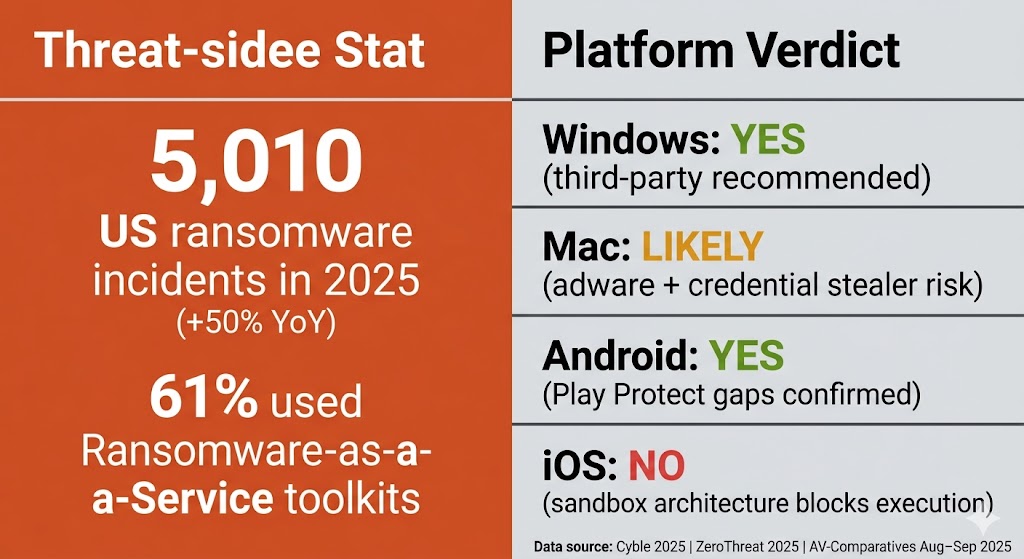
Most Windows users still need antivirus software in 2026. Windows Defender provides real-time protection but lacks dedicated phishing filters for Chrome and Firefox, identity monitoring, and VPN coverage. Mac and Android users face lower but real risk. Chromebooks sit near the low-risk end thanks to Chrome OS sandboxing. iOS users are the clear exception — Apple’s sandboxed architecture prevents traditional malware from executing on iPhones.
In 2026, whether you need antivirus software depends less on which operating system you use and more on how you use the internet — your browsing habits, your risk profile, and whether family members share your devices. The question has become harder to answer because the threats themselves have changed. Modern attackers rarely target your files directly. They target your identity, your banking session, and your browser credentials. That shift changes who needs protection and what kind of protection actually helps.
This article walks through every major platform, every major user type, and the six most persistent myths that lead US consumers to make the wrong call.
Table of Contents
The Short Answer: It Depends on What Kind of User You Are
Most Windows users still need a third-party antivirus or security suite in 2026. Windows Defender provides real-time malware scanning at no cost, but it lacks dedicated phishing protection in Chrome and Firefox, has no identity monitoring, and offers no VPN. Mac users face a lower but real risk — primarily from adware and credential stealers, not traditional viruses. Android carries meaningful risk. iOS does not require traditional antivirus at all.
The answer varies by user type rather than by product choice. A 22-year-old software engineer on Windows 11 with careful browsing habits faces a fundamentally different risk profile than a 68-year-old who shares a Windows 10 laptop with their grandchildren. The sections below break down each platform and each user type in detail.
Why There Is No Single Yes or No Answer Anymore
No single yes-or-no answer exists because the term “antivirus” has expanded far beyond its original meaning — and different users face fundamentally different threat profiles. The word is a legacy label from the 1990s, when threats were primarily self-replicating executable files. In 2026, the software still carries that name but defends against a far broader category: phishing links, session cookie theft, ransomware, stalkerware, and identity fraud. A blanket yes or no answer ignores that different users face entirely different risk surfaces. The rest of this article separates those profiles clearly.
What Threats Actually Target Everyday US Users in 2026
The threat landscape in 2026 looks very different from what most US consumers picture when they think “computer virus.” Ransomware, InfoStealers, and AI-assisted phishing have replaced the file-corrupting viruses of the 2000s as the primary risks to home users. US ransomware incidents reached 5,010 in the first ten months of 2025 — a 50% increase from 3,335 in 2024, according to Cyble research. Ransomware-as-a-Service now accounts for 61% of all ransomware attacks (ZeroThreat, 2025), meaning criminal groups sell attack toolkits to unskilled operators who then deploy them against any available target, including home users. Encrypted threats increased 93% in 2025, per the WEF Global Cybersecurity Outlook 2026 — making signature-based detection alone a weaker defense than it was three years ago.
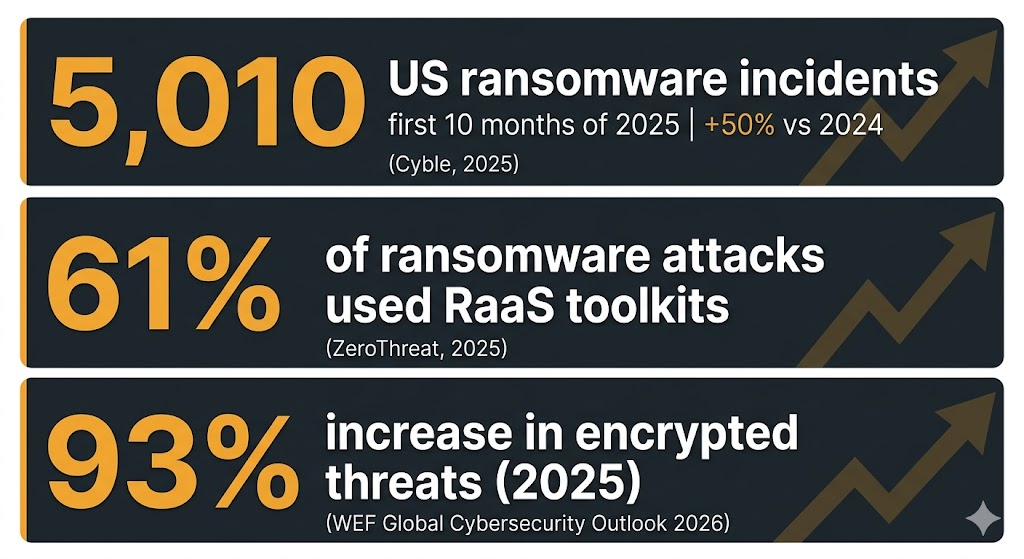
Those numbers mean home users are now targeted by the same attack infrastructure that once went exclusively after hospitals and large corporations.
AI-Generated Phishing: Why It’s Harder to Spot Than Ever
Phishing emails in 2019 were identifiable by awkward phrasing or mismatched fonts. Today’s AI-generated variants use correct grammar, accurate brand logos, and personalized details scraped from social media — removing the traditional warning signs entirely. AI-generated phishing emails in 2026 replicate the formatting, tone, and domain spoofing of legitimate US banks and retailers with enough accuracy that the traditional “look for spelling errors” advice no longer protects consumers. Spear-phishing — once reserved for targeting corporate executives — now reaches ordinary US consumers because large language models reduced the time and skill required to craft a convincing targeted attack to near zero.
InfoStealers and Ransomware-as-a-Service: The 2026 Threat Shift
Ransomware-as-a-Service has democratized sophisticated attacks: criminal groups package working ransomware into subscription toolkits and sell access to anyone willing to pay, driving the 61% RaaS share cited above. The result is that home users now face the same attack infrastructure previously aimed at hospitals and corporations. Equally dangerous are InfoStealers — malware that operates silently, collects browser-saved passwords and session cookies, and transmits them to attackers without displaying a ransom note or locking the screen. Session cookie theft is particularly damaging because it allows attackers to bypass two-factor authentication entirely. An attacker who copies your active banking or email session cookie can log in as you without ever entering a password.
The first question for most US users facing these threats is whether the protection already built into Windows addresses them.
Is Windows Defender Enough in 2026?
Windows Defender is a solid baseline for Windows 11 users who browse carefully and avoid risky downloads. It provides real-time malware scanning and integrates with Windows 11’s security stack. However, it lacks phishing protection in Chrome and Firefox, has no identity monitoring, and offers no VPN — gaps that matter for most US households.
What Windows Defender Does Well
Windows Defender provides real-time malware scanning, automatic signature updates through Windows Update, and full integration with Windows 11 at no additional cost — making it a stronger baseline than the paid antivirus software bundled on PCs a decade ago. Specifically, Defender offers:
- Real-time file and behavior scanning with cloud-delivered protection
- Automatic updates tied to the Windows Update cycle — no separate renewal required
- Microsoft SmartScreen phishing protection in Microsoft Edge
- Integration with Windows Security Center for a unified security dashboard
Where Windows Defender Falls Short
Defender’s documented gaps become meaningful for average users. It does not extend SmartScreen protection to Chrome or Firefox — the two most-used US browsers — leaving phishing links unblocked outside of Microsoft Edge. It includes no identity theft monitoring, no dark web scanning, and no built-in VPN. Its behavioral analysis for zero-day threats trails the top paid competitors in independent AV-Comparatives testing.
The most urgent gap in 2026 is specific to one user group: Windows 10 users. Windows 10 reached End of Life on October 14, 2025, meaning Microsoft stopped issuing OS security patches. Windows Defender on an unpatched Windows 10 system relies on security APIs that Microsoft is no longer updating — a significantly weaker position than Defender on a fully patched Windows 11 machine. This single factor makes a third-party antivirus close to mandatory for the tens of millions of US households still running Windows 10.
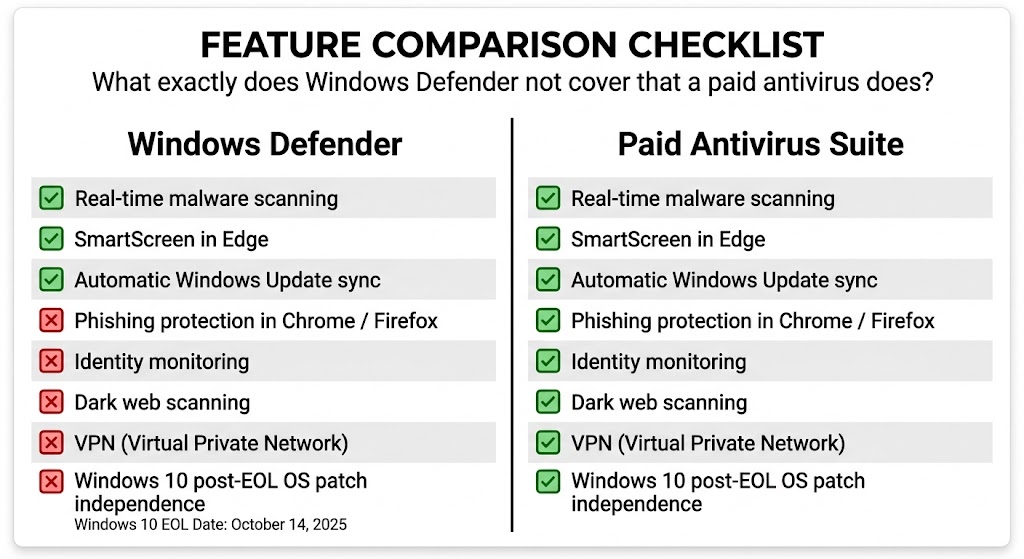
Where Defender leads on cost — built in at no charge — paid suites compensate on coverage: the three gaps above are precisely where modern phishing and identity attacks land.
Does a Mac Need Antivirus in 2026?
Macs do not get traditional Windows viruses, but they are targeted by adware, phishing attacks, and credential stealers built for macOS. Apple’s XProtect and Gatekeeper block known malware but do not classify adware — leaving Mac users exposed to one of the fastest-growing threat categories. Mac users handling sensitive data or sharing devices benefit from a third-party security tool.
What macOS XProtect and Gatekeeper Actually Cover
XProtect is Apple’s signature-based malware scanner. It updates silently in the background and blocks known malware variants from executing. Gatekeeper prevents running unsigned apps downloaded from outside the Mac App Store or from unverified developers. XProtect blocks only the threats Apple has already identified and catalogued — it cannot stop a novel variant that has not yet been added to its signature list. Neither tool uses behavioral analysis. Neither blocks potentially unwanted programs or adware.
The Mac Threats Apple’s Built-In Tools Miss
Apple’s XProtect does not classify adware as malware — a policy gap that leaves Mac users exposed to intrusive software that hijacks browsers, injects ads, and collects browsing data without Apple’s tools raising an alert. Beyond adware, macOS faces a growing category of credential stealers. Atomic Stealer — a macOS-targeted InfoStealer — scans for browser-saved passwords and crypto wallet data. Fake browser extension campaigns targeting Safari and Chrome deliver malicious code through convincing fake security warnings that Apple’s tools do not block. TechRadar (early 2026) reports Mac-targeted malware incidents rising year-over-year as the Mac user base and average device value increase.
Do Android and iPhone Users Need Antivirus?
Android users face real risk. Google Play Protect — Android’s built-in security scanner — detected only 53% of the 17 stalkerware samples in AV-Comparatives’ Stalkerware Test 2025 (August–September 2025), missing nearly half the test set. Sideloading apps from outside the Google Play Store amplifies that risk significantly, as unofficial APKs are a primary delivery vector for banking trojans and InfoStealers. Android users who install apps from unofficial sources, handle sensitive financial transactions on their phone, or share a device with family members should consider a dedicated mobile security app.
iPhone users are the genuine exception. Apple’s iOS sandboxes every app in an isolated container — a design that prevents traditional antivirus software from scanning other apps or system files. No iOS-specific malware campaign has successfully deployed at scale against standard, non-jailbroken iPhones. Web-based phishing protection apps and VPN tools can still add value for privacy-conscious iOS users, but a traditional antivirus app is not necessary and cannot function meaningfully within Apple’s security model.
Does a Chromebook Need Antivirus?
Chromebooks require traditional antivirus software far less than Windows or Android devices. Chrome OS sandboxes every app and browser tab in an isolated container, runs automatic verified boot to detect tampering, and forces OS updates automatically — a security architecture that removes most traditional malware vectors. No major malware campaign has successfully targeted the Chrome OS system layer.
The real risks for Chromebook users are browser-based: malicious Chrome extensions, phishing links, and compromised web apps. A browser security extension that blocks malicious URLs and phishing pages addresses those risks more effectively than a traditional AV install. A web-filtering extension is worth the five minutes it takes to configure. A full antivirus subscription is not.
For Windows and Mac users, the decision is more nuanced — and turns on specific risk factors that vary by user type.
5 Types of US Users Who Should Buy Paid Antivirus
The decision to pay for antivirus comes down to risk profile, not operating system alone.
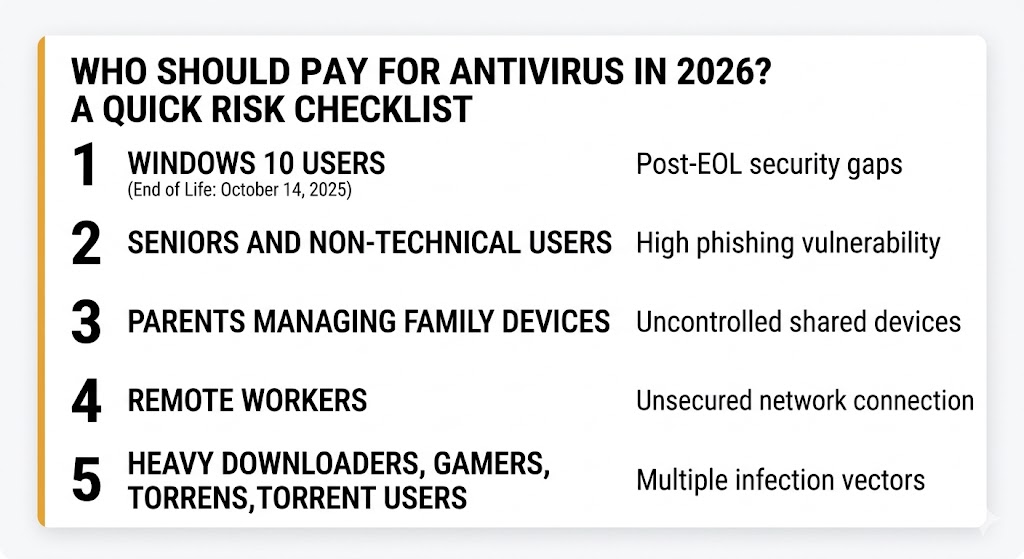
The free stack — Defender plus uBlock Origin plus free Malwarebytes — covers everyone outside these five profiles, provided they accept its gaps in phishing coverage and identity monitoring.
1. Windows 10 Users After the October 2025 End of Life
Windows 10 reached End of Life on October 14, 2025 — Microsoft no longer issues OS security patches, leaving Defender on an unpatched system significantly less effective than on a fully updated Windows 11 machine. A third-party antivirus provides behavioral detection independent of OS patch level if your PC runs Windows 10 and you cannot or will not upgrade. That behavioral layer functions regardless of whether the underlying OS receives security updates — the most practical mitigation available short of a hardware replacement.
2. Seniors and Non-Technical Users
Seniors represent the highest-risk demographic for phishing, tech-support scams, and fake antivirus popups — attack categories that exploit unfamiliarity with normal system behavior rather than software vulnerabilities. Paid antivirus suites with scam-call blocking, secure browser modes, and real-time phishing alerts add a meaningful protective layer that Defender does not provide. The most effective defense against social engineering is technical skill — and for users who don’t have it, software that fills that gap is worth the annual cost.
3. Parents Managing Family Devices
Shared devices are high-risk devices. One family member’s risky click affects every account stored on that machine. Children’s browsing behavior — following links in games, downloading mods, clicking ads — introduces threat vectors a careful adult user would avoid. Paid antivirus suites with parental controls, content filtering, and multi-device licenses manage that risk centrally. Multi-device family plans address that risk at a cost most US households will find reasonable.
4. Remote Workers and Home Office Users
Home networks lack the monitoring, segmentation, and endpoint management that corporate IT departments apply to company machines. A remote worker handling client data on a personal device sits on a home network with no intrusion detection and no lateral-movement monitoring. Corporate IT cannot reach that layer. Paid antivirus with network threat detection and secure DNS reduces exposure from the home network side — the one layer most corporate security policies cannot control.
5. Heavy Downloaders, Gamers, and Torrent Users
Downloaded executables — cracked software, unofficial game mods, patches from third-party sites — are the primary delivery vector for trojans, ransomware, and InfoStealers targeting home users. Modern paid antivirus suites include Game Mode, which suspends non-essential background processes during active gameplay, addressing the performance concern that keeps many gamers from installing protection. The performance cost of a well-designed AV on a modern NVMe SSD and multi-core CPU is negligible — that concern belongs to 2012-era hardware.
Who Can Safely Rely on Windows Defender Alone
Windows Defender is genuinely sufficient for a specific user profile: a Windows 11 user who browses on Chrome with uBlock Origin installed, avoids downloading software from unofficial sources, does not share their device, and does not store sensitive financial or work data locally. That profile describes a meaningful share of the US population — and for that narrow profile, the free-tools approach matches the actual risk evidence.
Windows 11 users with careful browsing habits and no shared devices can maintain a reasonable security baseline with Defender, uBlock Origin, and free Malwarebytes — provided they accept the gaps in phishing protection and identity monitoring that stack does not cover. The key elements of that free stack are:
- Windows Defender — real-time malware scanning, always-on, no action required
- uBlock Origin (browser extension) — blocks malicious ad networks and phishing redirect chains before they reach the OS
- Malwarebytes Free — on-demand scanner for periodic checks; designed specifically to run alongside Defender without conflict
A paid suite fills those gaps if they matter to your situation — phishing links in Chrome or Firefox, identity monitoring, and dark web scanning are the three protections the free stack does not provide. Beyond the question of which stack is right for your situation, six widespread beliefs continue to lead US consumers toward the wrong decision.
6 Antivirus Myths That Keep US Users Confused
These six beliefs circulate persistently in US online communities. Each one leads to a security decision that does not match the actual risk.
1. “My VPN protects me from viruses.” VPNs encrypt network traffic and mask your IP address — they do not scan files, detect malware, or block drive-by downloads. A VPN and an antivirus address completely different threat categories. Using a VPN does not reduce your need for malware protection in any way.
2. “Macs don’t get viruses.” As covered above, this myth persists despite documented growth in macOS adware, Atomic Stealer campaigns, and fake browser extension attacks. Macs do not get the same viruses Windows machines get — but they face their own threat categories that Apple’s built-in tools do not fully address.
3. “I only visit safe sites, so I’m fine.” Malvertising — malicious code injected into legitimate advertising networks — has appeared on major US publications including news and entertainment sites. Drive-by downloads in certain exploit scenarios require no user action beyond a page loading. Site reputation is no longer a reliable safety signal.
4. “Antivirus will slow down my gaming PC.” This concern is a holdover from 2012, when hard disk drives and single-core CPUs made background scanning noticeable during gameplay. Modern NVMe SSDs complete background scans in seconds. Multi-core CPUs allocate AV processes to idle cores. Game Mode in modern paid suites pauses non-essential scans while a game runs. The performance impact on current hardware is, in most cases, unmeasurable.
5. “Windows Firewall is the same as antivirus.” A firewall controls which network connections are permitted to enter and leave a device. Antivirus scans files and behavioral patterns for malicious activity. These are entirely different tools addressing entirely different threat surfaces. Windows Firewall does not detect, quarantine, or remove malware of any kind.
6. “Two antivirus programs give double the protection.” Running two real-time antivirus programs simultaneously causes definition file conflicts and performance degradation — most security experts recommend one real-time AV engine paired with an on-demand scanner like free Malwarebytes. Malwarebytes Free is specifically engineered for on-demand scanning alongside an existing real-time AV — not as a concurrent real-time layer.
Once the myths are cleared away, the next step is straightforward: match your situation to a specific action.
What to Do Next — Based on Your Risk Profile
A paid security suite is a sensible investment if you recognize yourself in the five high-risk categories above — Windows 10, senior user, family devices, remote work, heavy downloading. Windows 11 users with careful browsing habits and no shared devices can rely on the free stack described above with a clear understanding of what it does not cover.
From here, the next step depends on what you want to decide:
- Need paid antivirus and want the top picks for 2026: See our best antivirus software 2026 guide — all six brands reviewed and ranked.
- Using Windows and want platform-specific recommendations: See our best antivirus for Windows guide.
- Not sure whether to pay or use free tools: See our free vs. paid antivirus comparison.
- Weighing the cost against the actual benefit: See our is antivirus software worth it analysis.
- Want to understand how to evaluate antivirus products: See our how to choose antivirus software guide.
- Want to know exactly what you are defending against: See our types of malware guide covering viruses, worms, trojans, spyware, and rootkits.
Frequently Asked Questions About Antivirus in 2026
Do I Need Antivirus If I Have a VPN?
Yes — a VPN and antivirus protect against completely different threats. A VPN encrypts your network traffic and hides your IP address from websites and your internet provider. Antivirus software scans files and browser activity for malware, phishing links, and malicious downloads. A VPN cannot detect or remove malware. Antivirus cannot anonymize your network traffic. The two tools are complementary, not interchangeable.
What Happens If You Don’t Use Antivirus?
The outcome depends on your platform and behavior. Windows users without any antivirus — not even Defender — face meaningfully higher exposure to ransomware, InfoStealers, and drive-by downloads. Windows 11 with Defender active is a reasonable baseline for low-risk users. Mac users without any third-party tool face primarily adware and phishing risk. iOS users face negligible additional risk from skipping dedicated security apps. Not having antivirus does not guarantee infection — it reduces your detection and response capability when a threat arrives.
Is Windows 10 Safe Without Antivirus After October 2025?
No — this is the clearest case for paid antivirus in 2026. Microsoft ended security patches for Windows 10 on October 14, 2025. Windows Defender on an unpatched Windows 10 system operates without the underlying OS security improvements that Microsoft continues to deliver to Windows 11. A third-party antivirus adds behavioral detection that functions independently of OS patch level — the most practical protection available to users who cannot upgrade their hardware to meet Windows 11 requirements.
Is Free Antivirus Good Enough?
For careful Windows 11 users with clean browsing habits and no shared devices, the combination of Windows Defender and uBlock Origin covers most practical risks. For Windows 10 users, families, seniors, remote workers, and heavy downloaders, paid suites provide features free tools do not: phishing protection in all browsers, identity monitoring, dark web alerts, and multi-device coverage. The free vs. paid antivirus comparison linked above breaks down exactly which protections each tier includes.
The Bottom Line on Antivirus in 2026
Most Windows users still need antivirus protection in 2026 — but the reason is no longer “viruses.” US ransomware incidents rose 50% in 2025 to 5,010 documented cases, and 61% of those attacks used commercially available Ransomware-as-a-Service toolkits that any attacker can license. Windows 10 users face the most urgent case: Microsoft ended OS security patches on October 14, 2025, and Defender on an unpatched system is a materially weaker defense. For those users, a paid antivirus is close to mandatory. Windows 11 users with careful habits and no shared devices can maintain a reasonable security baseline with Defender, uBlock Origin, and free Malwarebytes — provided they accept the gaps in phishing protection and identity monitoring that stack does not cover. Mac users need protection against adware and credential stealers, not traditional viruses. Android carries real risk; Google Play Protect detected only 53% of stalkerware samples in independent testing (AV-Comparatives Stalkerware Test 2025, August–September 2025). iOS users remain the one clear exception — Apple’s architecture makes traditional antivirus both unnecessary and non-functional. Your risk profile, not your operating system, determines the right answer.