
Windows Defender earns 18/18 in AV-TEST’s February 2026 Windows evaluation but leaves three gaps: no identity theft monitoring, no ransomware file rollback, and no VPN. Bitdefender Total Security is the best antivirus for Windows in 2026 — 18/18 AV-TEST (Feb 2026), 30-day free trial with no credit card required, $59.99/yr for 5 devices. Norton 360 with LifeLock Select Plus adds identity theft monitoring at $99.99/yr. ESET HOME Security is the best pick for gaming PCs and Windows 10 machines.
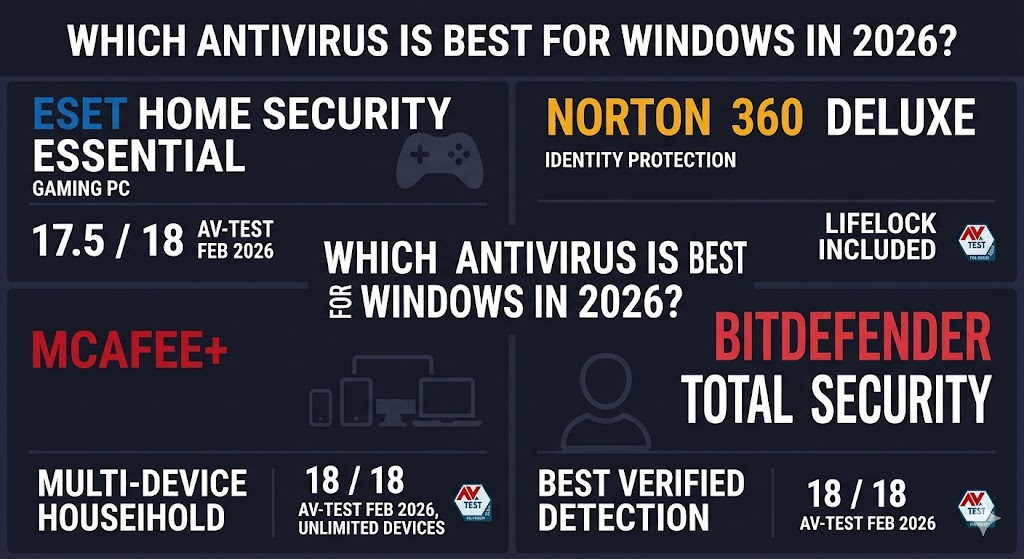
Windows users in 2026 face a specific question that generic antivirus guides rarely answer directly: does Windows Defender — now scoring 18/18 in AV-TEST’s February 2026 evaluation — make paid antivirus obsolete? The short answer is no. Defender handles malware detection well. It does not handle identity theft monitoring, ransomware file recovery, or cross-device protection. This guide ranks the six best antivirus programs for Windows specifically — evaluated on Windows 11 and Windows 10 compatibility, system performance impact, gaming mode quality, and the three gaps Defender leaves open.
Both Bitdefender Total Security and Norton 360 with LifeLock Select Plus earn 18/18 in AV-TEST’s February 2026 Windows evaluation — the highest detection score available — making them two of the strongest picks for US Windows users who want verified malware protection alongside additional protection layers. Every product below is scored against that benchmark. Pricing reflects current first-year promotional rates and renewal costs — both shown for every product.
Table of Contents
Is Windows Defender Enough to Protect Your Windows PC in 2026?
Windows Defender is not enough for most US Windows users in 2026. It earns 18/18 for malware detection in AV-TEST’s February 2026 evaluation — matching every paid antivirus on this list. Defender leaves three concrete gaps that matter for users storing financial data or using public Wi-Fi:
- No identity theft monitoring. Paid suites like Norton 360 with LifeLock Select Plus and McAfee+ include Social Security number monitoring, dark web alerts, and credit monitoring — critical for US residents as financial fraud and data breach exposure grow.
- No ransomware file rollback. Defender detects ransomware but does not recover files if encryption succeeds. Bitdefender’s ransomware remediation engine and Norton’s backup tool both fill this gap directly.
- No VPN. Defender provides no VPN for public Wi-Fi protection. Norton, McAfee+, and Bitdefender all include one on their mid-to-upper plans.
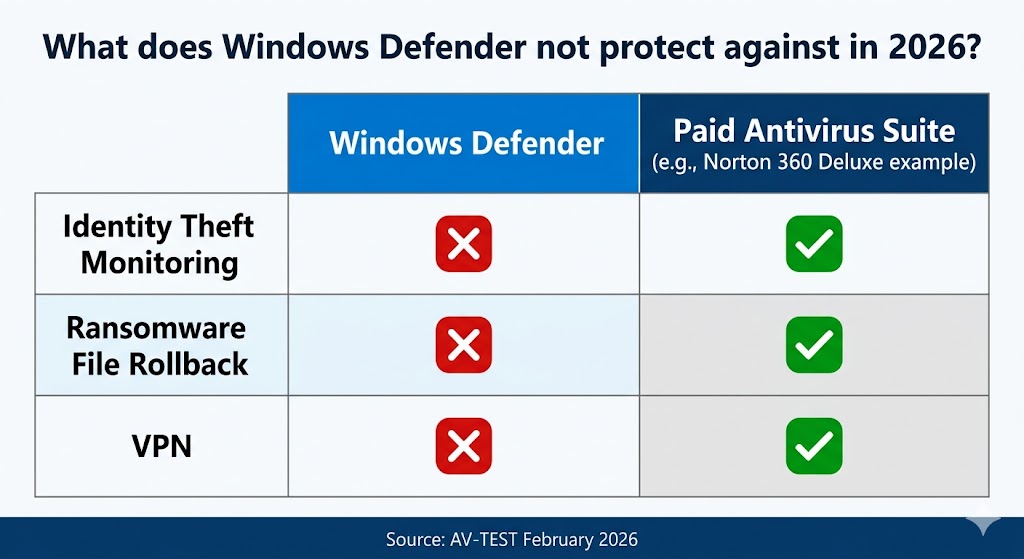
For low-risk users with disciplined browsing habits, Defender’s 18/18 detection score is sufficient. For everyone else — particularly US users who store financial data, bank online, or share a household PC with family members — a paid option fills those three gaps in ways that matter before an incident, not after.
Here is how the six paid options were evaluated against Windows-specific criteria.
How We Chose the Best Antivirus for Windows
Six Windows-specific criteria separated this ranking from a general antivirus guide: AV-TEST February 2026 Windows score, performance sub-score, Windows 11 24H2 compatibility, Windows 10 post-EOL support, Game Mode availability, and Windows Defender coexistence. Each product below was evaluated against every criterion — not vendor claims or marketing copy.
- AV-TEST Windows score (Feb 2026). The February 2026 round tested real-time malware protection, performance impact, and usability on Windows 10 and Windows 11. This served as the primary detection benchmark — not vendor claims or marketing copy.
- AV-TEST Performance sub-score. This measures how much each product slows a Windows machine during file copies, downloads, and application launches. A perfect 6/6 score indicates the lowest measurable system impact.
- Windows 11 24H2 compatibility. The Windows 11 24H2 update introduced integration changes for some security products.
- Windows 10 post-EOL support. Windows 10 reached end of support on October 14, 2025. Millions of US users remain on it. Which products support it in 2026 is confirmed in each section below.
- Game Mode or Silent Mode availability. Windows gaming PCs need antivirus that suppresses notifications and reduces scan intensity during active gameplay — not just a marketing badge.
- Windows Defender coexistence. Some products replace Defender entirely; others run alongside it. Each product’s approach to Windows Defender is noted in its section below.
Every recommendation below traces back to how a product performed against these six Windows-specific checkpoints — not general antivirus benchmarks or marketing claims.
The 6 Best Antivirus Programs for Windows in 2026
The six best antivirus programs for Windows in 2026 are Bitdefender Total Security, Norton 360 with LifeLock Select Plus, McAfee+, ESET HOME Security Essential, Malwarebytes Standard, and Webroot Essentials — ranked in order of Windows-specific fit.
Every product on this list was evaluated against AV-TEST’s February 2026 Windows results, which tested real-time protection, system performance impact, and usability on both Windows 10 and Windows 11.
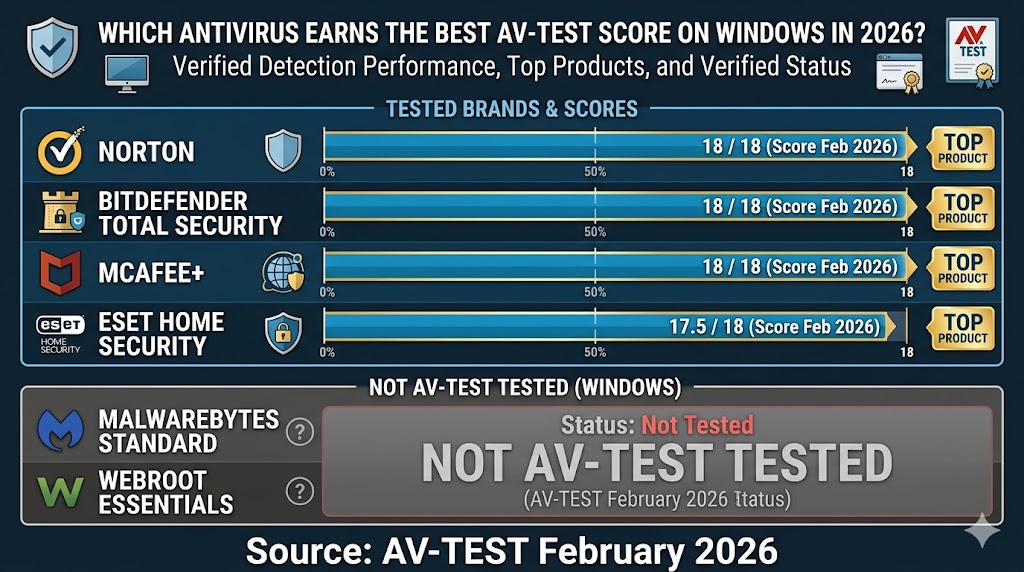
Where Norton, Bitdefender, and McAfee+ achieve identical 18/18 scores, the decision between them comes down to trial flexibility, identity monitoring depth, and per-device pricing — not detection performance.
1. Bitdefender Total Security — Best Overall for Windows
Bitdefender Total Security 27.0 earned 18/18 in AV-TEST’s February 2026 Windows evaluation — matching Norton and McAfee+ on detection while offering the longest free trial of the three at 30 days with no credit card required.
AV-TEST Windows Score
Bitdefender Total Security 27.0 scores 6/6 in protection, 6/6 in performance, and 6/6 in usability (AV-TEST, February 2026, Windows 10 and Windows 11) — 18/18 total, TOP PRODUCT. Game Mode detects fullscreen applications automatically and suppresses notifications without manual activation. Verify current Windows 11 24H2 compatibility status at Bitdefender’s official release notes before installing.
Plans and Pricing
Bitdefender Total Security costs $59.99/yr in the first year for 5 devices (Windows, Mac, iOS, and Android), renewing at $109.99/yr — nearly double the first-year rate. The 30-day free trial requires no credit card. A 30-day money-back guarantee applies after purchase. Parental controls are available on Family plans; Individual plans do not include this feature.
Bitdefender Total Security is the right pick for Windows users who want the highest verified detection rate combined with the most flexible entry point — 30 days to test the full product before committing to a paid year.
2. Norton 360 with LifeLock — Best for Identity Protection on Windows
Norton 360 25.12 earned 18/18 in AV-TEST’s February 2026 Windows evaluation and is the only product on this list that bundles LifeLock identity theft monitoring — Social Security number tracking, dark web alerts, and credit alerts — directly into a US consumer antivirus subscription.
AV-TEST Windows Score
Norton 360 25.12 scores 6/6 in protection, 6/6 in performance, and 6/6 in usability (AV-TEST, February 2026, Windows 10 and Windows 11) — 18/18 total, TOP PRODUCT. Norton also achieved 100% Total Accuracy in SE Labs’ Q1 2026 Endpoint Protection test, placing it in the highest tier alongside Kaspersky and McAfee. Silent Mode activates automatically when Norton detects fullscreen activity; confirm it is active in Settings before your first gaming session.
Plans and Pricing
Norton 360 with LifeLock Select Plus costs $99.99/yr in the first year for 10 devices, renewing at $189.99/yr — the highest renewal price on this list. The 7-day free trial requires a credit card, which is shorter and less flexible than Bitdefender’s 30-day no-CC offer. A 60-day money-back guarantee applies — the longest of the three top-scoring products. Know that trade-off before signing up.
Norton 360 with LifeLock Select Plus is the right pick for US Windows users managing financial data who need identity theft monitoring built directly into their antivirus subscription — a capability no other product on this list provides at the same tier.
3. McAfee+ — Best for Multi-Device Windows Households
McAfee Total Protection 1.35 earned 18/18 in AV-TEST’s February 2026 Windows evaluation and 100% Total Accuracy in SE Labs’ Q1 2026 Endpoint Protection test — the strongest dual-lab showing of any product on this list — making it the best value for US households running three or more Windows PCs under one subscription.
AV-TEST Windows Score
McAfee Total Protection 1.35 scores 6/6 in protection, 6/6 in performance, and 6/6 in usability (AV-TEST, February 2026, Windows 10 and Windows 11) — 18/18 total, TOP PRODUCT. It also achieved 100% Total Accuracy in SE Labs’ Q1 2026 Endpoint Protection test, which evaluates products under realistic attack simulations across the full attack chain. Its phishing and web protection scores rank consistently high in independent evaluations. Unlimited device coverage is available on Premium, Advanced, and Ultimate plans.
Plans and Pricing
McAfee+ Essential costs $39.99/yr in the first year for 5 devices, renewing at $119.99/yr — an $80 gap that is among the largest on this list. The 30-day free trial requires no credit card. A 30-day money-back guarantee applies. Unlimited device plans cost significantly more upfront than single-device or 3-device alternatives. For current deal options, the McAfee coupon page covers available offers.
McAfee+ is the right pick for families or households running three or more Windows devices who want a single subscription with top-tier detection and the option to scale to unlimited devices on higher-tier plans.
4. ESET HOME Security Essential — Best for Gaming PCs and Windows 10
ESET HOME Security Essential carries a 17.5/18 AV-TEST TOP PRODUCT award from the February 2026 Windows evaluation — one point below the 18/18 achieved by Norton, Bitdefender, and McAfee+ — with a 5.5/6 performance sub-score and a consistent real-world reputation as one of the lightest full-protection suites for Windows gaming machines.
AV-TEST Windows Score
ESET HOME Security Ultimate 19.0 scores 6/6 in protection, 5.5/6 in performance, and 6/6 in usability (AV-TEST, February 2026, Windows 10 and Windows 11) — 17.5/18 total, TOP PRODUCT. Essential uses the same core protection engine as Ultimate. Gamer Mode — ESET’s notification-suppression and background-task-pause feature that activates automatically when a fullscreen application is detected — is available in advanced settings and can be set to run hands-free. ESET HOME Security supports both Windows 10 and Windows 11 in 2026; confirm continued Windows 10 support directly at eset.com/us as the installed base shrinks.
Plans and Pricing
ESET HOME Security Essential costs $49.99/yr for 1 device or $59.99/yr for 3 devices. ESET HOME Security Essential renews at the same annual rate — no first-year discount spike to watch for. A 30-day free trial with no credit card is available for Essential and Premium plans; the Ultimate plan requires direct purchase with no trial period. A 30-day money-back guarantee applies to all plans.
ESET HOME Security Essential is the right pick for Windows gaming PC owners and Windows 10 users who need a verified lab score alongside the lightest real-world footprint of any full-protection suite on this list.
5. Malwarebytes Standard — Best for Layering With Windows Defender
Malwarebytes Standard does not participate in AV-TEST’s Windows evaluations — it is built as a malware removal and remediation tool designed to run alongside Windows Defender, not to replace it as a primary real-time antivirus engine. Independent SE Labs data (97% Total Accuracy, Q1 2026) confirms its Windows effectiveness as a complementary layer.
Lab Data
Malwarebytes Premium scored 97% Total Accuracy in SE Labs’ Q1 2026 Endpoint Protection test — the most recent independent lab evaluation available for the product on Windows, and the only lab validation currently available for Malwarebytes on this platform. This distinction matters before purchase. Users who need standalone real-time detection without Defender should choose a different product on this list. Users adding strong malware removal depth on top of Defender’s real-time scanning will find Malwarebytes Standard one of the best available options at the 1-device price point.
Plans and Pricing
Malwarebytes Standard costs $44.99/yr for 1 device or $59.99/yr for 3 devices, with no first-year discount — the price is the same at renewal. Plus and Total plans require a minimum of 3 devices; no single-device option exists for higher tiers. A 14-day free trial activates automatically on download. A 60-day money-back guarantee applies.
Malwarebytes Standard is the right pick for Windows users who already rely on Defender for real-time scanning and want to add targeted malware removal depth — at a lower cost than a full antivirus suite.
6. Webroot Essentials — Best for Minimal Footprint on Windows
Webroot’s cloud-based scanning engine maintains no large local signature database on Windows — a fraction of the local storage and background processing required by Bitdefender, Norton, and ESET HOME Security — making it the fastest-installing and least storage-intensive option on this list.
Lab Data
Webroot scored 95% Total Accuracy in SE Labs’ Q1 2026 Endpoint Protection test — the only independent lab evaluation currently available for the product, as Webroot does not participate in AV-TEST or AV-Comparatives Windows rounds. Webroot also offers the longest money-back guarantee on this list at 70 days.
Plans and Pricing
Webroot Essentials costs $29.99/yr in the first year for 1 device, renewing at $49.99/yr. A 14-day free trial is available. A 70-day money-back guarantee applies — the longest on this list.
Webroot Essentials is the right call only for very old or low-spec Windows hardware where local storage footprint is the binding constraint. Users with modern hardware will get stronger lab-validated protection from any of the other five products on this list.
Does Antivirus Software Slow Down Windows 11?
Most antivirus software has a minimal impact on Windows 11 performance when configured correctly. Norton, Bitdefender, and McAfee+ all score 6/6 on AV-TEST’s February 2026 Windows performance evaluation — the maximum score, indicating the lowest measurable impact. ESET HOME Security scores 5.5/6 in the same evaluation. Webroot and Malwarebytes Standard are not AV-TEST tested on Windows, but both have architectural or design characteristics that minimize background resource use.
The performance concern is real and worth taking seriously. AV-TEST measures it directly through its Performance sub-score, which tests system slowdown during file copies, application launches, downloads, and web browsing — on both Windows 10 and Windows 11 hardware.
Windows Antivirus Performance Scores — AV-TEST February 2026
Norton, Bitdefender, and McAfee+ each score 6/6 on AV-TEST’s February 2026 Windows performance evaluation — identical scores indicating equivalent real-world impact. ESET HOME Security scores 5.5/6 in the same evaluation.

The 5.5/6 ESET score is a 0.5-point difference, not a meaningful performance gap in day-to-day Windows use. The stronger reason to choose ESET HOME Security for a gaming PC is its overall 17.5/18 AV-TEST score combined with its consistent positioning as a lightweight product for low-resource machines and its dedicated Gamer Mode.
How to Use Game Mode on Windows
Game Mode — or Silent Mode, depending on the brand — instructs your antivirus to suppress popup notifications and reduce background scan intensity when it detects a fullscreen application running on Windows. Enabling it correctly eliminates the most common source of performance dips during active gaming sessions.
- Bitdefender: Game Mode detects fullscreen applications automatically without manual activation. Check the protection dashboard to confirm the feature is enabled on the installed version.
- Norton: Silent Mode activates automatically when Norton detects fullscreen activity. Confirm it is active in the Settings area of the installed version before the first gaming session.
- ESET HOME Security: Gamer Mode is available in the advanced settings of the installed version. Set it to activate automatically for a hands-free experience during gameplay.
For a dedicated ranking by gaming performance and Silent Mode configuration steps by product, the best antivirus for gaming PC guide at migendeals.com covers each configuration in depth.
Windows 10 and Windows 11 Compatibility in 2026
Every antivirus on this list supports Windows 11. The more pressing question for millions of US users is Windows 10 — which reached end of support on October 14, 2025.
Windows 10 reached end of support on October 14, 2025 — meaning Microsoft no longer releases security patches, making third-party antivirus a critical compensating control for the millions of US users who have not yet upgraded to Windows 11.
Without OS-level security patches, Windows 10 machines accumulate unpatched vulnerabilities over time. Antivirus software reduces — but does not eliminate — that exposure. All six products on this list support Windows 10 as of May 2026. Confirm continued Windows 10 support directly with each vendor as the installed base shrinks and vendors reassess legacy OS coverage.
For Windows 11, the 24H2 update introduced integration changes worth knowing. Bitdefender users should verify current release notes for Windows 11 24H2 compatibility status before installing. Norton, McAfee+, ESET HOME Security, and Malwarebytes passed Windows 11 24H2 compatibility checks in reviewed sources without critical flags as of May 2026.
Is It Safe to Use Windows 10 After End of Support?
Using Windows 10 after end of support increases your security risk — Microsoft no longer patches OS-level vulnerabilities, and unpatched kernel flaws accumulate over time. Antivirus software compensates by blocking threats at the application layer, but it cannot replace OS-level patches. Pairing a third-party antivirus with careful browsing habits is the strongest available defense for users who cannot yet upgrade to Windows 11. For a full breakdown of the risk factors and how antivirus compensates for unpatched vulnerabilities, the do you need antivirus in 2026 guide at migendeals.com has the complete analysis.
Which Antivirus Is Best for a Windows Gaming PC?
ESET HOME Security, Bitdefender Total Security, and Norton 360 are the three best antivirus options for Windows gaming PCs — all offering a dedicated Game or Silent Mode that suppresses notifications and reduces background scan activity during active gameplay, and all carrying AV-TEST TOP PRODUCT awards.
ESET HOME Security is the top pick for gaming PCs where the 17.5/18 AV-TEST score and real-world reputation for lightweight operation matter more than bundled extras. Its Gamer Mode is reliable on both Windows 10 and Windows 11. Bitdefender’s Game Mode is the most automatic of the three, detecting fullscreen activity without requiring manual activation. Norton’s Silent Mode is well-implemented, though the 7-day credit-card trial makes pre-purchase testing harder.
For full gaming antivirus criteria and a dedicated ranking by gaming performance, the best antivirus for gaming PC guide at migendeals.com has a complete comparison by system impact and Game Mode implementation.
Who Should NOT Buy Third-Party Antivirus for Windows
Third-party antivirus is not the right choice for every Windows user. Three specific profiles can rely on Windows Defender without meaningful security compromise:
- Advanced users with strong security hygiene. Windows users who rely on a hardware security key, use a dedicated password manager, and avoid downloading files from unverified sources are the least likely to benefit from adding a paid antivirus subscription on top of Windows Defender. Defender’s 18/18 detection is sufficient for this threat model — the identity monitoring and VPN gaps matter most to users with broader exposure.
- Users on very old Windows hardware. On machines where the choice is between a usable PC with Defender or an unusable one burdened by a paid suite’s background processes, Defender combined with careful browsing habits is the practical answer. Less than 4 GB of RAM or a pre-2015 processor makes any background security process a real performance cost.
- Users already covered by employer or school endpoint protection. Users whose organization deploys endpoint protection to their device gain no benefit from adding a consumer antivirus subscription — it creates redundancy at best and system instability at worst. Running two endpoint security agents on the same Windows machine causes performance conflicts and detection overlaps that reduce protection rather than increase it.
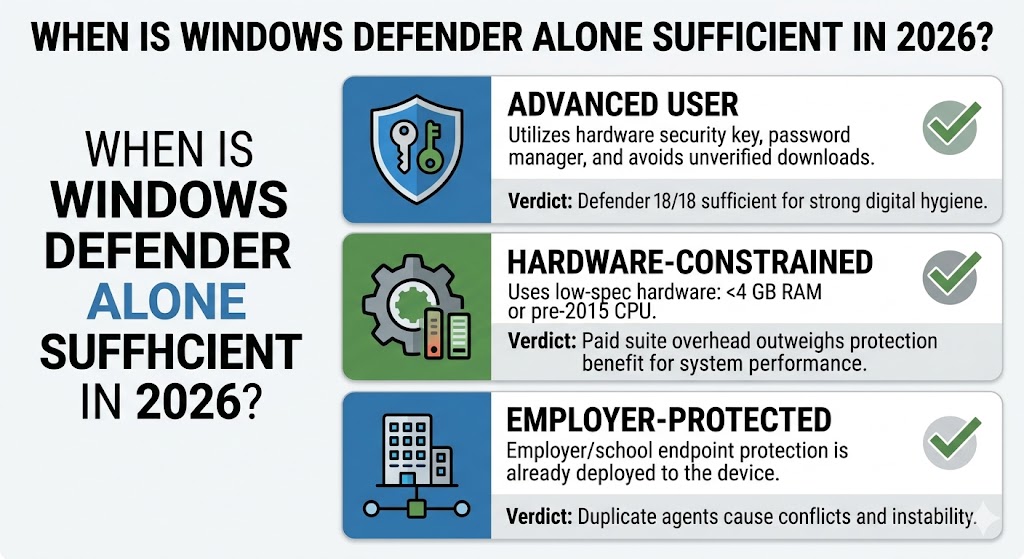
For everyone else — particularly Windows users who store tax records, access banking apps, or share a household PC with children — a paid option fills the three gaps Defender leaves open in ways that matter before an incident, not after.
How to Pick the Right Windows Antivirus for Your Situation
Match your primary Windows need to the product built for it:
| Your Windows Situation | Best Pick | Why |
|---|---|---|
| Maximum detection on Windows 11 | Bitdefender Total Security | 18/18 AV-TEST (Feb 2026) + 30-day free trial, no credit card |
| Identity theft and phishing protection | Norton 360 with LifeLock Select Plus | LifeLock monitoring + 18/18 AV-TEST (Feb 2026) + 60-day money-back — 10 devices |
| Multiple Windows devices in one household | McAfee+ | 18/18 AV-TEST (Feb 2026) + unlimited device plans on Premium, Advanced, and Ultimate tiers |
| Gaming PC or older Windows 10 machine | ESET HOME Security Essential | 17.5/18 AV-TEST (Feb 2026) — TOP PRODUCT + Gamer Mode + lightweight real-world footprint |
| Strengthen Windows Defender | Malwarebytes Standard | Anti-malware engine built to run alongside Defender — not replace it — from $44.99/yr (1 device) |
| Old or low-spec Windows hardware | Webroot Essentials | Cloud-based scanning, minimal local footprint — $29.99/yr first year |
For Windows users who also own Mac, Android, or iOS devices, Norton 360 with LifeLock Select Plus (10 devices) and McAfee+ both offer cross-platform licenses that cover all devices under one subscription. For a full ranking that goes beyond Windows, see the complete best antivirus software guide.
Bitdefender Total Security is the top-rated pick for most Windows users based on AV-TEST February 2026 scores, free trial access, and Windows-specific optimization. Current Bitdefender pricing and the latest promotional offers for 2026:
The questions Windows users ask most often before committing to a paid subscription are answered directly below.
Frequently Asked Questions
Is Windows Defender Enough for Windows 11 in 2026?
Windows Defender earns 18/18 for detection in AV-TEST’s February 2026 evaluation — but it lacks identity theft monitoring, ransomware file rollback, and a VPN. For users who store financial data, use public Wi-Fi, or own multiple devices, paid antivirus fills these three gaps directly. For low-risk users with disciplined browsing habits, Defender alone is sufficient.
Which Antivirus Uses the Least Memory on Windows?
Webroot uses the least local storage on Windows — its cloud-based scanning engine maintains no large local signature database. Among AV-TEST-validated products, Norton, Bitdefender, and McAfee+ all achieve 6/6 on the February 2026 Windows performance sub-score — the maximum rating for system impact. ESET HOME Security scores 5.5/6. Malwarebytes Standard also runs a light footprint by design, as it operates as a remediation tool rather than a full-time scanning engine. The full historical AV-TEST performance sub-scores across test rounds are available in the antivirus performance benchmarks guide.
Is Norton or Bitdefender Better for Windows?
Both Bitdefender Total Security 27.0 and Norton 360 25.12 earn 18/18 in AV-TEST’s February 2026 Windows evaluation. Bitdefender leads on free trial access — 30 days with no credit card versus Norton’s 7 days with credit card required. Norton leads on identity protection — LifeLock monitoring is available only through Norton 360 with LifeLock Select Plus ($99.99/yr first year), not through standard Norton 360 plans. Choose Bitdefender to test first without financial commitment; choose Norton’s LifeLock bundle if identity monitoring is your top priority. For a full head-to-head, see the Bitdefender vs. Norton comparison or the full Norton 360 review.
Can I Run Malwarebytes Alongside Windows Defender?
Yes — Malwarebytes Standard is specifically designed to run alongside Windows Defender without conflict. Defender handles real-time protection and background scanning; Malwarebytes Standard adds targeted malware removal and remediation when threats are found. Do not run two full-engine antivirus products simultaneously on the same Windows machine — that causes performance conflicts and detection overlaps that reduce protection rather than increase it.
What Is the Best Free Antivirus for Windows in 2026?
Windows Defender is the best free antivirus for Windows — built in, zero cost, and earning 18/18 in AV-TEST’s February 2026 Windows evaluation. For users who want to test a paid product before committing, Bitdefender, McAfee+, and ESET all offer 30-day free trials with no credit card required — the lowest-friction way to experience full-suite protection on a specific Windows machine.
The Bottom Line on the Best Antivirus for Windows in 2026
Bitdefender Total Security is the strongest all-round antivirus for Windows in 2026 — it earns 18/18 in AV-TEST’s February 2026 evaluation, offers a 30-day free trial with no credit card, and costs $59.99/yr in the first year ($109.99/yr renewal) for 5 devices. Norton 360 with LifeLock Select Plus ($99.99/yr first year, $189.99/yr renewal, 10 devices) is the right choice for identity theft monitoring — LifeLock is the only bundled monitoring service of its kind for US residents on this list. ESET HOME Security earns 17.5/18 in the same February 2026 evaluation and carries a real-world reputation as one of the lightest full-protection suites for Windows, making it the strongest pick for gaming PCs and Windows 10 machines still running after the October 2025 end-of-support date.
McAfee+ matches Norton and Bitdefender on detection (18/18, Feb 2026) and also achieved 100% Total Accuracy in SE Labs’ Q1 2026 Endpoint Protection test — it suits households with three or more Windows devices, with the Essential plan starting at $39.99/yr first year ($119.99/yr renewal). For the latest deals, the McAfee+ review and McAfee coupon code page cover current pricing options. Malwarebytes Standard works best alongside Defender — not as a standalone replacement — starting at $44.99/yr for 1 device, backed by a 97% Total Accuracy score in SE Labs’ Q1 2026 evaluation. Webroot Essentials is the right call only for very old or low-spec hardware where local storage footprint is the binding constraint, starting at $29.99/yr first year ($49.99/yr renewal); it scored 95% Total Accuracy in SE Labs’ Q1 2026 evaluation.
The one action that matters most before buying: use the free trials. Bitdefender, McAfee+, and ESET all offer 30 days with no credit card. For the latest Norton pricing, the Norton discount code page lists current promotional rates. For ESET pricing, the ESET discount code page covers available offers. Test on a specific Windows machine before committing to a full year.