
Free antivirus — including Windows Defender and Avast Free — matches paid antivirus on core malware detection: both scored 18.0/18 in AV-TEST February 2026. The meaningful gap is in what paid tiers add: VPN, parental controls, identity monitoring, and ransomware file rollback. Whether those features matter depends on your household composition, not your browsing habits. Paid antivirus starts at $39.99/yr for three devices. All pricing verified May 2026 against official brand sites.
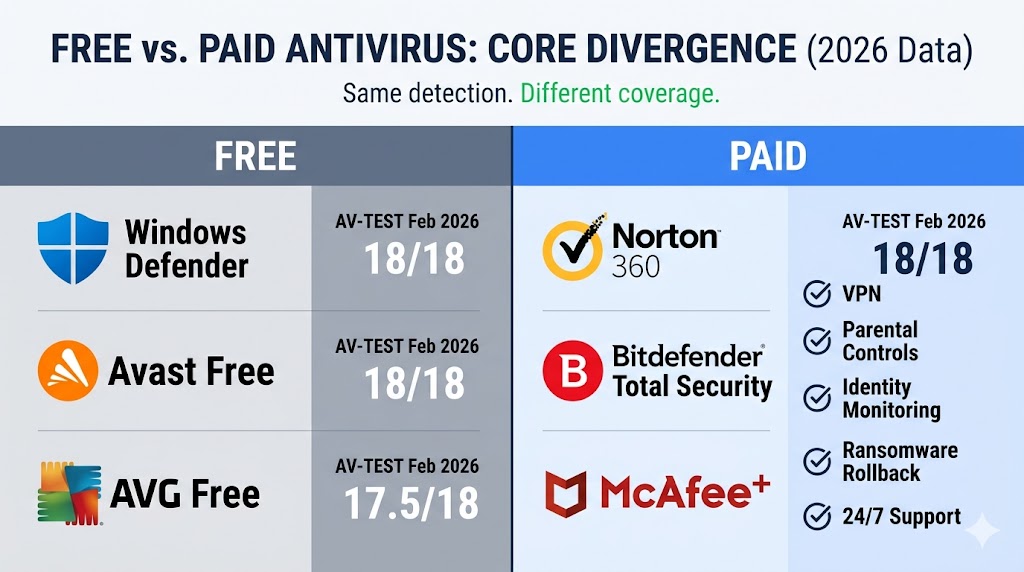
Core detection quality is now equivalent across tiers — Avast Free, Windows Defender, and Norton 360 all earned TOP PRODUCT status in AV-TEST February 2026. Paid plans extend that foundation with eight structural protections that free tiers consistently skip: ransomware file rollback, identity monitoring, parental controls, and 24/7 live support with a removal guarantee. The decision between free and paid is not a detection question. It is a household-composition question — and the risk profile framework in this guide answers it directly.
The short version: free antivirus has genuinely improved. For the right user, it is a legitimate choice. For the wrong user, the gaps are expensive. The decision framework below tells you which category you fall into.
Start with what free antivirus actually includes — and where it stops.
Table of Contents
What Free Antivirus Actually Covers — and Where It Stops
Free antivirus software protects your device against known malware, viruses, and basic web threats in real time. Most free products — including Avast Free, AVG Free, and Windows Defender — use the same core detection engines as their paid counterparts. What they skip: VPN, parental controls, identity monitoring, ransomware rollback, and customer support.
What Every Major Free Antivirus Includes
Every mainstream free antivirus product ships with these five protections:
- Real-time malware scanning. Your device is monitored continuously — known threats are blocked before they execute.
- Virus signature detection. Files are compared against a regularly updated database of known malware definitions.
- Basic web and URL protection. Dangerous or flagged websites are blocked before they load in your browser.
- On-demand manual scanning. You can scan individual files, folders, or your entire drive at any time.
- Automatic definition updates. Threat databases update in the background without user action.
One important exception: Malwarebytes Free is an on-demand scanner only, with no real-time protection running in the background. It does not actively monitor your device between scans. It is a useful cleanup tool, not a standalone security solution.
Features You Will Not Get Without a Paid Subscription
Free antivirus draws a hard line at detection. It identifies and blocks known threats. What it does not do: protect your files after ransomware executes, monitor your identity on the dark web, filter content for children, or secure additional devices in your household.
The five features consistently absent from free tiers are VPN, parental controls, identity monitoring, ransomware file rollback, and 24/7 live technical support. Each is covered in detail in the feature comparison below. The biggest gap is not in detection — it is in what happens after your device is compromised, and whether your household’s specific risks make that gap matter.
Is Windows Defender Good Enough in 2026?
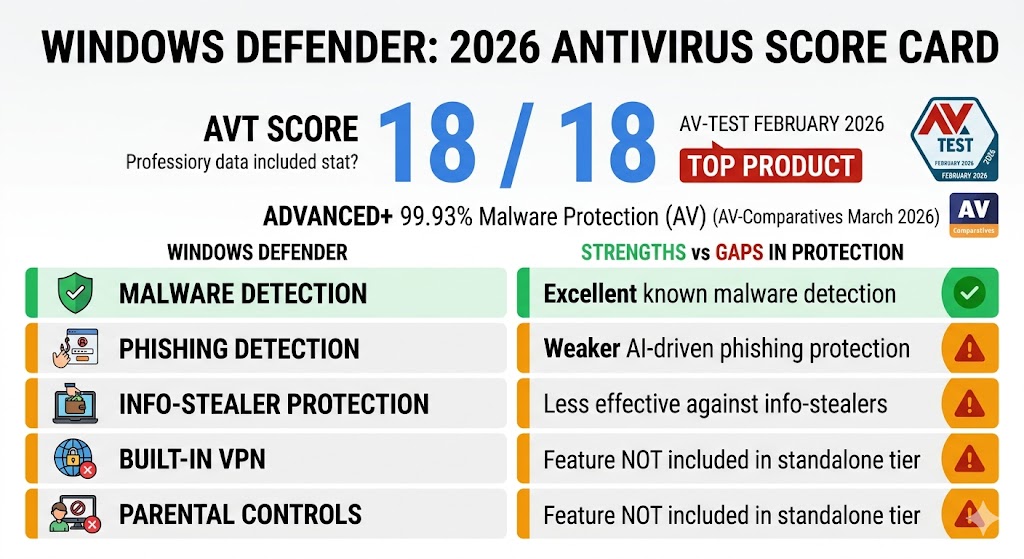
Windows Defender is good enough in 2026 for careful solo users on Windows 11. It earned a perfect 18.0/18 in AV-TEST February 2026 — matching Norton and Bitdefender. It falls short on AI-powered phishing detection, offers no VPN or parental controls, and has no identity monitoring — gaps that matter for families and financial users.
Where Defender Matches Paid Antivirus
Defender’s core malware detection is stronger in 2026 than it has ever been. In AV-TEST February 2026, Microsoft Defender (Consumer, version 4.18) scored 18.0/18 — a perfect score placing it in the same tier as Norton and Bitdefender. (Source: AV-TEST, Magdeburg Germany, February 2026)
The Windows 11 24H2 update (October 2024) added three meaningful security improvements to Defender’s foundation:
- Administrator Protection. Any process that requires elevated system privileges now requires explicit user approval, cutting off a common malware escalation path.
- Controlled Folder Access. Unauthorized changes to protected folders — including Documents and Desktop — are blocked, directly limiting ransomware’s ability to encrypt your files. It is disabled by default — enable it in Windows Security → Virus & Threat Protection → Ransomware Protection.
- Microsoft’s global telemetry network. Threat signals from hundreds of millions of Windows devices enable rapid response to newly identified malware variants.
In AV-Comparatives’ Malware Protection Test March 2026, Defender earned ADVANCED+ certification with a 99.93% online protection rate. (Source: AV-Comparatives, March 2026)
Where Defender Falls Short
Defender falls short in four specific areas — phishing detection, info-stealer monitoring, system performance under load, and missing suite features — where paid products measurably outperform it.
- Phishing detection. Microsoft’s SmartScreen URL reputation filter — which checks URLs against a database of known malicious domains — shows measurable gaps on AI-generated fake login pages that use newly registered, clean-reputation domains specifically designed to bypass blocklist-dependent filters. Paid products from Norton, Bitdefender, and ESET add real-time behavioral URL analysis that evaluates page structure, not just domain reputation.
- Info-stealer blind spot. Info-stealers that target saved browser passwords and active session cookies execute through browser memory and network channels — without the file-system activity that triggers Defender’s scanner. Paid products with behavioral monitoring layers detect abnormal process activity before data leaves your device.
- System performance. Independent performance testing confirms Defender uses significantly more CPU during active scans than lightweight alternatives like Avast Free on equivalent hardware. Avast and AVG both earned the Gold Award for Low System Impact in AV-Comparatives’ 2025 Performance Test. (Source: AV-Comparatives Consumer Summary Report 2025)
- No VPN, no parental controls, no identity monitoring. These are structural absences — Microsoft does not include them in any Windows Security tier, at any price.
The four gaps are not in what Defender detects — they are in coverage breadth and response capability. To see exactly how free and paid products compare across every feature that matters, the next section puts them side by side.
Free vs. Paid Antivirus: Side-by-Side Comparison
Free antivirus matches paid antivirus on core malware detection scores — the significant gap is in features, support, and protection breadth. Two organizations conduct the most rigorous annual independent testing: AV-TEST (Germany) and AV-Comparatives (Austria). Both score products on real-world protection, system performance, and usability without vendor payment for results.
Table 1 — Lab Scores (Most Recent Available Data)
The table below shows the most recent AV-TEST and AV-Comparatives results for the free and paid products covered in this guide. All free products with real-time protection are included; Malwarebytes Free is excluded as it has no real-time engine to test.
| Product | Tier | AV-TEST Score /18 | AV-Comparatives Status |
|---|---|---|---|
| Avast Free Antivirus | Free | 18.0 | ADVANCED+, Malware Protection March 2026 |
| AVG AntiVirus Free | Free | 17.5 | ADVANCED+, Malware Protection March 2026 |
| Microsoft Defender | Free | 18.0 | ADVANCED+, Malware Protection March 2026 |
| Malwarebytes Free | Free | N/A | Not tested — on-demand only, no real-time protection |
| Norton 360 | Paid | 18.0 | 🏆 Top-Rated — Gold Real-World Protection |
| Bitdefender Total Security | Paid | 18.0 | 🏆 Top-Rated — Gold Advanced Threat Protection |
| ESET HOME Security | Paid | 17.5 | 🏆 Top-Rated — consistently top-rated across 2025 tests |
| McAfee+ | Paid | 18.0 | ADVANCED, AV-Comparatives 2025 Annual |
(Source: AV-TEST, Magdeburg Germany, February 2026; AV-Comparatives Consumer Summary Report 2025; AV-Comparatives Malware Protection Test March 2026)
Detection scores confirm that free and paid products are in the same tier — the practical difference is in what each tier can do after a threat is detected.
Table 2 — Feature Comparison
The table below shows feature presence and absence across the three most relevant protection tiers: Windows Defender (the built-in default), Avast Free (the strongest third-party free option), and a representative mid-tier paid suite. Features marked ✓ are included; ✗ are absent from that tier.
| Feature | Windows Defender | Avast Free | Paid Antivirus (mid-tier) |
|---|---|---|---|
| Real-time malware protection | ✓ | ✓ | ✓ |
| Firewall | Windows built-in only | Windows built-in only | ✓ Dedicated |
| VPN | ✗ | ✗ | ✓ Varies by plan and brand* |
| Parental controls | ✗ | ✗ | ✓ Deluxe tier+ (Norton); Family plans (Bitdefender, McAfee+) |
| Identity monitoring | ✗ | Basic breach alerts only | ✓ Full (mid-tier+) |
| Ransomware file rollback | ✗ | ✗ | ✓ Selected products |
| Password manager | ✗ | ✗ | ✓ Most paid plans |
| 24/7 tech support | ✗ | ✗ | ✓ |
| Multi-device license | 1 device | 1 device | 3–unlimited |
| Ad-free experience | ✓ | ✗ | ✓ |
*VPN availability varies by plan and brand: Norton Standard and above include unlimited VPN; Bitdefender Total Security includes a 200 MB/day VPN limit (unlimited requires Premium Security or above); McAfee+ Premium and above include unlimited VPN. Parental controls require Deluxe tier or above for Norton, and Family plans for Bitdefender and McAfee+. See individual product reviews or our best antivirus software guide for plan-level detail.
Detection scores tell half the story. The other half is what happens when malware gets past the scan — and what your antivirus can do about it.
What Does Paid Antivirus Have That Free Doesn’t?
Paid antivirus adds eight capabilities free versions consistently skip: ransomware file rollback, identity monitoring and dark web alerts, a password manager, a VPN, a dedicated firewall, parental controls, a safe banking and payment browser, and 24/7 live technical support with a malware removal guarantee. These features are absent from every major free product.
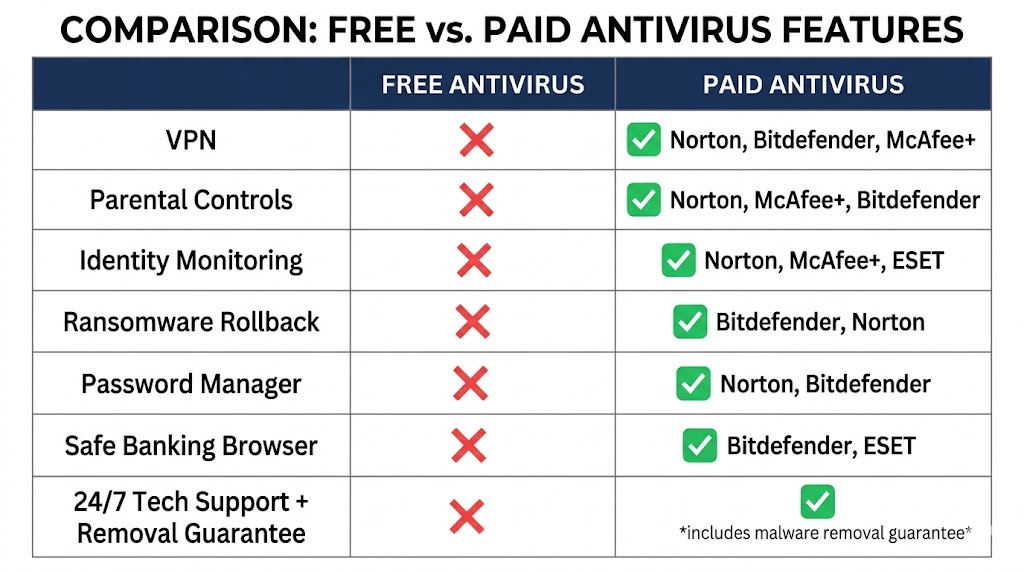
Where free antivirus draws the line at detection, paid tiers extend coverage to what happens after the scan. Here is what each gap means in practice:
- Ransomware file rollback. Free antivirus can detect ransomware as it begins executing but cannot undo encrypted files after an attack. Paid suites including Bitdefender Total Security and above can reverse file encryption — the single most significant protection gap for users who store important documents locally.
- Identity monitoring and dark web alerts. Free tiers offer, at most, basic breach alerts. Paid plans at mid-tier and above add continuous dark web scanning, SSN tracking, credit monitoring, and real-time breach notifications. Full identity monitoring is included with Norton 360 Select Plus, McAfee+ Advanced, ESET HOME Ultimate, and Bitdefender Ultimate Security.
- Password manager. Absent from all free tiers. Included with Norton (all paid plans), Bitdefender Total Security and above, and most other major paid suites.
- VPN. Free tiers include no VPN. Paid plans from Norton (Standard and above, unlimited), Bitdefender (Premium Security and above for unlimited; Total Security includes a 200 MB/day limit), and McAfee+ (Premium and above) include VPN on all covered devices.
- Dedicated firewall. Avast Free and AVG Free rely on Windows Firewall for network protection. Paid suites add a dedicated two-way firewall monitoring both incoming and outgoing traffic. (Source: AV-Comparatives Consumer Summary Report 2025)
- Parental controls. No free antivirus product includes parental controls. Norton Family is included with Norton 360 Deluxe and above. McAfee Safe Family is included with McAfee+ Family plans. Bitdefender parental controls are available on Family plan tiers only.
- Banking and payment protection. Dedicated safe browsers for financial transactions — Bitdefender Safepay and ESET’s Banking & Payment Protection — are paid-only features that isolate your banking session from the rest of your browsing environment.
- 24/7 tech support with malware removal guarantee. Free users receive community forums only. Paid subscribers get live chat, phone support, and — with most major brands — a guarantee that a technician will remove any malware that gets through, or refund the subscription.
The gaps above are not equally important for every household — ransomware rollback and identity monitoring matter most for users with financial accounts or stored documents; parental controls matter only for households with children. In 2026, AI-powered phishing tools and browser credential theft via info-stealers are widening the gap at the exact points where free antivirus is weakest, making the risk profile decision in the next section more consequential than it was three years ago.
Does Free Antivirus Sell Your Data?
One factor that shapes the real cost of free antivirus is what the product collects in exchange for the no-charge model. Free antivirus products do not universally sell user data — but some historically have, and all collect telemetry. In 2020, Avast was found selling user browsing data through its Jumpshot subsidiary; clients included major tech and consulting firms. Jumpshot was dissolved following public disclosure, and Avast’s data practices have since been updated. Every free product today still collects telemetry — URLs visited, app usage data, and device identifiers — for threat intelligence purposes.
For users concerned about third-party data collection, Windows Defender is the cleanest option among free products, governed by Microsoft’s broader Windows privacy policy rather than a standalone antivirus data agreement. After installing any free antivirus, open the privacy or settings menu and disable optional telemetry and marketing data sharing — this takes under five minutes and removes the most intrusive data collection without affecting protection quality. Whether your chosen free product’s data practices are acceptable is a decision worth making consciously before it affects your risk profile.
Do You Really Need to Pay for Antivirus, or Is the Free Version Fine?
Whether free antivirus is enough depends on one factor: your household’s actual risk profile — not how careful you think you are.
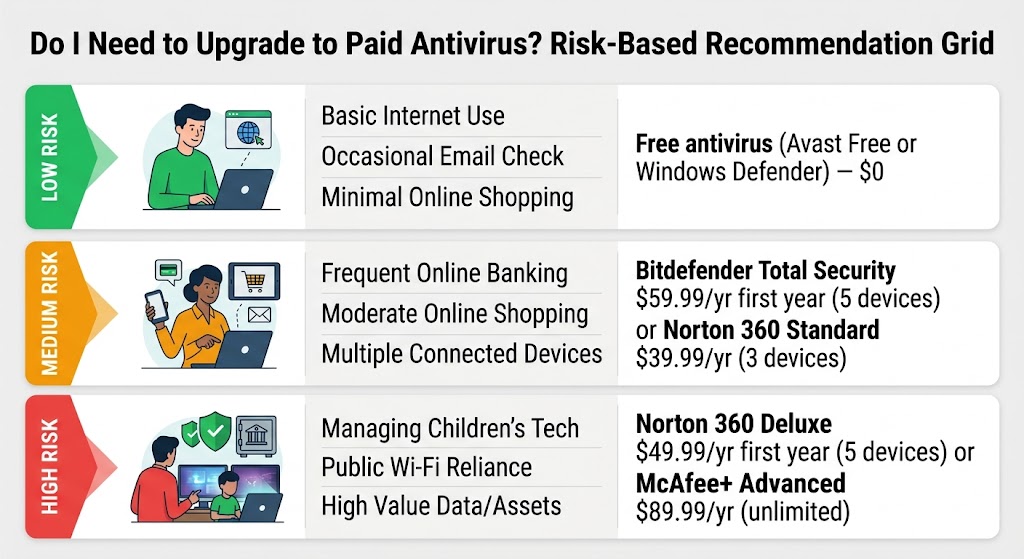
In 2026, “I don’t click on suspicious links” is no longer a complete defense. The three-tier framework below matches your household profile to the right protection level — place yourself in the correct tier before deciding.
Use the table below to place yourself, then read the one-paragraph explanation for your profile:
| Your Risk Profile | What It Looks Like | Right Protection Tier |
|---|---|---|
| Low risk | Solo adult on one Windows 11 PC, careful browsing habits, no financial credentials stored in browser, no children on the device | Windows Defender or Avast Free |
| Medium risk | Family PC with children online, light online shopping, 2–3 devices in the household, occasional software downloads | Bitdefender Total Security or Norton 360 Standard |
| High risk | Home office with financial accounts, frequent downloads, elderly family member on the same network, remote work on a personal device | Norton 360 Deluxe or McAfee+ Advanced |
Low-risk users: Avast Free and AVG Free both earned ADVANCED+ certification in AV-Comparatives’ Malware Protection Test March 2026 — the same protection tier as Norton and Bitdefender in that test round. For a solo adult with careful habits and a single device, the detection quality of these free products is not a meaningful compromise. Defender is equally valid if you prefer no third-party software.
Medium-risk users: The breaking point for most families is two factors arriving together — children using the device, and more than one device needing coverage. No free antivirus includes parental controls. No free antivirus covers multiple devices on a single license. Bitdefender Total Security at $59.99/yr first year ($109.99/yr renewal) covers 5 devices with a 200 MB/day VPN and a password manager. Norton 360 Standard at $39.99/yr first year ($94.99/yr renewal) covers 3 devices with an unlimited VPN and dark web monitoring. Either removes the gaps that matter for this profile.
High-risk users: A home office PC storing tax documents, financial accounts, and work files is a target with real financial value. Norton 360 Deluxe ($49.99/yr first year, $124.99/yr renewal, 5 devices) adds parental controls, 50 GB cloud backup for Windows, and dark web monitoring. McAfee+ Advanced ($89.99/yr first year, $199.99/yr renewal, unlimited devices) adds automated personal information removal and identity theft coverage. For anyone managing a non-technical family member’s security — an elderly parent who may click on fake security pop-ups — paid antivirus with scam detection and phone support is worth the cost.
Students on a single device with careful habits fit the low-risk profile. Avast Free or Windows Defender is a legitimate choice. Malwarebytes Standard at $44.99/yr (1 device, no renewal spike) is the lowest-cost paid entry point for real-time protection with a lighter system footprint on campus Wi-Fi.
Once you know your risk profile, the next section maps it to specific product choices.