
Norton is the stronger antivirus for most US households — it earns 18/18 in AV-TEST’s February 2026 evaluation, ADVANCED+ in AV-Comparatives’ March 2026 Malware Protection Test, and 100% Total Accuracy in SE Labs’ Q1 2026 Endpoint Protection test. Webroot earns 95% Total Accuracy in SE Labs — the only independent lab it submits to. Both start at $29.99/yr.
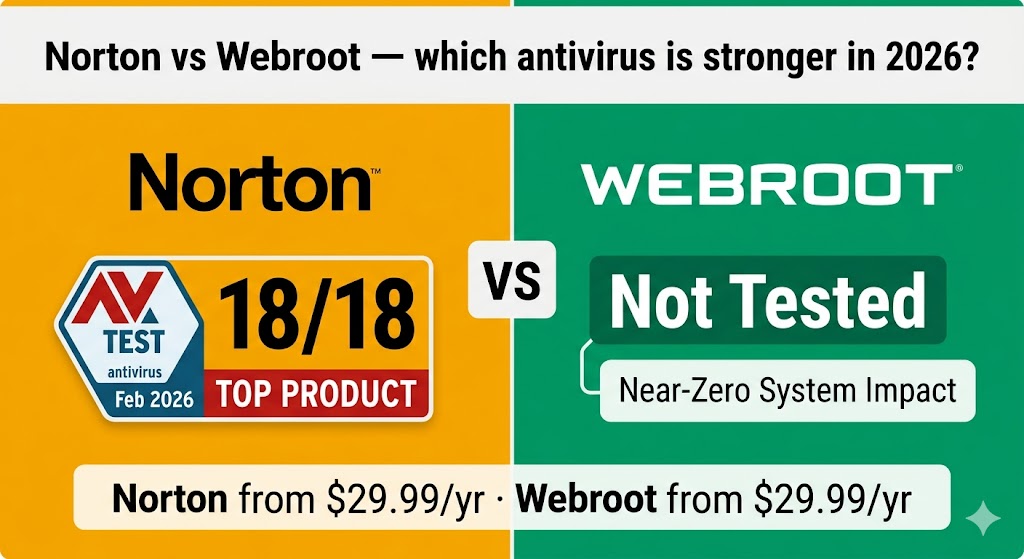
Choosing between Norton and Webroot comes down to one core trade-off: verified, comprehensive protection versus lightweight, low-impact scanning. Norton wins on multi-lab verification, feature breadth, and suite value across most household configurations. Webroot wins on system performance and trial terms. The right pick depends on your hardware age, household size, and how much weight you place on independent test verification.
This comparison covers how each product’s detection architecture creates that trade-off, what three independent lab organizations show for Norton versus Webroot’s single-lab standing, how each product performs on real hardware, which features each suite includes at each price point, and which specific US situations favor one product over the other — so you can stop comparing and start protecting.
Table of Contents
Is Norton Better Than Webroot for Most US Households?
Yes — Norton is the better antivirus for most US households. It carries independently verified malware detection scores from three separate testing organizations, a broader security suite, and competitive entry pricing. Webroot is a legitimate alternative for users with older or low-spec PCs where system performance takes priority over multi-lab verification.
What makes Norton the stronger default — and when Webroot earns the recommendation instead — comes down to a few concrete attributes. The architecture difference between the two products is the right place to start.
Why Is Norton the Safer Default Choice for Most Users?
Norton is the clear starting point for non-technical users, families, and anyone who wants one product that handles everything. What makes it the starting point rather than just the leading option is the combination of multi-lab verified scores and a full security suite — VPN from the Standard plan, parental controls from the Deluxe plan, dark web monitoring from the Standard plan, and 50 GB of cloud backup from the Deluxe plan. Its multi-lab verified scores confirm the protection claims the product makes across three independent methodologies.
That full-suite verification is the key differentiator — and the reason Webroot suits a narrower, more specific user profile.
When Does Webroot Make More Sense Than Norton?
Webroot is the stronger choice for PCs with 4 GB of RAM or less, where Norton’s local engine creates measurable slowdown. Its cloud-based engine uses a near-zero local RAM footprint at idle, making it the right call for aging hardware with a stable broadband connection. Webroot also offers a 14-day free trial with no credit card required and a 70-day money-back guarantee — both more generous than Norton’s equivalent terms. Webroot Essentials at $29.99/yr first year ($49.99/yr at renewal) is worth testing on an aging laptop before committing to a heavier suite.
Understanding why this trade-off exists requires knowing how each product’s detection engine works under the hood.
What Is the Difference Between Norton and Webroot?
Norton uses a traditional local detection engine; Webroot relies primarily on cloud-based lookups. That architectural difference has one concrete consequence for everyday users: Webroot’s protection is reduced to heuristic-only detection when your internet connection drops. Norton continues to protect your device fully offline using its locally installed virus definition database.
| Norton | Webroot | |
|---|---|---|
| Engine type | Local (traditional) | Cloud-based |
| Scan speed impression | Standard (minutes) | Very fast (seconds) |
| Offline protection | Full | Reduced |
| Best-fit user | Most households | Older or low-spec PCs |
For users who need full offline capability — frequent travelers, remote workers in low-connectivity areas — Norton’s local engine is the essential differentiator. The detection approach each product uses directly affects how well it catches real-world malware, which the next section covers with lab data.
Malware Protection: What the Lab Data Actually Shows
Norton’s malware detection is verified across three independent testing organizations; Webroot holds one independent lab result. That difference in verification depth is the single most important fact in this comparison. What does three-lab standing mean in practice? It means Norton’s protection rates have been confirmed by separate organizations using different methodologies and malware sample sets — not a single snapshot.
Norton 360 achieves a perfect 18/18 score in AV-TEST’s February 2026 Windows evaluation and ADVANCED+ status — 99.97% online protection rate across 10,000 malware samples with 9 false alarms — in AV-Comparatives’ March 2026 Malware Protection Test, per those organizations’ published results. Norton also achieves 100% Total Accuracy in SE Labs’ Q1 2026 Endpoint Protection test.
The comparison below shows how each product’s independent lab verification base differs — Norton verified across three organizations, Webroot exclusively through SE Labs.
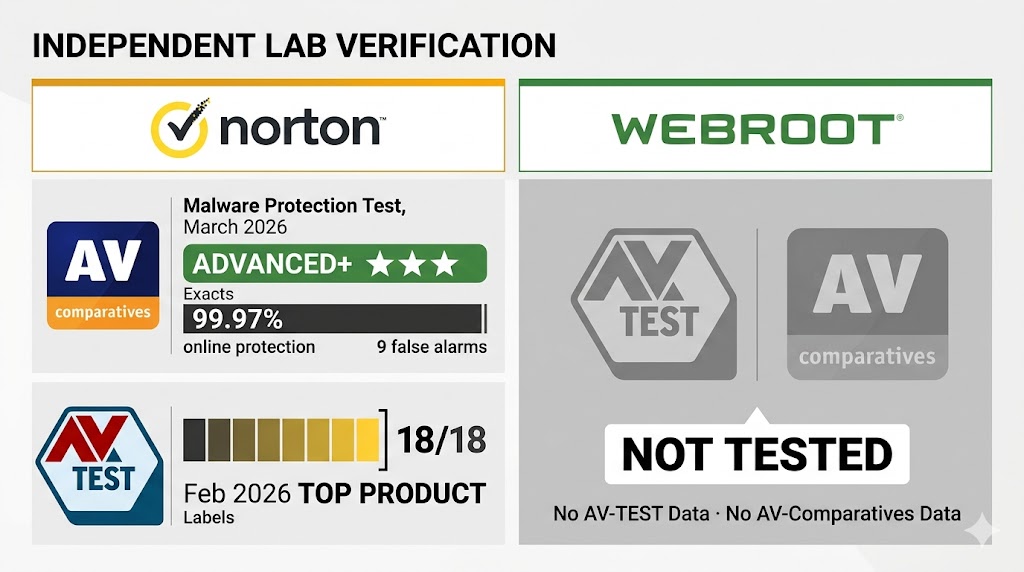
Webroot does not submit to AV-TEST or AV-Comparatives consumer testing. It does participate in SE Labs’ Q1 2026 Endpoint Protection test, earning 95% Total Accuracy — the most recent independent lab result available for the product. SE Labs uses a realistic attack simulation methodology, replicating credible adversary behavior across the full attack chain. A 95% result places Webroot in SE Labs’ green tier alongside Norton, McAfee, and Malwarebytes.
That verification gap — three labs for Norton versus one for Webroot — is the defining trade-off. Norton’s scores tell you precisely what you are buying across multiple standardized methodologies; Webroot’s SE Labs result confirms functional protection but cannot be compared directly to AV-TEST or AV-Comparatives’ standardized malware datasets.
Protection quality matters — but so does what the product costs your PC in speed and resources.
Does Webroot Slow Down Your Computer Less Than Norton?
Yes — Webroot has a significantly lower system impact than Norton, and the difference is most noticeable on older hardware. What does that lighter footprint mean for day-to-day use?
Webroot’s cloud-based architecture keeps the local install lightweight — virus definitions are maintained in the cloud, which means near-zero RAM usage at idle. That makes it the stronger performer on PCs with 4 GB of RAM or less.
Norton’s full suite installs a local detection engine, a firewall, a VPN client, and additional background utilities that require more local resources. On modern machines — Windows 11 PCs with 8 GB of RAM or more — Norton’s performance impact is minimal in everyday use. The difference becomes meaningful on PCs that are three or more years old, running near-capacity RAM, or used by multiple family members simultaneously.
The trade-off is clear: Webroot is faster and lighter, but its protection relies on a live internet connection. Norton is heavier locally but fully capable offline. System performance is one side of the trade-off. The other is what each product actually includes for the money.
Which Antivirus Has Better Features — Norton or Webroot?
Norton wins more feature categories outright; Webroot wins where it counts for a specific type of user. The table below maps the eleven features most relevant to this comparison, with a winner for each:
| Feature | Norton | Webroot | Winner |
|---|---|---|---|
| Lab-verified protection | 18/18 AV-TEST Feb 2026 + 100% SE Labs Q1 2026 | 95% SE Labs Q1 2026 | Norton |
| Offline threat detection | Full local engine | Cloud-dependent (reduced offline) | Norton |
| System performance impact | Higher (local engine) | Near-zero (cloud) | Webroot |
| Breach monitor | Not included on entry plans | All plans (Essentials, Premium, Total) | Webroot |
| VPN included | From Standard ($39.99/yr) | Total Protection only ($89.99/yr) | Norton |
| Dark web monitoring + identity | Standard (monitoring) / Select Plus (full identity) | From Premium ($64.99/yr, $1M coverage) | Webroot (lower entry for identity) |
| Parental controls | From Deluxe ($49.99/yr) | Total Protection only ($89.99/yr) | Norton |
| Cloud backup | Deluxe: 50 GB · Select Plus: 250 GB | Unlimited, 1 device (Total Protection) | Norton (for families) |
| False positive risk | Low — game mode available | Higher — cloud flags new executables | Norton |
| Free trial | 7 days (CC required) | 14 days (no CC required) | Webroot |
| Money-back guarantee | 60 days | 70 days | Webroot |
The feature split above reflects why hardware age matters — Norton wins where full-suite depth counts; Webroot wins where performance, trial generosity, and entry-level identity coverage are the deciding factors.
VPN — Norton Wins at a Lower Plan
Norton includes a VPN from its 360 Standard plan at $39.99/yr first year ($94.99/yr renewal) for 3 devices. Webroot bundles a VPN only with Total Protection at $89.99/yr first year ($179.99/yr at renewal) — a $50.00/yr difference for users who need secure browsing at the first-year price. Norton Standard is the more cost-effective choice if VPN access is a non-negotiable requirement.
Identity Protection — Webroot Offers It at a Lower Plan
Webroot’s Premium plan ($64.99/yr first year, 5 devices plus 1 identity) includes dark web monitoring and up to $1M fraud expense reimbursement. Norton’s comparable identity protection starts at its 360 with LifeLock Select Plus plan at $99.99/yr first year for 10 devices. For a single user focused on identity coverage on a mid-tier budget, Webroot Premium is the lower-cost entry point by $35.00/yr.
Parental Controls — Norton Wins
Norton includes parental controls from its Deluxe plan ($49.99/yr first year, 5 devices). Webroot’s parental controls are available only on Total Protection ($89.99/yr first year). For families with children, Norton Deluxe delivers parental controls at $40.00/yr less than Webroot’s comparable tier.
Cloud Backup — Norton for Families
Norton Deluxe includes 50 GB of cloud backup for Windows devices; Select Plus includes 250 GB. Webroot Total Protection includes unlimited cloud backup, but only for 1 device. For multi-device households, Norton’s cloud backup covers more devices at the same or lower price point.
Features on paper tell one story. How each product performs in the specific situations US users actually face tells another.
Norton vs Webroot for Real US Situations
Your specific situation determines which product wins — hardware age, household size, and how often you work offline all shift the answer.
The situations below illustrate when Norton’s verified protection or Webroot’s lighter footprint becomes the deciding factor for a US household.
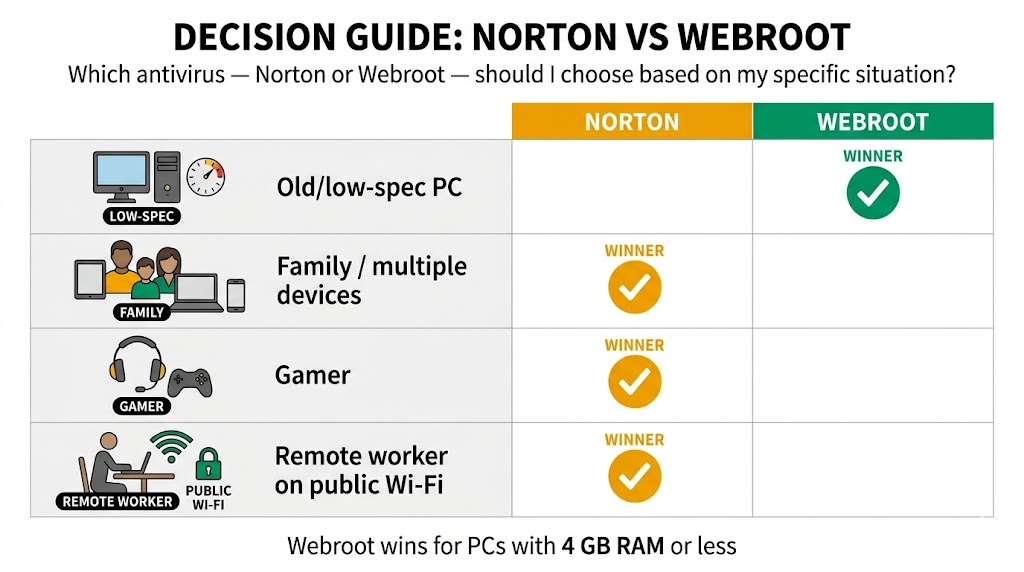
That split verdict — Norton for most, Webroot for older hardware — holds across every common US household scenario except one: the aging laptop with 4 GB of RAM where Webroot’s cloud engine creates a real performance advantage.
You Have an Older or Low-Spec PC
Best for: Webroot Essentials ($29.99/yr first year, 1 device; renews at $49.99/yr).
Webroot’s cloud engine installs with a minimal local footprint and runs with near-zero RAM at idle. Norton’s full suite runs on older PCs, but users with 4 GB of RAM or less consistently report measurable system drag. Webroot is the right call here if your older PC has a stable broadband connection. Webroot’s reduced offline detection becomes a meaningful risk if your connection is slow or unreliable.
You Have a Family with Multiple Devices
Best for: Norton 360 Deluxe ($49.99/yr first year, $124.99/yr renewal, 5 devices).
Norton Deluxe covers 5 devices with parental controls, a VPN, and 50 GB of cloud backup. For families needing parental controls across five devices, Norton 360 Deluxe at $49.99/yr first year is the more complete choice — Webroot’s parental controls require its Total Protection plan at $89.99/yr.
You’re a Gamer or Use Creative Software
Best for: Norton 360 for Gamers ($44.99/yr first year, $119.99/yr renewal, 3 devices).
Norton 360 for Gamers includes a dedicated game mode that suppresses notifications and minimizes resource usage during active gameplay. Webroot’s cloud lookup approach generates a higher false positive rate on new executables — gaming clients and creative application updaters are flagged more frequently than with Norton, requiring manual whitelisting. For non-technical gamers, that friction is a real barrier.
You’re a Remote Worker on Public Wi-Fi
Best for: Norton 360 Standard ($39.99/yr first year, $94.99/yr renewal, 3 devices).
Norton Standard includes a VPN on all covered devices from $39.99/yr. Webroot’s VPN is available only on Total Protection at $89.99/yr — making Norton Standard $50.00/yr cheaper for equivalent VPN-included protection. For remote workers who regularly use public networks, Norton Standard is the practical and lower-cost choice.
Before choosing based on features alone, understand what each product costs — not just in year one, but at renewal.
How Do Norton and Webroot Pricing and Renewal Costs Compare?
Norton and Webroot both start at $29.99/yr for a single device, but Webroot renews at the lower rate ($49.99/yr vs Norton’s $59.99/yr) and offers the better trial — 14 days with no credit card required versus Norton’s 7-day CC-required trial — and the longer money-back window at 70 days versus Norton’s 60.
The four comparison points that matter most for a US buyer:
| Norton | Webroot | |
|---|---|---|
| Starting price | $29.99/yr first year | $29.99/yr first year |
| Renewal (entry plan) | $59.99/yr (1 device) | $49.99/yr (1 device) |
| Free trial | 7 days (CC required) | 14 days (no CC required) |
| Money-back guarantee | 60 days | 70 days |
Webroot’s 70-day money-back guarantee is the longest of any antivirus brand covered on this site — 10 days longer than Norton’s 60-day policy. Both allow a full refund within the stated window.
Both products increase significantly at renewal — Webroot Essentials renews at $49.99/yr and Norton AntiVirus Plus renews at $59.99/yr. The most reliable way to maintain first-year pricing: cancel before your renewal date and repurchase as a new subscriber.
Pricing is one thing. How each product behaves in daily life — pop-ups, background scans, renewal reminders — is another question entirely.
What Else Should You Know Before Choosing Between Norton and Webroot?
The pricing and features above cover the mechanical differences. Before committing, two additional factors shape the everyday experience: how each product behaves once installed, and which type of user should avoid each product entirely. For families and gamers researching situation-specific picks across all major brands, the best antivirus for families and best antivirus for gaming guides cover additional options and testing data.