
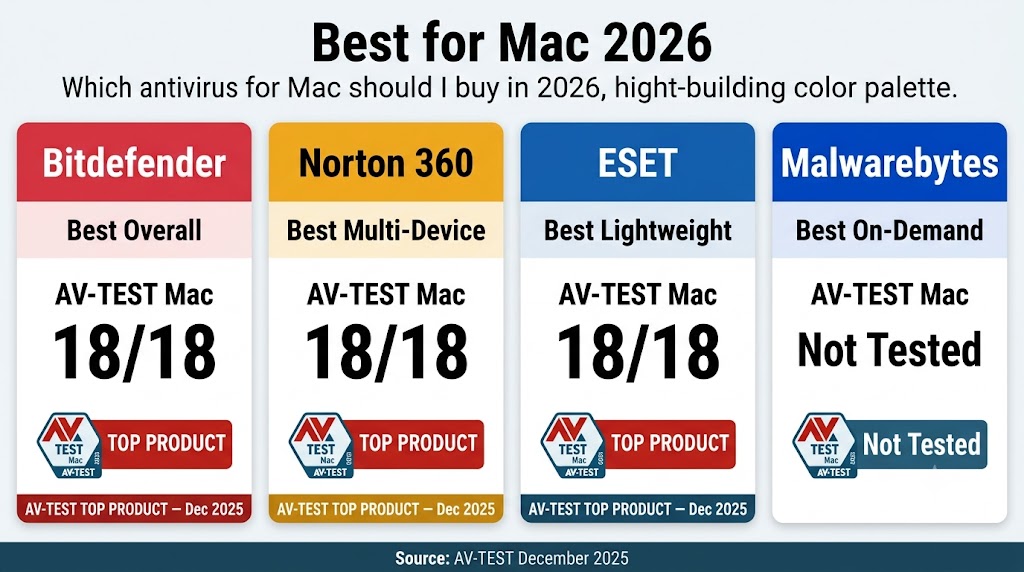
Bitdefender Antivirus for Mac is the best antivirus for Mac in 2026, earning a perfect 18/18 in AV-TEST’s December 2025 Mac evaluation. Norton 360 Deluxe leads for multi-device households covering Mac, Windows, and mobile. ESET HOME Security Essential is the lightest always-on option for MacBook Air users. Malwarebytes is the only pick with a permanently free scanning tier.
Mac users face a genuine security risk in 2026. Apple’s built-in XProtect uses signature-based detection that lags behind new threats by days or weeks — allowing info stealers like Atomic Stealer, Banshee Stealer, and Poseidon Stealer to reach Mac users before signature updates arrive. Mac malware registrations increased 67% in 2025, with trojans accounting for more than half of all macOS malware detected globally, according to Moonlock’s 2025 threat report and Jamf’s 2026 security study. Third-party antivirus adds real-time behavioral detection that XProtect does not provide.
The core challenge for Mac users is finding protection that does not slow down Apple Silicon. This guide covers the four best options — ranked by AV-TEST Mac scores, system impact on M-series chips, and macOS Sequoia compatibility — so you can choose with confidence.
Table of Contents
Top Mac Antivirus Picks for 2026
The best antivirus for Mac in 2026 is Bitdefender, followed by Norton 360, ESET HOME Security Essential, and Malwarebytes — in that order — based on AV-TEST Mac scores from December 2025, Apple Silicon performance, and pricing value for Mac-specific plans.
All three lab-tested picks earned the maximum 18/18 score in AV-TEST’s December 2025 Mac evaluation. Malwarebytes holds a different position: it does not participate in AV-TEST Mac evaluations, but earns its place as the strongest on-demand free option for budget-conscious users.
| Brand | Best For | AV-TEST Mac (Dec 2025) | Free Trial | Money-Back | Starting Price |
|---|---|---|---|---|---|
| Bitdefender | Best overall Mac protection | 18/18 TOP PRODUCT ✓ | 30 days (no CC) | 30 days | $24.99/yr (Antivirus Plus, 1 Device) |
| Norton 360 | Multi-device households | 18/18 TOP PRODUCT ✓ | 7 days (CC required) | 60 days | $39.99/yr (360 Standard, 3 Devices) |
| ESET | Lightweight / MacBook Air | 18/18 TOP PRODUCT ✓ | 30 days (no CC) | 30 days | $49.99/yr (HOME Essential, 1 Device) |
| Malwarebytes | On-demand / budget | Not tested | 14 days | 60 days | $44.99/yr (Standard, 1 Device) |
Best Overall — Bitdefender Antivirus for Mac
Bitdefender earns the top position on every Mac evaluation criterion: 18/18 in AV-TEST’s December 2025 Mac evaluation, the lowest entry price of the lab-tested group at $24.99/yr, and strong user-reported performance on Apple Silicon. It is the default choice for single-Mac users who want independently validated real-time protection.
Best for Multi-Device Households — Norton 360
Norton 360 Deluxe covers Mac, Windows, Android, and iOS on one plan — up to 5 devices at $49.99/yr first year — matching Bitdefender and ESET at 18/18 in AV-TEST’s December 2025 Mac evaluation. It is the default choice for households where multiple device types need coverage under one subscription.
Best Lightweight Option — ESET for Mac
ESET HOME Security Essential earns 18/18 in AV-TEST’s December 2025 Mac evaluation while running fewer background services than Norton or Bitdefender — no VPN agent or dark web monitoring service active at all times. It is the default choice for MacBook Air users with 8GB of RAM who need always-on protection with the smallest possible background footprint.
Best On-Demand Scanner — Malwarebytes for Mac
Malwarebytes offers the only permanently free scanning tier in this group, making it the default choice for Mac users who want lightweight on-demand scanning without a subscription. Its paid Standard plan adds real-time protection at $44.99/yr for 1 device, backed by a 60-day money-back guarantee.
Read the next two sections before choosing — your Mac’s chip and RAM configuration changes which pick is right for you.
Do Macs Really Need Antivirus in 2026?
Yes — Macs need antivirus in 2026. Apple’s built-in XProtect uses signature-based detection that lags behind new threats by days or weeks. Mac-targeting info stealers — including Atomic Stealer, Banshee Stealer, and Poseidon Stealer — all bypassed XProtect at the time of their initial release; signature updates arrived days after initial infections were reported, according to Moonlock’s 2025 threat report.
The Mac threat landscape has expanded sharply. Mac malware registrations increased 67% in 2025, with trojans accounting for more than half of all macOS malware detected globally, according to Moonlock’s 2025 threat report and Jamf’s 2026 security study. Third-party antivirus adds real-time behavioral detection that XProtect does not provide — catching threats before signature databases catch up. Modern attack techniques including supply-chain compromises and fake software updates require no obvious user error, making passive protection essential.
Your Mac’s chip generation and RAM configuration change which antivirus you should choose — the next section explains why.
Why Does Performance Matter More on Apple Silicon Macs?
Performance matters more on Apple Silicon Macs because M-series chips — particularly the MacBook Air at 8GB of RAM — show measurable slowdowns from always-on background security processes that Intel Macs absorbed with more available headroom. MacBook Air users with 8GB of RAM should prioritize lightweight always-on options (ESET) or on-demand scanners (Malwarebytes). MacBook Pro users with 16GB or more can run any of the four picks without noticeable impact.
The RAM threshold — not chip generation alone — determines which pick fits your daily workflow. An M3 MacBook Air at 8GB and an M3 MacBook Pro at 18GB are not equivalent environments for always-on security software, even though they share the same chip family.
Is Your Mac Antivirus Natively Built for Apple Silicon?
A Universal Binary app runs natively on both Apple Silicon (ARM) and Intel (x86) without a translation layer. An Intel-only app runs through Rosetta 2 — Apple’s translation software that lets older Intel apps function on M-series Macs. When an antivirus runs through Rosetta 2 instead of natively, it consumes more CPU and memory than a native ARM app, affecting the performance impact you experience on your Mac.
To check whether your antivirus runs natively: right-click the app in your Applications folder → Get Info → look under General. If it says “Apple Silicon,” the app runs natively. If it says “Intel” or shows an “Open using Rosetta” checkbox, contact the vendor to confirm whether a native ARM build is available for your Mac model.
With the performance context established, here is how each of the four picks was evaluated against these Mac-specific criteria.
How We Evaluated Mac Antivirus in 2026
AV-TEST Mac certification is the primary benchmark in this evaluation — Norton, Bitdefender, and ESET all achieve 18/18 in the December 2025 Mac round (9 products tested), making Apple Silicon performance impact the deciding factor between them for most Mac users. Each product is ranked across five criteria, applied in this order:
- AV-TEST Mac Score (December 2025). AV-TEST Institute’s Mac evaluation serves as the primary independent benchmark — it scores each product on Protection (/6), Performance (/6), and Usability (/6) for a total of /18. TOP PRODUCT status requires a minimum of 17.5/18. Source: av-test.org, December 2025 Mac evaluation round (9 products tested). Norton, Bitdefender, and ESET all earned 18/18 — TOP PRODUCT — in AV-TEST Institute’s December 2025 Mac evaluation, the highest score available.
- Apple Silicon performance. Community performance reports from r/mac and r/MacOS (April 2026) are cross-referenced for real-world M-chip impact data, focusing on MacBook Air (M2, 8GB RAM) and MacBook Pro (M3 Pro, 18GB RAM) — the two most common US Mac configurations in 2026.
- macOS Sequoia compatibility. Each product is checked for whether it requires disabling System Integrity Protection (SIP), conflicts with macOS system extensions, or requires additional approval steps after Sequoia’s system extension policy changes.
- Privacy permission footprint. The number of macOS permissions each product requests — Full Disk Access, System Extensions, Network Filter — is noted, along with whether those requests are proportionate to the product’s feature set.
- Mac-specific plan value. Each product is evaluated on whether it offers a dedicated Mac plan — not just a Windows plan with Mac listed as compatible — and whether bundled extras reflect features Mac users actually use on macOS.
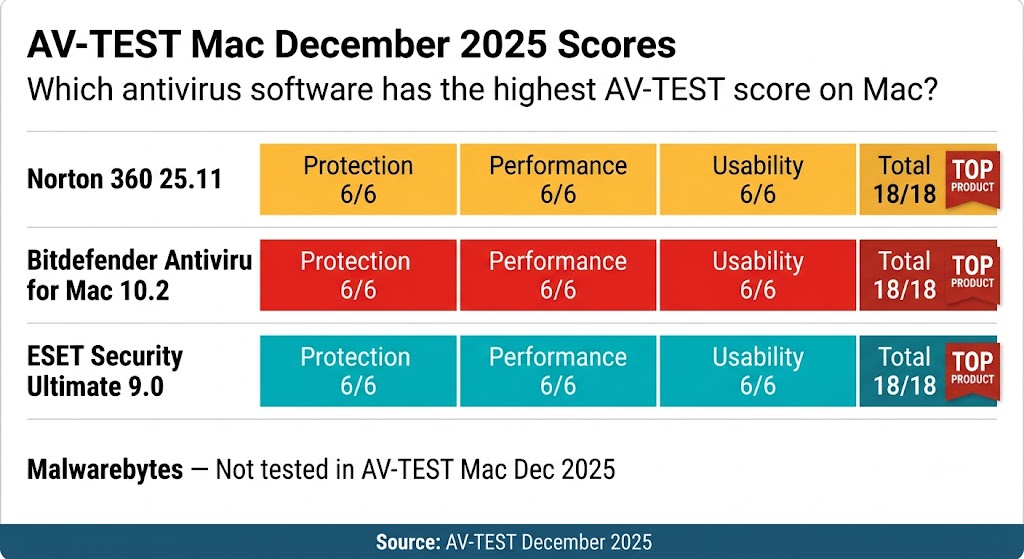
That shared perfect score across all three brands makes detection quality a settled question — the real comparison comes down to performance impact on Apple Silicon, per-device pricing, and what bundled extras each plan includes on macOS.
Here is how each product performed across all five criteria.
Bitdefender Antivirus for Mac — Best Overall
Bitdefender Antivirus for Mac earns 18/18 in AV-TEST’s December 2025 Mac evaluation — a perfect score across protection, performance, and usability — and leads on entry pricing at $24.99/yr for 1 device, the lowest first-year cost of the three lab-tested picks in this guide.
Mac-specific threat detection is where Bitdefender stands out beyond the shared 18/18 lab score. Community benchmarks from r/mac (April 2026) report full scans completing in under 15 minutes on M-series MacBook Pros, with low reported background CPU impact during normal daily use on Apple Silicon. The 30-day free trial requires no credit card, and the 30-day money-back guarantee applies to all plans.
The entry plan, Antivirus Plus, covers 1 device at $24.99/yr first year ($49.99/yr at renewal). Multi-device households covering Mac and Windows should compare Norton 360 Deluxe, which covers 5 devices at $49.99/yr first year — here is how it performs on macOS.
Norton 360 for Mac — Best for Multi-Device Households
Norton 360 Deluxe 5 Devices earns 18/18 in AV-TEST’s December 2025 Mac evaluation and covers up to 5 devices — Mac, Windows, Android, and iOS — at $49.99/yr in the first year ($124.99/yr at renewal), making it the only plan in this guide with cross-platform coverage in a single subscription.
Norton 360 is the right choice when your household runs a mix of platforms and you want one subscription covering all of them. Dark Web Monitoring is included on Deluxe plans and above — it scans for your personal information on the dark web and alerts you to exposures. An unlimited VPN is also included on Deluxe plans and above; a full breakdown of what antivirus VPNs deliver is available in the VPN in antivirus guide on this site. Norton AntiVirus Plus 1 Device does not include VPN or Dark Web Monitoring.
The 7-day free trial requires a credit card — the shortest trial of the four picks. Norton backs every purchase with a 60-day money-back guarantee, the longest in this group. MacBook Air users with 8GB of RAM who want maximum performance with minimal background services should consider ESET for Mac instead — it matches Norton at 18/18 on AV-TEST Mac while running fewer background processes.
ESET for Mac — Best Lightweight Option
ESET HOME Security Essential earns 18/18 in AV-TEST’s December 2025 Mac evaluation while running fewer active background services than Norton or Bitdefender — no VPN agent, password manager, or dark web monitoring service running at all times, making it the lowest-footprint always-on option among the three lab-tested picks.
ESET’s approach is focused protection without bundled extras. It includes only what is needed for security — real-time malware detection, phishing protection, and network monitoring — without the additional background services that contribute to system load on MacBook Air configurations with 8GB of RAM. Creative professionals using Final Cut Pro, Logic Pro, or Lightroom benefit from ESET’s lean background profile, which avoids CPU spikes during video renders and audio sessions.
ESET HOME Security Essential starts at $49.99/yr for 1 device and renews at the same annual rate — no first-year discount spike to watch for, unlike most competitors. Identity protection is available on ESET HOME Security Ultimate at $179.99/yr for a minimum of 5 devices. Budget-conscious Mac users who want on-demand scanning at no cost will find Malwarebytes the better fit.
Malwarebytes for Mac — Best On-Demand Scanner
Malwarebytes is the only pick in this guide with a permanently free scanning tier — its free tier provides on-demand scanning at no cost, and its paid Standard plan adds real-time protection at $44.99/yr for 1 device ($59.99/yr for 3 devices) with a 60-day money-back guarantee.
Malwarebytes does not participate in AV-TEST Mac evaluations. No independent lab data for general Mac malware detection on macOS is available. The recommendation here is based on its reputation as an on-demand scanner, its free tier availability, and user reports from Mac communities — not lab-verified detection rates. Users who need independently validated real-time Mac malware protection should choose Bitdefender, Norton, or ESET.
Malwarebytes achieves 100% detection across all 17 stalkerware test cases in AV-Comparatives’ Android stalkerware test (August–September 2025) — the only independent test where it leads the field, outperforming Bitdefender, ESET, Norton, and McAfee on Android stalkerware defense, though it does not participate in Mac-specific lab evaluations. The on-demand approach suits MacBook Air users who want macOS XProtect as their primary real-time layer and Malwarebytes as a periodic second-opinion scan. Plus and Total plans require a minimum of 3 devices; Standard is the only plan available for 1 device.
With all four picks covered, the table below puts them side by side for a direct comparison.
Mac Antivirus Side-by-Side Comparison
All three lab-tested picks earn 18/18 in AV-TEST’s December 2025 Mac evaluation — Bitdefender leads on entry price ($24.99/yr for 1 device), Norton 360 Deluxe leads on device count (5 devices), and ESET leads on background process footprint. Use this table to make a final call without re-reading every section.
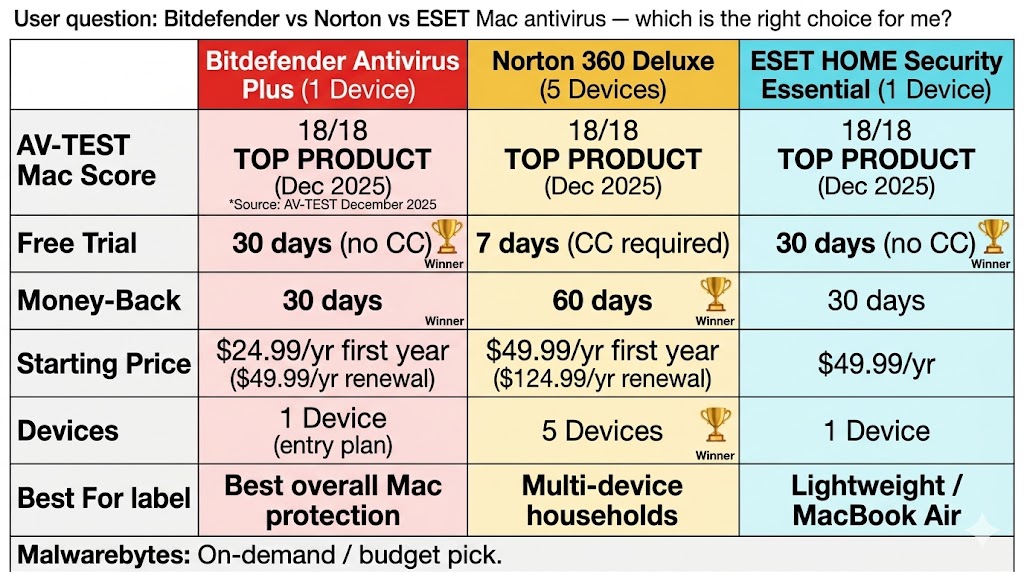
Where Bitdefender leads on entry price — $24.99/yr for 1 Device — Norton 360 Deluxe compensates on multi-device value at 5 devices for $49.99/yr first year, and ESET stays lightest on background services for MacBook Air users at $49.99/yr with a 30-day no-credit-card trial.
| Brand | AV-TEST Mac (Dec 2025) | Free Trial | Money-Back | Starting Price | Best For |
|---|---|---|---|---|---|
| Bitdefender | 18/18 TOP PRODUCT ✓ | 30 days (no CC) | 30 days | $24.99/yr (Antivirus Plus, 1 Device) | Best overall Mac protection |
| Norton 360 | 18/18 TOP PRODUCT ✓ | 7 days (CC required) | 60 days | $49.99/yr (Deluxe, 5 Devices) | Multi-device households |
| ESET | 18/18 TOP PRODUCT ✓ | 30 days (no CC) | 30 days | $49.99/yr (HOME Essential, 1 Device) | Lightweight / MacBook Air |
| Malwarebytes | Not tested | 14 days | 60 days | $44.99/yr (Standard, 1 Device) | On-demand / budget |
Bitdefender Antivirus for Mac earns the top recommendation in this guide — the only pick with a perfect AV-TEST Mac score at the lowest entry price of the three lab-tested options.
One practical question remains before you commit to any of these picks: will running antivirus noticeably slow down your Mac?
Does Antivirus Slow Down Your Mac?
Antivirus software can slow down a Mac, but the impact depends on your chip and RAM. MacBook Air users with 8GB of RAM notice the most performance drag from always-on suites. MacBook Pro users with 16GB or more rarely notice any slowdown. On-demand scanners like Malwarebytes cause virtually no background impact during normal daily use.
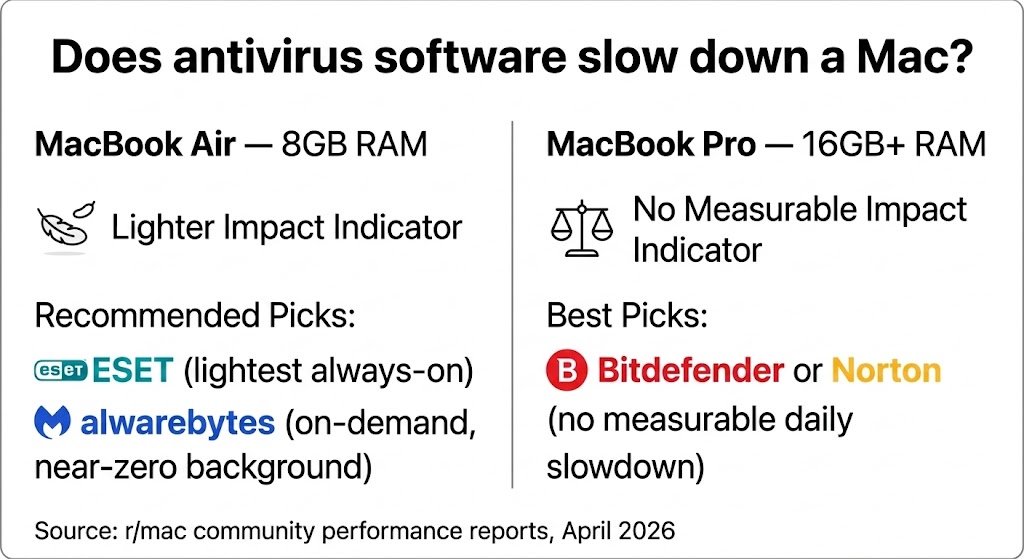
That RAM threshold — not chip generation — determines whether ESET’s lighter footprint matters for your daily workflow, or whether Bitdefender’s full feature set runs without friction on your Mac.
MacBook Pro users on 14-inch or 16-inch models with 18GB or 36GB of unified memory report no meaningful performance difference whether or not antivirus runs in the background. An M3 MacBook Air at 8GB and an M3 MacBook Pro at 18GB are not equivalent environments for always-on security software. For detailed antivirus performance benchmark data across all platforms, see the antivirus performance benchmarks guide on this site.
Beyond performance, a few other criteria matter when choosing the right Mac antivirus — here is what to check before you buy.
What to Look for When Choosing Mac Antivirus
Five criteria determine the best Mac antivirus: independent AV-TEST Mac certification, Apple Silicon native support, macOS Sequoia compatibility, background system impact, and whether bundled extras serve macOS users. Each of the four picks in this guide meets a different combination of these criteria at different price points.
- AV-TEST Mac certification. Look for TOP PRODUCT status in the most recent Mac evaluation round. Norton, Bitdefender, and ESET all hold this status as of December 2025 — the benchmark that gives you independent verification of detection quality, not just marketing claims.
- Apple Silicon optimization. Verify the app ships as a Universal Binary (ARM-native), not an Intel app running through Rosetta 2. An antivirus running through Rosetta 2 consumes more resources than a natively compiled ARM app. Check by right-clicking the app → Get Info → General.
- macOS Sequoia compatibility. Confirm the app is fully updated for your macOS version and does not require disabling System Integrity Protection (SIP). Antivirus that conflicts with SIP introduces more risk than it removes.
- System impact rating. Use AV-TEST’s Performance score (/6) as a starting proxy — all three lab-tested brands in this guide score 6/6 on Mac Performance. Then cross-reference community reports from r/mac for real-world M-chip feedback specific to your Mac model.
- Mac-specific plan value. Purchase a Mac-compatible plan and confirm that bundled extras — VPN, password manager, dark web monitoring — are features you will actually use on macOS, not Windows-only tools inflating the price.
Even if you meet all five criteria, there are some Mac users for whom third-party antivirus is genuinely unnecessary — the next section covers who they are.
Who Should NOT Buy Mac Antivirus Software
Most Mac users benefit from third-party antivirus in 2026. But these four profiles are the exceptions:
- Fully sandboxed Mac App Store users. XProtect and Gatekeeper provide meaningful baseline protection if you install software exclusively from the Mac App Store, never open DMG files from the web, never click links in unsolicited emails, and never download attachments from unknown senders. This profile describes very few working adults in practice.
- MacBook Air users with 8GB RAM on a strict budget. The free tier of Malwarebytes delivers periodic on-demand scanning at no cost. Commit to a paid plan only when your budget allows — do not run a heavy suite that degrades your machine.
- Enterprise Mac users under MDM management. Check with your IT department before installing any third-party security software. Adding a personal antivirus may conflict with your employer’s existing endpoint security stack.
- Users who already own a multi-device Norton or Bitdefender subscription. Check your current plan before buying a separate Mac subscription. Norton 360 Deluxe and Bitdefender Total Security 5 Devices both include Mac coverage under their multi-device allowances — you may already have protection you have not activated.
The sections below answer the questions Mac users ask most often before committing to an antivirus purchase — followed by a complete final recommendation.
Frequently Asked Questions
What Is the Best Free Antivirus for Mac?
Malwarebytes is the strongest free option for Mac — its free tier provides on-demand scanning that detects and removes existing malware. It does not include real-time protection on the free tier; upgrading to the paid Standard plan ($44.99/yr for 1 Device) adds real-time protection. Bitdefender and ESET both offer 30-day free trials with no credit card required. No permanently free full real-time protection option exists among the four brands in this guide.
Does Apple Have Built-In Antivirus?
Yes — macOS includes XProtect for signature-based detection and Gatekeeper to block apps from unidentified developers. Both update automatically but work reactively — XProtect can lag behind new malware families by days or weeks after their initial release. For a full breakdown of macOS built-in security tools and where they fall short, see our guide on whether you need antivirus in 2026.
Is Bitdefender Safe for Mac?
Yes. Bitdefender Antivirus for Mac earns 18/18 TOP PRODUCT in AV-TEST Institute’s December 2025 Mac evaluation (9 products tested) — a perfect score across protection, performance, and usability. It does not require disabling System Integrity Protection to function.
What Is the Best Antivirus for MacBook Air?
For MacBook Air with 8GB of RAM: ESET HOME Security Essential delivers the lightest always-on real-time protection with a perfect 18/18 AV-TEST Mac score, or Malwarebytes Standard for on-demand scanning at $44.99/yr for 1 Device with zero background impact on the free tier. For MacBook Air M3 with 16GB of RAM: Bitdefender Antivirus for Mac is the best overall choice — same AV-TEST score, strong Mac-specific threat detection, and negligible daily performance impact at that memory configuration. Match your choice to your RAM, not just your chip.
The Bottom Line on Mac Antivirus in 2026
Bitdefender Antivirus for Mac is the best antivirus for Mac in 2026 — it earns a perfect 18/18 in AV-TEST Institute’s December 2025 Mac evaluation (9 products tested) and delivers real-time detection of Mac-specific info stealers, with strong user-reported performance on Apple Silicon M-series Macs. The entry plan, Bitdefender Antivirus Plus 1 Device, starts at $24.99/yr first year ($49.99/yr renewal). See current pricing and deals on the Bitdefender deals page, or read the full Bitdefender review for a complete feature breakdown.
For multi-device households, Norton 360 Deluxe 5 Devices covers Mac, Windows, Android, and iOS at $49.99/yr first year ($124.99/yr renewal), includes Dark Web Monitoring and an unlimited VPN, and backs every purchase with a 60-day money-back guarantee — the longest in this group. See current Norton discounts or read the full Norton 360 review. MacBook Air users with 8GB of RAM should choose ESET for Mac instead — it matches Bitdefender and Norton at 18/18 on AV-TEST Mac while running fewer background services than either, with ESET HOME Security Essential starting at $49.99/yr for 1 device and renewing at the same rate. See current ESET deals or read the full ESET review.
Malwarebytes earns its place for budget-conscious users: its Standard paid plan starts at $44.99/yr for 1 Device and adds real-time protection, while the free tier provides on-demand scanning at no cost. No AV-TEST Mac data exists to compare Malwarebytes detection quality against the other three picks. See the Malwarebytes deals page or read the full Malwarebytes review.
Check your existing Norton or Bitdefender subscription before buying a separate Mac plan — both brands include Mac coverage on multi-device plans, and activating it takes under five minutes. For a complete ranking of antivirus options across all platforms, see the Best Antivirus Software 2026 guide. For a full breakdown of what to look for before buying, see the antivirus buying guide.