
For most Windows users who regularly download software or want focused malware protection beyond Windows Defender, upgrading to Malwarebytes Standard is worth $44.99 per year. Malwarebytes Free is an on-demand scanner that removes existing infections but provides no real-time protection — it cannot stop threats as they execute. Every paid plan adds continuous background defense: real-time malware blocking, ransomware file protection, and web threat filtering. No plan adds a firewall, password manager, or parental controls — Malwarebytes trades suite breadth for depth in malware defense, and that trade-off defines who it suits.
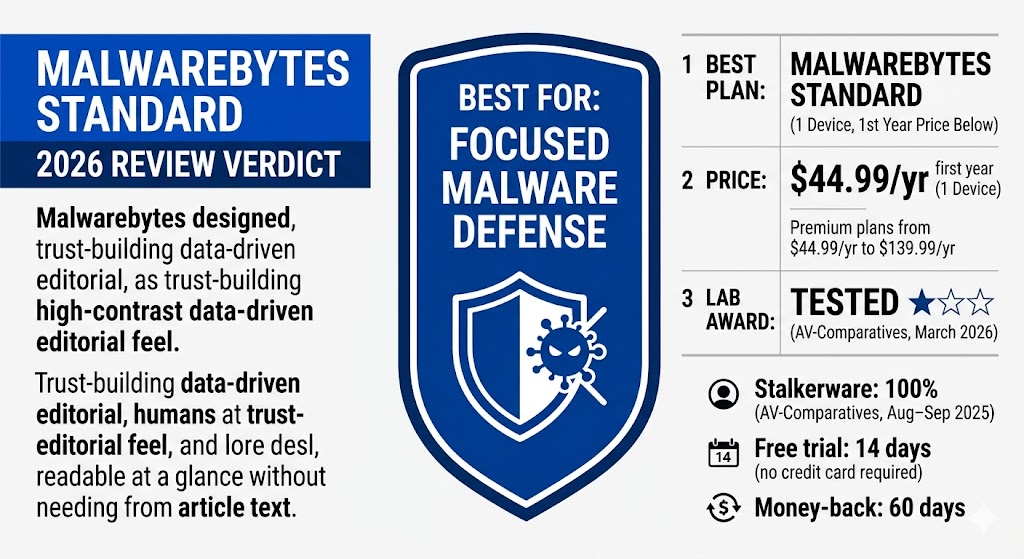
The paid lineup covers four tiers: Standard ($44.99/yr, 1 device — the only single-device option) adds real-time protection; Plus ($79.98/yr, 3 devices) adds an unlimited VPN; Total ($89.99/yr first year, 3 devices) adds $1M identity theft insurance; and Ultimate ($139.99/yr first year, 3 devices) raises coverage to $2M and adds a Personal Data Remover that automatically removes your information from data broker sites. Standard and Plus carry no introductory discount — year-one price equals renewal. Total and Ultimate renew at $179.99/yr and $279.99/yr respectively. All plans run on Windows, Mac, Android, and iOS, include a 14-day free trial (no credit card required), and carry a 60-day money-back guarantee.
In independent lab testing, Malwarebytes earned a 100% stalkerware detection rate — the highest among all 13 products in AV-Comparatives’ 2025 Stalkerware Test — and 97% Total Accuracy in SE Labs’ Q1 2026 Endpoint Protection test. In AV-Comparatives’ March 2026 Malware Protection Test it received a TESTED ★☆☆ rating, the lab’s second-lowest tier. MRG Effitas named Malwarebytes a Winter 2025 Leader in its consumer security assessment. System impact is measurable but modest: brief CPU spikes during threat database updates are the most common real-world cost. Pricing verified at malwarebytes.com, May 2026.
Table of Contents
What Malwarebytes Free Does — And Where It Stops
Malwarebytes Free is an on-demand malware removal tool — it scans and cleans infections you already have, but it does not run in the background. It provides no real-time protection, no ransomware shield, and no scheduled scans. Use it to clean an infected PC; do not rely on it as your primary defense.
Download Malwarebytes Free and your computer is not protected around the clock. Free gives you a powerful scanner you can launch manually. It does not watch for threats as you browse, open files, or download software.
Why Doesn’t Malwarebytes Free Provide Real-Time Protection?
Malwarebytes Free is designed for removal, not prevention. It runs a scan when you launch it and cleans infections already present on the system. Every paid plan adds the prevention layer: a continuously running background service that blocks threats at the moment they attempt to execute. Many IT professionals use Malwarebytes Free as a second-opinion scanner even when they have a full suite installed, because its on-demand cleaning engine is excellent at removing infections other products missed.
The Free version runs on Windows, Mac, Android, iOS, and Chromebook. The on-demand scanner is powerful and current. What it cannot do is stop a threat at the moment it tries to execute.
What You Lose Without Real-Time Protection
Without a paid plan, four active defenses are absent from Malwarebytes:
- No real-time malware blocking — threats execute before any scan can catch them
- No ransomware file protection — no shield stops encryption of your documents and photos
- No scheduled scans — you must manually remember to run a scan
- No Web Protection — malicious URLs are not blocked at the network level
One clarification worth knowing: Malwarebytes Browser Guard — the free browser extension for Chrome, Firefox, Edge, and Safari — blocks ads, trackers, and tech support scam pages at the browser level, and requires no subscription. The paid Web Protection in Premium plans is a separate system-level layer that filters malicious URLs before your browser loads them. Both can run simultaneously and serve different but complementary functions.
AV-Comparatives tested the real-time Premium version of Malwarebytes, not Free. Any lab scores in this review apply only to paid plans — and the paid lineup itself splits into four tiers covered next.
Malwarebytes Plans: Standard, Plus, Total, And Ultimate Compared
Malwarebytes offers four paid plans built on a single protection core — each tier adds one major upgrade: Plus adds an unlimited VPN, Total adds $1M identity theft insurance, and Ultimate adds $2M coverage plus a Personal Data Remover that automatically removes your information from data broker sites. Standard covers real-time protection for most users. None of the four plans include a firewall, password manager, or parental controls.
Malwarebytes Total costs $89.99/yr first year for 3 devices — only $10 more than Plus at $79.98/yr — and adds $1M identity theft insurance and dark web monitoring. That $10 premium makes Total the better value of the two for any user who does not already hold a dedicated identity protection subscription.
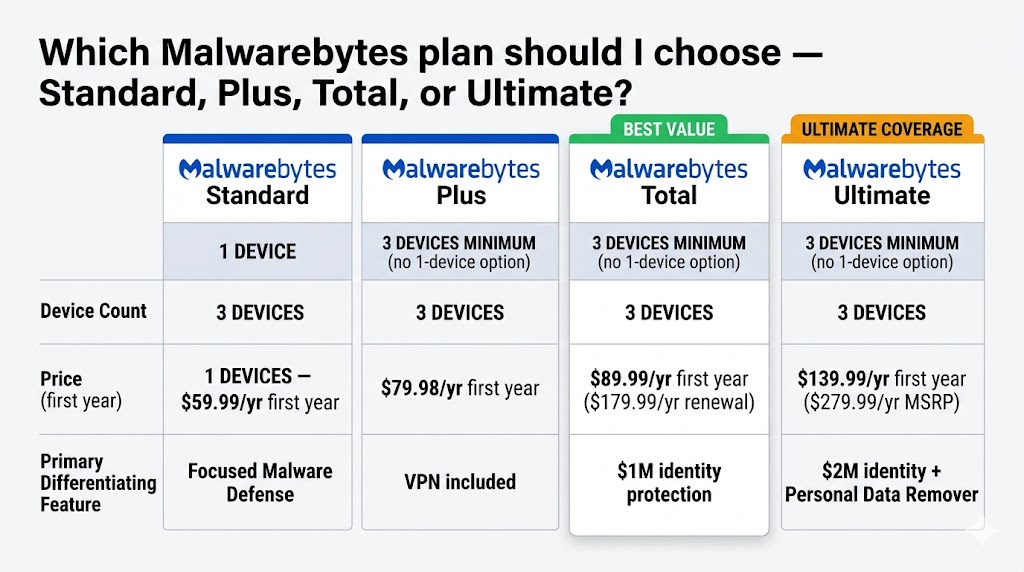
| Standard | Plus | Total | Ultimate | |
|---|---|---|---|---|
| Devices | 1 or 3 | 3 only | 3 only | 3 only |
| First-Year Price | $44.99/yr (1D) · $59.99/yr (3D) | $79.98/yr | $89.99/yr | $139.99/yr |
| Renewal Price | No introductory discount — year 1 price equals renewal price for Standard and Plus | $179.99/yr | $279.99/yr | |
| Real-Time Protection | ✓ | ✓ | ✓ | ✓ |
| Ransomware Shield | ✓ | ✓ | ✓ | ✓ |
| Browser Guard (free extension) | ✓ | ✓ | ✓ | ✓ |
| VPN (WireGuard, unlimited) | ✗ | ✓ | ✓ | ✓ |
| Identity Theft Insurance | ✗ | ✗ | ✓ $1M | ✓ $2M |
| Personal Data Remover | ✗ | ✗ | ✗ | ✓ |
| Firewall | ✗ | ✗ | ✗ | ✗ |
| Password Manager | ✗ | ✗ | ✗ | ✗ |
| Free Trial | 14 days | 14 days | 14 days | 14 days |
| Money-Back Guarantee | 60 days | 60 days | 60 days | 60 days |
Pricing verified at malwarebytes.com, May 2026. First-year promotional rates apply to Total and Ultimate — renewal prices are significantly higher. Standard and Plus carry no introductory discount; the first-year price is the ongoing renewal price. Verify renewal pricing directly at malwarebytes.com before your subscription auto-renews.
Standard ($44.99/yr, 1 Device) — Best For Most Users
Best For: Single-device users who want set-and-forget real-time protection without overpaying.
Standard is the only Malwarebytes plan available for a single device. Every other plan — Plus, Total, and Ultimate — requires a minimum of three devices. Real-time malware detection, ransomware file protection, and web threat blocking are all included. At $44.99/yr for one device, Standard covers most non-technical US users who browse, shop, and bank online on a single computer — without paying for features they don’t need.
Plus ($79.98/yr, 3 Devices) — Best For Users Who Want a VPN
Best For: Users who want real-time protection and a simple privacy VPN on up to three devices.
Plus bundles Standard’s real-time protection with an unlimited-bandwidth VPN. The VPN has no data cap — a genuine advantage over entry-level antivirus bundles that cap VPN bandwidth to as little as 200MB per day. The trade-off: Plus is only available for three devices minimum, and costs $20 more per year than Standard’s 3-device price ($79.98 vs. $59.99). Users who already subscribe to a dedicated VPN gain no meaningful value from Plus over Standard.
Total ($89.99/yr, 3 Devices) — Best For Identity Protection Concerns
Best For: Users who want antivirus, an unlimited VPN, and identity theft coverage in one subscription — and don’t already have a separate identity protection service.
Total adds $1M identity theft insurance and credit monitoring to everything in Plus. At $89.99/yr first year, it sits only $10 above Plus ($79.98/yr) — making it the better value of the two when identity coverage matters. The critical number is the renewal price: $179.99/yr. That is a 100% jump from the first-year rate. Set a calendar reminder before your renewal date.
Ultimate ($139.99/yr, 3 Devices) — Best For Maximum Privacy and Data Removal
Best For: Users who want the highest identity theft coverage and want their personal information automatically removed from data broker sites.
Malwarebytes Ultimate adds the Personal Data Remover — a tool that automatically removes your personal information from data broker sites, people-search sites such as Spokeo and WhitePages, and spam lists. It also raises the identity theft insurance ceiling to $2M versus $1M in Total. At $139.99/yr first year, it costs $50 more annually than Total for the same 3-device coverage. Malwarebytes Ultimate renews at $279.99/yr — significantly higher than Total’s $179.99/yr renewal rate. Total remains the better fit for users who primarily want identity theft insurance without automated data removal. Whichever tier you choose, the protection engine underneath is the same — and independent labs have measured how well that engine performs.
How Well Does Malwarebytes Detect Malware? Lab Results Explained
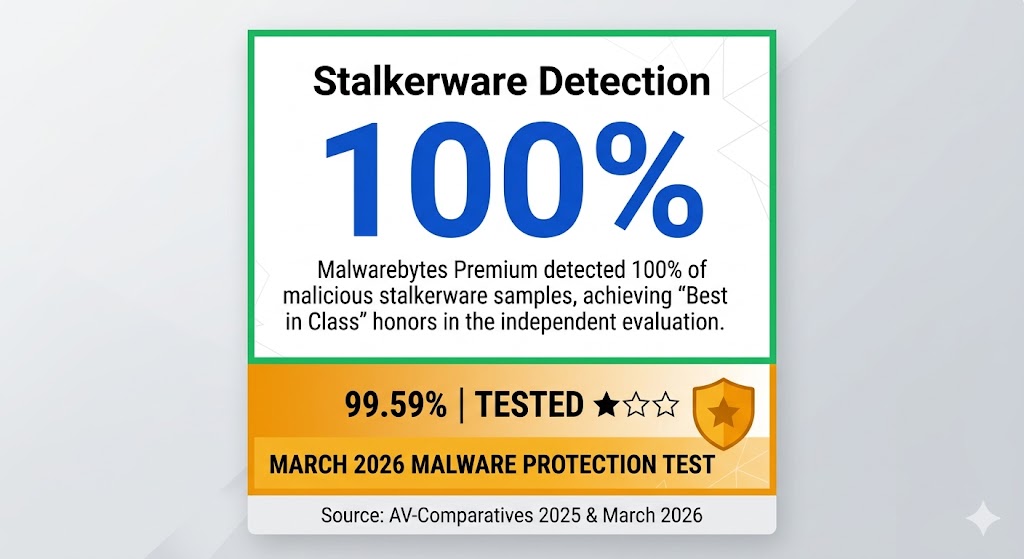
Malwarebytes’ strongest independent result is 100% detection across all 17 stalkerware samples in AV-Comparatives’ August–September 2025 Stalkerware Test — the highest rate among all 13 tested products, outperforming Bitdefender, ESET, McAfee, Kaspersky, and Norton. In AV-Comparatives’ March 2026 Malware Protection Test (10,000 samples), Malwarebytes received a TESTED ★☆☆ rating — the lab’s second-lowest tier, below ADVANCED and ADVANCED+ — with a 99.59% online protection rate and 23 false alarms; AV-Comparatives’ 2025 Annual Summary classified Malwarebytes as not top-rated across the full annual test series. SE Labs’ Q1 2026 Endpoint Protection test recorded 97% Total Accuracy for Malwarebytes Premium among 10 tested Windows products. MRG Effitas named Malwarebytes a Winter 2025 Leader in its consumer security assessment. Full test methodologies and datasets are published at av-comparatives.org and selabs.uk.
The stalkerware result deserves particular attention because no other major brand comes close: Bitdefender, ESET, McAfee, and Kaspersky each detected 94% of samples, and Norton detected 82%.
What the Stalkerware Result Means for Privacy-Conscious Users
AV-Comparatives’ Stalkerware Test (August–September 2025, 13 products tested, 17 stalkerware-type samples) is the one independent lab category where Malwarebytes definitively leads every major competitor. Stalkerware is software secretly installed on a device — often by an intimate partner — to monitor location, messages, and calls without consent. A 100% detection rate carries practical weight for privacy-conscious users and households with domestic safety concerns. This test is conducted on Android; results apply specifically to the Malwarebytes mobile security product. (Source: AV-Comparatives, Stalkerware Test 2025.)
Why Malwarebytes Doesn’t Appear in AV-TEST
Malwarebytes does not participate consistently in AV-TEST’s Windows Home User testing rounds. This is not a disqualification. Malwarebytes prioritizes behavior-based detection — identifying threats by how they act rather than by matching known signatures — and standard AV-TEST methodology does not fully capture that approach. The practical implication: users who rely on AV-TEST scores as their primary benchmark will find a data gap for Malwarebytes compared to Norton, Bitdefender, McAfee, and ESET — all of which earn regular TOP PRODUCT awards in AV-TEST Windows testing. Lab numbers measure detection; the next question is which threat categories that detection actually covers.
What Malwarebytes Protects Against — And What It Doesn’t
Every paid Malwarebytes plan covers real-time malware detection, ransomware file protection, PUP blocking (potentially unwanted programs — bundled software that installs without clear consent), adware blocking, and web threat filtering. None of the plans include a firewall, password manager, or parental controls.
Ransomware Shield, Browser Guard, And Web Protection (What’s Included)
Malwarebytes Premium’s protection layer covers the following four threat categories:
- Real-time malware scanning — blocks threats before they execute
- Ransomware shield — monitors file activity for encryption patterns and blocks unauthorized mass-encryption of your files
- Web Protection — filters malicious and phishing URLs at the system level, before your browser loads them
- Stalkerware detection — 100% detection rate, highest among all products in the AV-Comparatives Stalkerware Test 2025
Malwarebytes Browser Guard is a free extension that operates at the browser level, blocking ads and trackers. The paid Web Protection layer in Premium plans is a separate system-wide filter. Both run simultaneously and cover different scopes.
No Firewall, No Password Manager, No Parental Controls (What’s Missing)
Three gaps matter for some users:
- No firewall. Malwarebytes does not add a network-level firewall. It relies on Windows Firewall, which remains active on Windows 10 and Windows 11. ESET Home Security Essential ($49.99/yr, 1 device) and Bitdefender Total Security ($59.99/yr first year, 5 devices) both include managed two-way firewalls.
- No password manager. There is no built-in credential vault. Norton 360 Standard ($39.99/yr first year, 3 devices) and Bitdefender Total Security include password managers at comparable price points.
- No parental controls. Malwarebytes has no content filtering or screen time management. For households with children, Norton 360 Deluxe ($49.99/yr first year, 5 devices) and McAfee+ Advanced Family ($119.99/yr first year) are better fits.
Malwarebytes’ feature set is intentionally lean. It is built for security depth in malware defense — not as an all-in-one suite. That focus is either a strength or a gap, depending entirely on what you need.
Does Malwarebytes Replace Windows Defender?
No. Malwarebytes Premium and Windows Defender run alongside each other without conflict. When Malwarebytes is installed, it disables Windows Defender’s real-time scanning to avoid resource duplication — but Windows Defender’s firewall remains fully active.
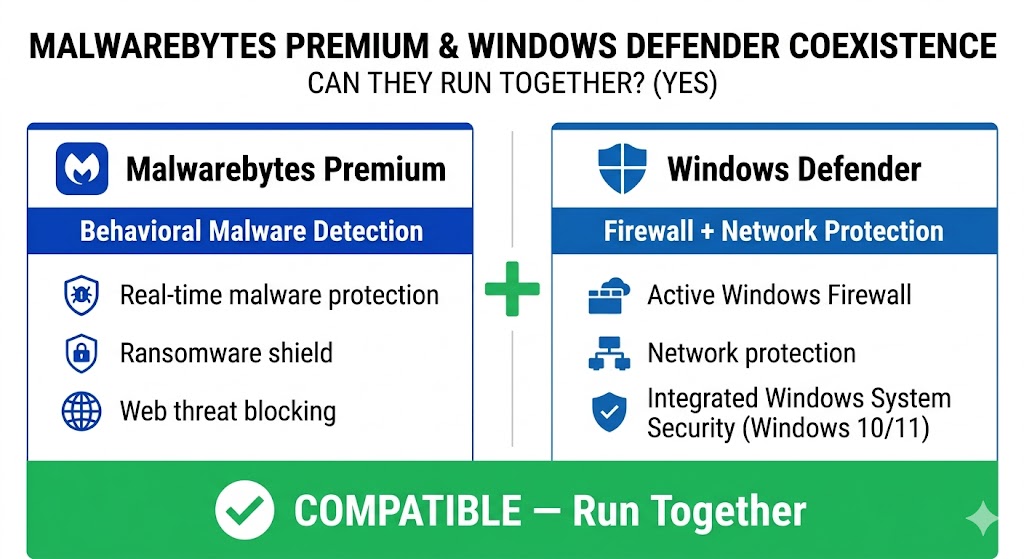
The recommended setup for most Windows 10 and Windows 11 users: run Malwarebytes Standard for malware detection, and keep Windows Defender’s firewall and network protection enabled. This coexistence is the default behavior — Malwarebytes handles the handoff automatically on installation, with no manual configuration needed. The combination covers the most common attack vectors a non-technical US user encounters: malicious downloads, phishing sites, ransomware payloads, and PUPs from bundled software installers. Whether that combination justifies the subscription cost is the question the next section answers.
Is Malwarebytes Premium Worth It If You Already Have Windows Defender?
For most Windows 10 and Windows 11 users, Malwarebytes Standard is worth the upgrade. Windows Defender has improved significantly, but it underperforms Malwarebytes on behavioral detection of PUPs, adware, stalkerware, and ransomware rollback. At $44.99/yr for one device, the protection gap is real — and the price is low enough that it’s hard to argue against it for anyone who regularly downloads software.
The upgrade matters most for users who download software from third-party sites, install freeware, or have dealt with an infection in the past three years — Defender misses behavioral threats Malwarebytes catches reliably. Users who stay within the Microsoft Store and major vendors, or who already pay for a full suite from Norton, Bitdefender, or McAfee, get equivalent value from Malwarebytes Free run as a monthly second-opinion scan. A structured walkthrough of how to weigh these criteria across all six brands belongs to our antivirus buying guide.
One misconception to clear up: Malwarebytes Premium is not “better” than Windows Defender in every category. Defender has a firewall; Malwarebytes does not. They are complementary tools, not competitors. The other cost worth weighing before you buy is what happens to the price after year one.
Malwarebytes Renewal Pricing: What You’ll Pay After Year One
Malwarebytes Total renews at $179.99/yr — a 100% increase from the $89.99/yr first-year rate — the sharpest confirmed renewal jump in the Malwarebytes lineup. Ultimate renews at $279.99/yr. Standard and Plus carry no introductory discount and renew at the same price as year one.
| Plan | First-Year Price | Renewal Price |
|---|---|---|
| Standard — 1 Device | $44.99/yr | $44.99/yr (no introductory discount) |
| Standard — 3 Devices | $59.99/yr | $59.99/yr (no introductory discount) |
| Plus — 3 Devices | $79.98/yr | $79.98/yr (no introductory discount) |
| Total — 3 Devices | $89.99/yr | $179.99/yr |
| Ultimate — 3 Devices | $139.99/yr | $279.99/yr |
Source: malwarebytes.com, May 2026. Total and Ultimate buyers should set a calendar reminder 14 days before the renewal date — auto-renewal is managed through your payment provider, and PayPal users may need to cancel the billing agreement directly in their PayPal account. Our antivirus renewal pricing guide covers the strategies for managing renewal costs across all brands. With the cost picture complete, the remaining question is whether the two upgrade features — VPN and identity protection — earn their tiers.
Malwarebytes VPN And Identity Protection: Are the Upgrades Worth It?
Both upgrades are worth having if you don’t already pay for them elsewhere — and neither justifies upgrading if you already hold dedicated tools. The VPN uses the WireGuard protocol with unlimited bandwidth — no data cap on any tier. The identity theft insurance in Total covers up to $1M; Ultimate covers up to $2M and adds Personal Data Removal.
The VPN (Plus, Total, And Ultimate)
Verdict: Worth adding if you don’t already subscribe to a standalone VPN and want basic privacy on public Wi-Fi — not a replacement for a dedicated VPN service if streaming access or multi-country server selection matters to you. Unlimited bandwidth means no throttling or daily data caps, which separates the Malwarebytes VPN from entry-level bundles like Bitdefender Total Security (200MB/day cap on the base tier). The 14-day free trial lets you test VPN performance on your own network before committing.
Identity Theft Insurance (Total And Ultimate)
Verdict: The $1M coverage in Total is a concrete advantage for users without existing identity theft protection — evaluate the renewal price before treating either plan as a long-term subscription. Malwarebytes Total includes up to $1M in identity theft insurance with credit monitoring and dark web scanning. Malwarebytes Ultimate raises the coverage ceiling to $2M and adds automated Personal Data Removal — the tool that deletes your information from data broker sites and people-search sites. For full policy terms, coverage conditions, and limits, review the details directly at malwarebytes.com before purchase.
For context: Norton 360 with LifeLock Select Plus ($99.99/yr first year, 10 devices) offers $25,000 stolen funds reimbursement at the entry LifeLock tier with 1-bureau credit monitoring. Malwarebytes Total at $89.99/yr first year offers a higher stated insurance ceiling at a lower first-year price, but covers only 3 devices versus Norton’s 10. At $179.99/yr renewal, Malwarebytes Total becomes more expensive than several identity-inclusive alternatives. Features and price decide most purchases — but day-to-day system impact decides whether you keep the software installed.
Does Malwarebytes Slow Down Your Computer?
Malwarebytes has a measurable system impact in everyday use. The most consistent user-reported complaint is CPU spikes during threat database updates — these windows typically last 30–90 seconds, during which CPU usage increases noticeably. For background gaming or video editing sessions, this matters.
In AV-Comparatives’ March 2026 Malware Protection Test, Malwarebytes earned a TESTED ★☆☆ rating — placing it in the lab’s third performance cluster, below the ADVANCED and ADVANCED+ products in the same round — with a 99.59% online protection rate and 23 false alarms. A higher false alarm rate means more interruptions for users who frequently install diverse software. Most home users running standard applications will not notice this in daily use.
Malwarebytes does not include a dedicated Game Mode — a feature that automatically suppresses updates, scans, and notifications during full-screen gaming. Bitdefender Total Security and Norton 360 both include this mode. This is a real gap to weigh in your decision if system performance during gaming is a primary concern.
Putting Malwarebytes in Context: Who Benefits Most From This Approach
The data above covers what Malwarebytes does technically. The purchase decision depends on a different question: does this particular combination of strengths and gaps match your actual situation? Three types of users should look elsewhere — and three types will find it the right fit. The following two sections answer that directly.
Who Should Not Buy Malwarebytes
Malwarebytes provides no parental controls, no firewall, and no password manager — making it unsuitable for households with children or users who need an all-in-one security suite.
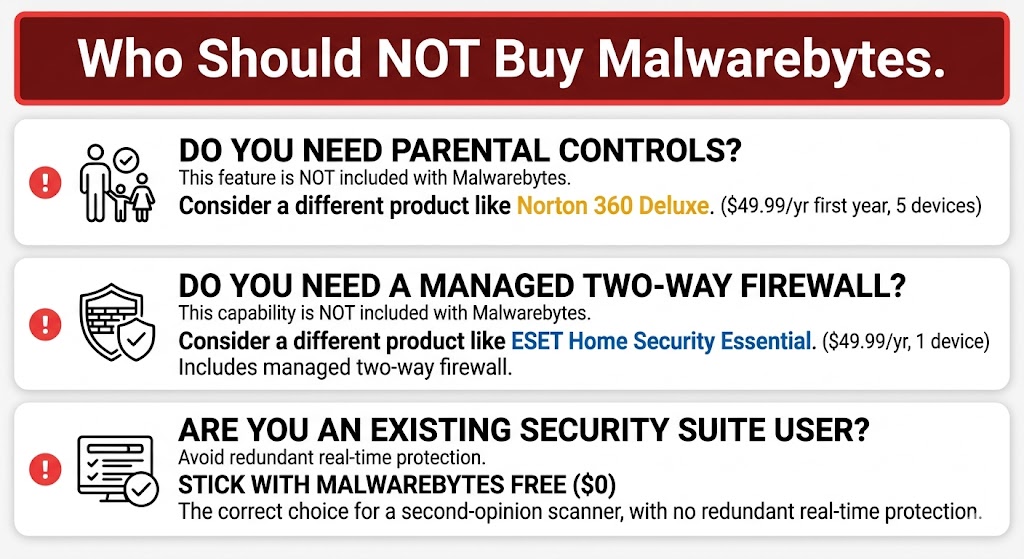
Users with those requirements will find Norton 360 Deluxe ($49.99/yr, 5 devices) or Bitdefender Total Security ($59.99/yr, 5 devices) a better fit — both cover the missing features at a comparable or lower price per device.
- You need parental controls. Malwarebytes has no content filtering, web category blocking, or screen time management. Norton 360 Deluxe ($49.99/yr first year, 5 devices) includes Norton Family parental controls — our full Norton 360 review covers the family features in detail. McAfee+ Advanced Family ($119.99/yr first year) includes parental controls. Malwarebytes has no equivalent.
- You already pay for Norton, Bitdefender, or McAfee. Adding Malwarebytes Standard on top of a full suite creates redundant real-time protection. Use the free version for monthly second-opinion scans instead.
- You want a two-way firewall. Malwarebytes does not include one. ESET Home Security Essential ($49.99/yr, 1 device) and Bitdefender Total Security ($59.99/yr first year, 5 devices) both include managed firewalls at comparable or lower price points — see the Bitdefender Total Security review for the full feature breakdown.
Malwarebytes vs. Bitdefender And Norton: Key Differences at a Glance
Malwarebytes’ competitive advantage is focused malware defense depth and the highest independent stalkerware detection rate among tested products; Bitdefender and Norton counter with suite breadth — firewalls, password managers, and stronger general malware-protection lab ratings at comparable prices. For the feature-by-feature breakdown and a declared winner, see the Malwarebytes vs. Bitdefender guide.
Frequently Asked Questions About Malwarebytes
Is Malwarebytes Safe to Use?
Yes. Malwarebytes is a US-based company founded in Santa Clara, California. It is not owned by any Chinese entity — that misconception circulates on Reddit due to confusion with other security brands. Malwarebytes has been independently audited, holds no known data-sharing agreements with foreign governments, and has operated continuously since 2008 with no major data breach or ownership controversy on record.
Does Malwarebytes Work on Mac, Android, And iPhone?
Yes — all four platforms. The Mac version includes real-time protection on paid plans. The Android version includes malware scanning and a Privacy Audit feature. The iOS version provides web protection and ad blocking through the app; iOS security restrictions prevent true on-device malware scanning on iPhone — a platform limitation, not a Malwarebytes limitation. Browser Guard is available for Safari on both Mac and iOS at no cost.
How Do I Cancel Malwarebytes Auto-Renewal?
Log in at My.Malwarebytes.com → Account → Subscription → Cancel Auto-Renewal. Do not attempt to cancel through the Malwarebytes desktop app — cancellation must go through the account portal or directly through your payment provider (PayPal or your credit card issuer). Cancel at least 7 days before your renewal date to ensure the cancellation processes before the charge posts.
Is There a Malwarebytes Student Discount or Family Plan?
Malwarebytes offers a student discount through StudentBeans — typically a steep promotional rate for students with a valid school email address. Family plans are available: Malwarebytes Total Family covers 10 devices at $124.99/yr first year (2 adults, 10 kids, includes $1M identity coverage and VPN); Malwarebytes Ultimate Family covers 10 devices at $199.99/yr first year and adds $2M identity coverage and Personal Data Removal. For households that also need parental controls, Norton 360 Deluxe ($49.99/yr first year, 5 devices) remains the better fit.
Does Malwarebytes Browser Guard Come Free?
Yes. Malwarebytes Browser Guard is a free browser extension available for Chrome, Firefox, Edge, and Safari. It blocks ads, trackers, and tech support scam pages. It requires no Malwarebytes account or subscription — install it from your browser’s extension store at no cost, regardless of whether you have a paid Malwarebytes plan.
Where Can I See Current AV-TEST Scores for Malwarebytes’ Competitors?
Malwarebytes does not appear in AV-TEST Windows testing. Current AV-TEST results for Norton, Bitdefender, McAfee, and ESET are published by test round and operating system directly at av-test.org.
Who Gets the Most From Malwarebytes — And When to Look Elsewhere
Malwarebytes Standard ($44.99/yr, 1 device) is the right upgrade for users who want focused malware and ransomware defense without paying for suite features they don’t need. The free version remains the top second-opinion scanner — use it to clean infections or as a monthly check alongside a full suite.
For plan selection: Standard at $44.99/yr (1 device) covers most individual users. Plus at $79.98/yr (3 devices) adds an unlimited VPN worth having if you don’t already subscribe elsewhere — our guide to VPNs included with antivirus covers how bundled VPNs compare to standalone services. Total at $89.99/yr first year (3 devices) adds $1M identity theft insurance — but the $179.99/yr renewal doubles your cost at year two, so set a calendar reminder; the antivirus renewal pricing guide explains how to manage renewal costs across every brand. Ultimate at $139.99/yr first year (3 devices) raises identity coverage to $2M and adds a Personal Data Remover; it renews at $279.99/yr.
Independent testing in 2025–2026 shows both strengths and limits: 100% stalkerware detection (AV-Comparatives Stalkerware Test 2025), 97% Total Accuracy (SE Labs Q1 2026), and a MRG Effitas Winter 2025 Leader designation — genuine strengths. In AV-Comparatives’ March 2026 Malware Protection Test, it earned a TESTED ★☆☆ rating with 23 false alarms. Users who need a firewall, parental controls, or a password manager should choose Norton 360 Deluxe, Bitdefender Total Security, or McAfee+ instead — Malwarebytes’ value is depth of malware defense, not breadth of features.
For current deals and active promotional pricing, see the Malwarebytes Deals page. For a broader comparison across all six major antivirus brands, see the Best Antivirus Software guide.