
Bitdefender Total Security is the stronger standalone antivirus for most Windows and Mac users — it covers 5 devices for $59.99/yr first year ($109.99/yr renewal) with a full firewall, password manager, and verified macOS protection that Malwarebytes cannot match across any of its plans. Malwarebytes Premium is a legitimate real-time antivirus for Windows — but it lacks a firewall, parental controls, and reliable macOS protection.
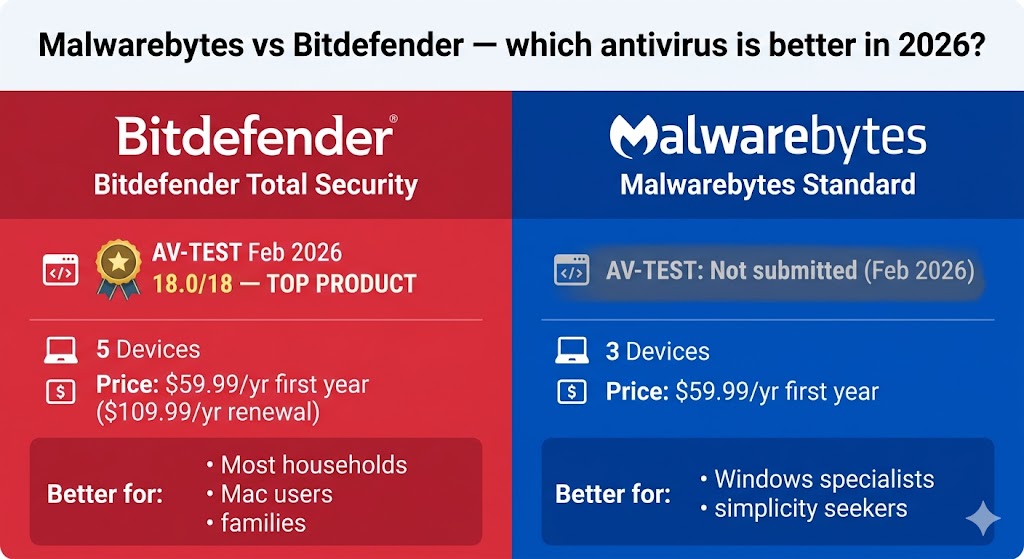
These two products are priced similarly in Year 1, which is why buyers compare them. But they serve different primary purposes: Bitdefender Total Security is designed to be the only security product on your device, while Malwarebytes Premium was built as a surgical cleanup tool and later expanded into real-time protection — a distinction that shapes every part of this comparison, including the question of whether Malwarebytes Premium qualifies as a real antivirus. In independent lab tests, Bitdefender earned 18.0/18 and TOP PRODUCT status from AV-TEST (February 2026) and ADVANCED+ in AV-Comparatives’ 10,000-sample malware test (March 2026). Malwarebytes earned 97% Total Accuracy in SE Labs’ Q1 2026 Endpoint Protection test — the most current lab validation available for the product on Windows. This comparison covers both products across protection scores, features, system performance, macOS support, pricing, and the one question every buyer eventually asks: can you run them together?
Table of Contents
Malwarebytes vs. Bitdefender: The Core Difference You Need to Understand
Bitdefender is a complete security suite. Malwarebytes is a specialist anti-malware tool — powerful at detection and removal, but without a firewall, parental controls, or reliable macOS protection. But what does that distinction mean for what Bitdefender actually stops that Malwarebytes does not?
The comparison below covers 9 key attributes across Malwarebytes Standard and Bitdefender Total Security:
| Feature | Malwarebytes Standard | Bitdefender Total Security |
|---|---|---|
| Real-time protection | ✓ | ✓ |
| Firewall | ✗ | ✓ |
| VPN | ✗ (Plus/Total plans only) | ✓ 200 MB/day |
| Password manager | ✗ | ✓ |
| Parental controls | ✗ | ✓ Family plans only |
| macOS lab validation | ⚠ No independent lab data | ✓ 18/18 AV-TEST (Dec 2025) |
| AV-TEST score (Feb 2026) | Not tested | 18.0/18 — TOP PRODUCT |
| Starting price | $44.99/yr (1 device) | $59.99/yr (5 devices) |
| Money-back guarantee | 60 days | 30 days |
At the same $59.99/yr price point, Bitdefender Total Security covers 5 devices with a full suite. Malwarebytes Standard 3 Devices covers 3 devices with antivirus only. Bitdefender is the clear answer if you want one product that handles everything. Malwarebytes earns its place if you want a lightweight Windows-only specialist to pair with another product. That feature distinction is validated most precisely by independent lab tests — and the 2026 results produce a clear verdict.
Protection Scores: What Independent Lab Tests Say in 2026
Bitdefender earned perfect 6.0/6.0/6.0 scores and TOP PRODUCT status from AV-TEST in February 2026. Malwarebytes did not submit to the February 2026 round. In the AV-Comparatives Malware Protection Test March 2026, Bitdefender earned ADVANCED+ — the top certification tier; Malwarebytes received TESTED — the lowest possible rating, with no award designation. In SE Labs’ Q1 2026 Endpoint Protection test, Malwarebytes earned 97% Total Accuracy — the most current independent lab validation available for the product on Windows.
| Product | Protection | Performance | Usability | Award | Round |
|---|---|---|---|---|---|
| Bitdefender Total Security | 6.0/6 | 6.0/6 | 6.0/6 | TOP PRODUCT | February 2026 |
| Malwarebytes Premium | — | — | — | Not submitted | February 2026 |
Bitdefender’s perfect scores across all three dimensions — protection, performance, and usability — mean no trade-off: maximum defense with no measurable system cost. Source: AV-TEST, February 2026 (av-test.org).
Malwarebytes has not submitted to AV-TEST’s consumer Windows test in recent rounds. That is not an automatic disqualification — but it means Bitdefender’s lab record is more than two full years more current. A product that does not submit cannot earn the TOP PRODUCT designation, regardless of actual quality. For buyers who rely on third-party lab validation, this gap is a real consideration.
AV-Comparatives Malware Protection Test (March 2026) sharpens the picture significantly. This test ran 10,000 malware samples. Bitdefender achieved a 99.94% protection rate with only 4 false alarms, earning ADVANCED+ — the highest possible rating. Malwarebytes earned TESTED — the lowest possible rating in the test — with a 99.59% protection rate and 23 false alarms. (Source: AV-Comparatives, Malware Protection Test March 2026, released April 15, 2026.)
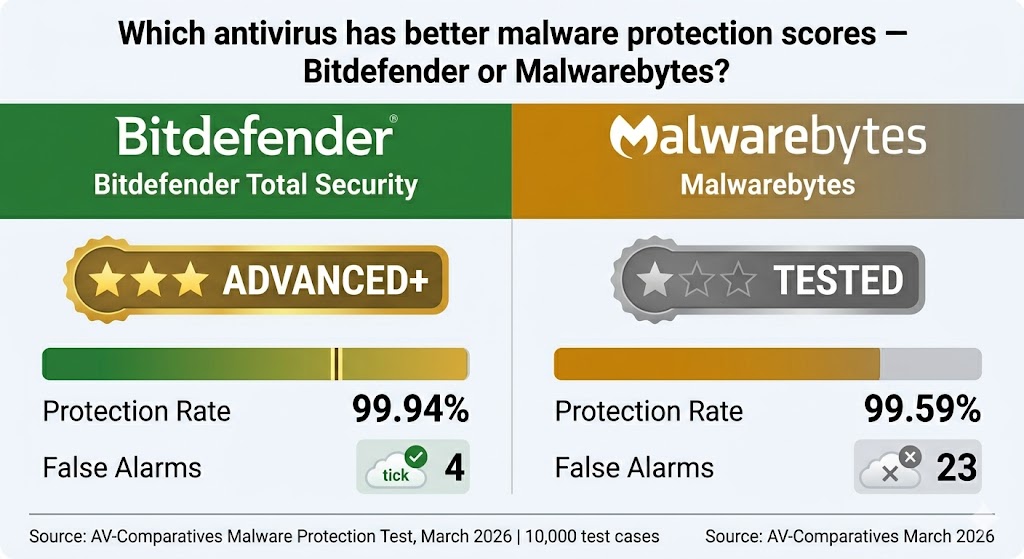
That five-to-one false-alarm advantage means Bitdefender is far less likely to quarantine legitimate files your work or software depends on — a practical difference that shows up in daily use on creative and development workstations.
The TESTED result for Malwarebytes is not a minor shortcoming. In AV-Comparatives’ rating scale, TESTED means the product failed to qualify for even the standard ADVANCED designation. It also generated nearly six times as many false alarms as Bitdefender in the same test.
SE Labs’ Q1 2026 Endpoint Protection (Home) test adds important Windows context for Malwarebytes. Running “Protection Under Realistic Attack” methodology, Malwarebytes Premium earned 97% Total Accuracy — placing it in SE Labs’ top green tier. This is the most current independent lab evaluation available for Malwarebytes on Windows and provides meaningful verification of its real-time protection capability. (Source: SE Labs, EPS Home Q1 2026, 10 products tested, selabs.uk.)
The broader picture: Bitdefender’s lab record is stronger, more current, and more comprehensive across AV-TEST and AV-Comparatives. Malwarebytes performs adequately on Windows — SE Labs’ 97% Total Accuracy confirms real-world protection capability — but a TESTED result in the most recent AV-Comparatives malware test remains a meaningful flag, not a minor footnote. Those lab scores translate directly into the feature comparison that follows — where the gap between a full suite and a specialist tool is measurable across 10 specific attributes.
Is Malwarebytes a Real Antivirus — or Just a Malware Scanner?
Malwarebytes Free is an on-demand scanner only — it provides zero active defense while your computer is running. The $44.99/yr Premium Standard plan adds real-time malware blocking, ransomware protection, and web filtering on Windows — but the product remains Windows-specialized, without the firewall, parental controls, or independent Mac validation that a complete suite provides. Understanding that product scope is the foundation for the feature comparison that follows.
Features Head-to-Head: What You Get (and What You Miss)
Bitdefender Total Security includes every feature most US households need. Malwarebytes, across all plans, is missing a firewall, password manager, and parental controls.
The table below maps 10 features across all Malwarebytes plan tiers and Bitdefender Total Security:
| Feature | Malwarebytes Standard | Malwarebytes Plus / Total | Bitdefender Total Security |
|---|---|---|---|
| Real-time malware protection | ✓ | ✓ | ✓ |
| Ransomware protection | ✓ | ✓ | ✓ |
| Web protection | ✓ | ✓ | ✓ |
| Firewall | ✗ | ✗ | ✓ |
| VPN | ✗ | ✓ WireGuard | ✓ 200 MB/day |
| Password manager | ✗ | ✗ | ✓ |
| Parental controls | ✗ | ✗ | ✓ Family plans only |
| Browser extension | ✓ Browser Guard | ✓ Browser Guard | ✓ TrafficLight |
| Identity protection ($1M) | ✗ | ✓ Total ($1M) / Ultimate ($2M) | ✗ (Ultimate Security and above) |
| macOS full lab validation | ✗ | ✗ | ✓ 18/18 AV-TEST Dec 2025 |
Features confirmed from official product pages and spec file. Prices verified May 2026.
Bitdefender Total Security’s firewall adds active network monitoring — including intrusion detection and Wi-Fi scanning — that Windows Firewall does not provide. Malwarebytes has no equivalent across any plan.
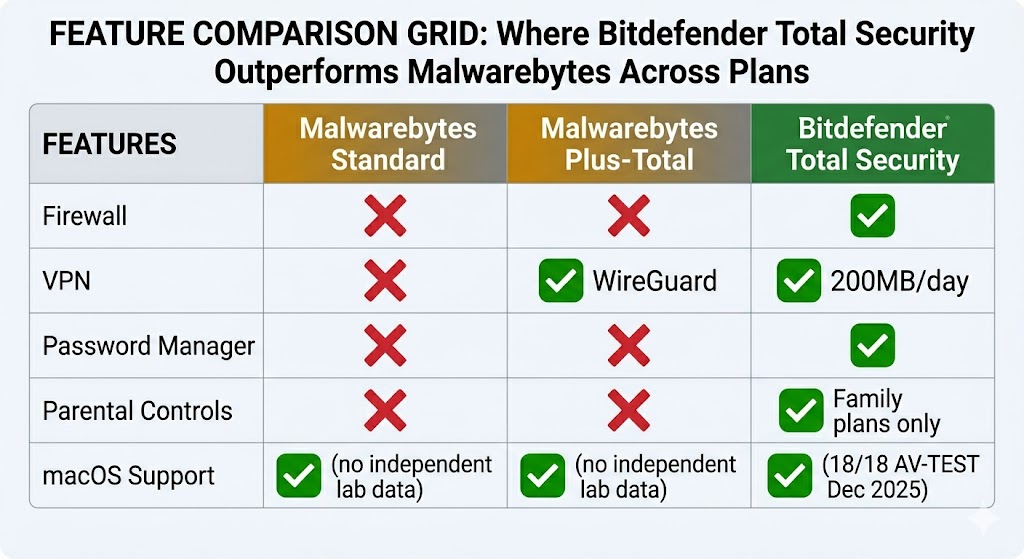
Where Malwarebytes leads on interface simplicity and cleanup speed, Bitdefender compensates with a full network protection layer — the right balance depends on whether you already run a dedicated router-level firewall or rely entirely on Windows Firewall.
Malwarebytes Plus and Total plans include a fast WireGuard VPN. Bitdefender Total Security caps its included VPN at 200 MB per day per device — sufficient for occasional secure browsing, not sustained streaming. Neither included VPN replaces a dedicated VPN service.
One important clarification: Bitdefender parental controls are only available on Family plans ($79.99/yr first year, 25 devices across 5 accounts). Individual plans — including Bitdefender Total Security — do not include parental controls.
Beyond raw features, how each product handles system resources and gaming workloads is the next practical comparison.
System Performance: Which Antivirus Is Lighter on Your PC?
Both products score well on system performance — Bitdefender’s verified 6.0/6 AV-TEST performance score confirms no measurable slowdown, but its heuristic engine generates more gaming-related false positives than Malwarebytes.
AV-TEST February 2026 scored Bitdefender Total Security at 6.0/6 for performance — meaning it caused no measurable slowdown in standard benchmark tasks. In day-to-day use, neither product creates a meaningful performance difference on modern hardware with 8 GB or more of RAM.
For gaming, the picture splits. Bitdefender Total Security includes a Game/Movie/Work Profiles mode that suppresses popups and reduces resource usage during full-screen applications. Bitdefender’s heuristic engine has a documented false-positive pattern with game executables — particularly Call of Duty and Steam titles — that requires a manual exclusion step before your first gaming session. Add your game folders as exclusions in Bitdefender Settings before launching any game.
Malwarebytes does not have a dedicated gaming mode. It also does not carry Bitdefender’s reputation for false positives on game files. AV-Comparatives Malware Protection Test March 2026 found Malwarebytes generated 23 false alarms versus Bitdefender’s 4 across a 10,000-sample test — but gaming-specific false positives are less frequently reported for Malwarebytes than for Bitdefender. (Source: AV-Comparatives, March 2026.)
Both products run light on modern hardware. Bitdefender wins on features but requires manual exclusion setup for gaming. Malwarebytes is simpler to run without adjustments. That simplicity difference becomes an absolute verdict when comparing macOS coverage — a platform where only one product in this comparison has been independently validated.
Mac Users: Why This Comparison Has a Clear Winner
For Mac users, Bitdefender is the only independently validated choice in this comparison.
Neither AV-TEST nor AV-Comparatives has published macOS lab results for Malwarebytes as of May 2026 — the product has not submitted to independent Mac testing. Without third-party validation, there is no reliable independent data on Malwarebytes’ macOS detection rates from a recognized security testing organization.
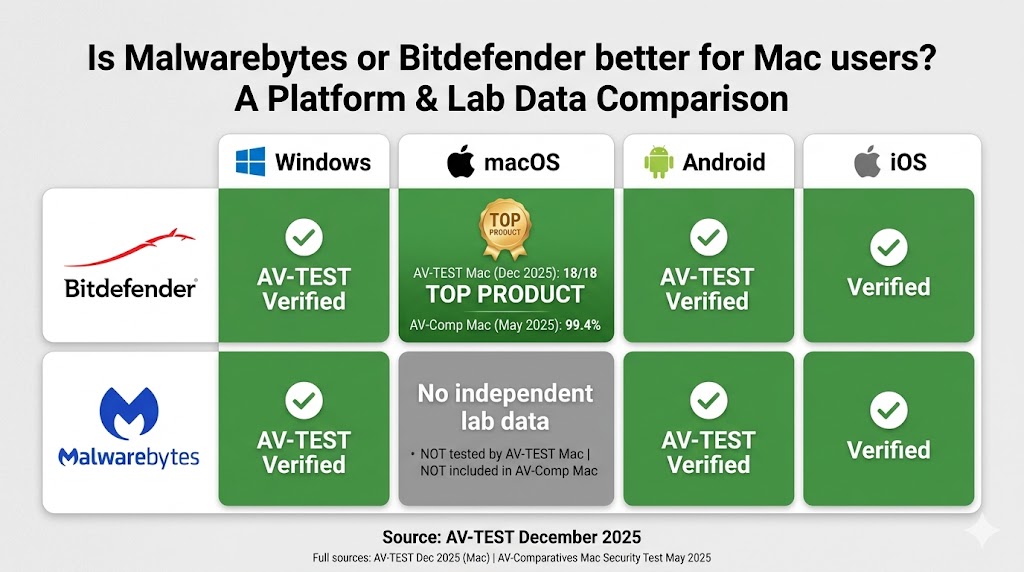
That gap in independent validation makes Bitdefender Total Security the only verifiable choice for macOS protection in this comparison — Bitdefender’s 18/18 AV-TEST score on Mac eliminates the need to rely on vendor claims alone.
Bitdefender Total Security delivers full macOS protection on all plans. Real-time threat detection, web filtering, VPN, password manager, and anti-tracker all function on macOS. Bitdefender Antivirus for Mac 10.2 earns AV-TEST’s TOP PRODUCT award for macOS (December 2025) with a perfect 18/18 score, and achieves 99.4% Mac malware detection in AV-Comparatives’ May 2025 Mac Security Test. (Source: AV-TEST December 2025; AV-Comparatives Mac Security Test 2025.)
For Mac users, the comparison ends here:
- Malwarebytes: No independent Mac lab data from AV-TEST or AV-Comparatives. Cannot verify Mac protection effectiveness through third-party testing.
- Bitdefender Total Security: 18/18 AV-TEST TOP PRODUCT for macOS (December 2025) and 99.4% Mac malware detection (AV-Comparatives, May 2025). Full macOS protection verified.
Any Malwarebytes plan — Standard, Plus, Total, or Ultimate — is not an independently validated standalone antivirus for Mac users.
Bitdefender Total Security 5 Devices covers both Windows and macOS for $59.99/yr first year ($109.99/yr renewal) under one subscription if you run a mixed household. Malwarebytes offers no comparable verified Mac coverage. The final piece of this comparison is cost — and what each product actually charges when first-year pricing expires.
Pricing and Renewal Costs — The Number Every Comparison Ignores
At the same $59.99/yr first-year price, Bitdefender Total Security covers 5 devices with a full suite. Malwarebytes Standard 3 Devices covers 3 devices with antivirus only.
Every comparison article shows Year 1 prices. Almost none show what you actually pay in Year 2. Here is the complete picture for both brands.
Malwarebytes 2026 pricing starts at $44.99/yr for 1 device (Standard). The Plus 3 Devices plan ($79.98/yr) adds a WireGuard VPN. The Total 3 Devices plan ($89.99/yr) adds $1M identity theft protection. Malwarebytes Ultimate 3 Devices ($139.99/yr) — new in 2026 — adds Personal Data Remover and $2M identity coverage. Malwarebytes Standard and Plus plans carry no introductory discount — the price you pay in Year 1 is the same at renewal.
Bitdefender pricing starts at $24.99/yr for 1 device (Antivirus Plus 1 Device, renewal $49.99/yr). Bitdefender Total Security 5 Devices costs $59.99/yr first year ($109.99/yr renewal).
Year-Two Reality — The Side-by-Side That Matters
The year-two cost gap is the most important number in this comparison — here it is side by side:
| Comparison Point | Malwarebytes Standard 3 Devices | Bitdefender Total Security 5 Devices |
|---|---|---|
| Year 1 price | $59.99 | $59.99 |
| Year 2 price | $59.99 (no introductory discount — same price at renewal) | $109.99 |
| Devices covered | 3 | 5 |
| Cost per device (Year 1) | $20.00 | $12.00 |
| Firewall included | ✗ | ✓ |
| Password manager | ✗ | ✓ |
Prices verified May 2026. Malwarebytes Standard: no introductory discount — Year 1 = renewal price. Bitdefender: renewal (MSRP) applies from Year 2.
Bitdefender Total Security covers 5 devices for $59.99/yr first year ($109.99/yr renewal) — the same Year 1 price as Malwarebytes’ 3-device Standard plan — with a full firewall, password manager, and verified macOS protection. At Year 1, Bitdefender costs $12.00 per device versus $20.00 per device for Malwarebytes Standard. Bitdefender’s renewal rate of $109.99/yr is steep — but it is published transparently on the product page.
Free Trials and Money-Back Guarantees
Bitdefender Total Security offers a 30-day free trial with no credit card required — the more generous trial in this comparison. Malwarebytes offers a 14-day trial, also with no credit card required.
On money-back guarantees, Malwarebytes wins: 60 days versus Bitdefender’s 30 days. Malwarebytes’ 60-day money-back window is the longest in this category — nearly double Bitdefender’s. Malwarebytes is the lower-risk purchase if maximum evaluation time matters, including time to verify compatibility with existing software, VPN services, or router-level firewalls before fully committing.
Can You Run Malwarebytes and Bitdefender at the Same Time?
Yes — Malwarebytes and Bitdefender run together without conflicts, and the combination is a setup recommended across security forums including r/antivirus.
Most antivirus products conflict when installed side by side because both attempt to intercept file-access events at the same system layer. Malwarebytes is specifically architected to co-exist with other security software, including Bitdefender. This is a deliberate design choice, not an accident.
The most common setup recommended on r/antivirus: use Bitdefender Total Security as your primary real-time protection — it handles your firewall, web filtering, full scan engine, and password manager. Keep Malwarebytes Free installed separately for on-demand second-opinion scans. Run it manually after a suspected infection, before opening a suspicious file, or whenever your primary AV flags something unusual. This setup costs nothing extra if you already subscribe to Bitdefender.
One important boundary: do not run Malwarebytes Premium alongside Bitdefender Total Security simultaneously as dual real-time agents. Two active scan engines competing for the same file events will slow your system and provide minimal additional protection benefit. Malwarebytes Free as a manual scanner is the right companion tool — not Malwarebytes Premium running in real time. With the core comparison complete, the section below matches each product to the right buyer — including the scenarios where each product is the wrong choice.
Putting It Together: Which Product Belongs on Which Machine?
The comparison across lab scores, features, system performance, Mac coverage, pricing, and compatibility points consistently in one direction: Bitdefender Total Security as the primary security layer for most households, with Malwarebytes occupying a specialist role. The section below identifies exactly which buyer each product is designed for — and which buyers each should turn down.