
Antivirus software detects and blocks malware using five layered methods: signature-based detection, heuristic analysis, behavioral monitoring, cloud reputation lookup, and machine learning. It runs in real time, firing on every file download, program launch, and USB insertion. No single method catches every threat — which is why modern antivirus stacks all five.
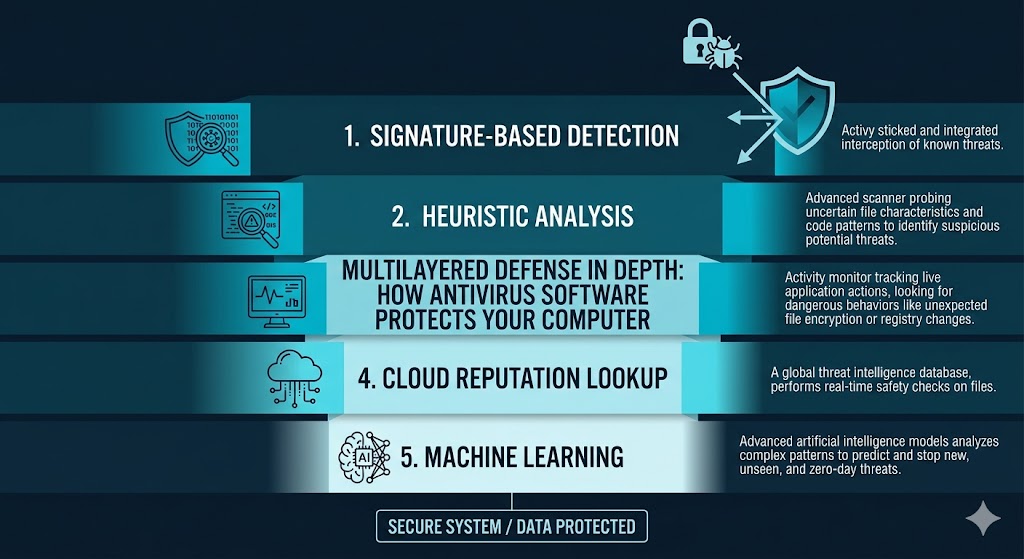
Each layer covers a different gap: signature matching identifies known malware in milliseconds, heuristics examine suspicious code structure before execution, behavioral monitoring stops active threats such as ransomware mid-encryption, cloud lookup checks a file’s hash against a live global threat database, and machine learning scores never-before-seen files against patterns learned from millions of samples. To stay current, major vendors push virus definition updates multiple times per day. The protection has measurable limits: zero-day threats, fileless malware, password-protected archives, and social engineering attacks fall outside reliable detection range, and proactive detection methods occasionally flag safe files as suspicious. Antivirus also performs a different job than a firewall — one inspects file content, the other controls network traffic — and a full system scan causes a temporary slowdown that real-time protection does not. Built-in protection has improved as well: Microsoft Defender scores 18/18 in AV-TEST’s February 2026 evaluation, which changes the calculation of when a third-party suite adds value. This guide explains each detection mechanism, when real-time protection actually fires, what antivirus cannot catch, and how to decide whether the protection you already have is sufficient.
Table of Contents
What Antivirus Software Actually Does
Antivirus software continuously monitors your device for malicious code, blocking threats before they execute — not after they have already caused damage. It does this by intercepting files, programs, and data as they move through your system, analyzing each one against known threat signatures and behavioral patterns.
When antivirus detects a threat, it takes one of three actions:
Quarantine: The file is isolated in a secure location where it cannot execute. You can review it before deciding to delete or restore it.
Delete: The file is removed automatically when the antivirus determines the threat is confirmed and the file has no legitimate use.
Block: The threat is stopped at the point of entry — for example, when a malicious file attempts to download from a website — before it ever reaches your storage.
Antivirus software monitors every file that opens, downloads, or executes on your device — blocking threats before they reach your operating system, not after. The older mental model of “running a virus scan” suggests a passive, occasional check. Modern antivirus is an always-on monitoring layer that acts in milliseconds.
To block those threats, antivirus relies on five distinct detection methods — each designed for a different type of threat.
The Five Ways Your Antivirus Detects Threats
No single detection method catches every threat. Known malware needs a different approach than brand-new malware. Malware hiding in a file’s code needs a different approach than malware disguising itself as a legitimate running process. Modern antivirus uses five layered methods because the threat landscape requires it — each layer catches what the others miss.
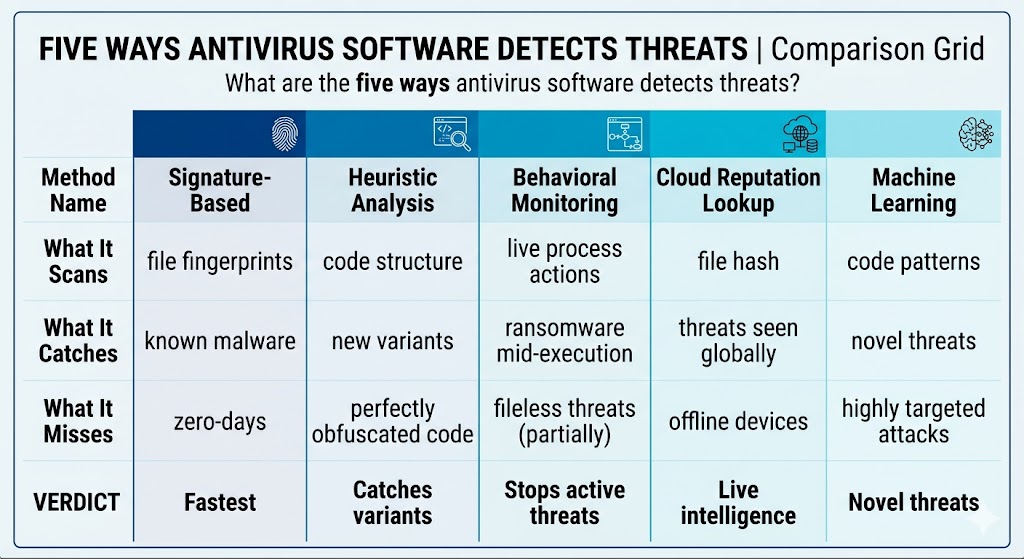
That layered architecture is the reason modern antivirus catches threats it has never encountered before — not just those already catalogued in its signature database.
The first and oldest method is also the fastest: signature-based detection.
Signature-Based Detection: Matching Known Threats
Every piece of malware has a unique code fingerprint — a specific sequence of bytes that identifies it. Security researchers extract these fingerprints from confirmed malware samples and add them to a virus definition database. When your antivirus scans a file, it compares that file’s fingerprint against every entry in the database. A match means the file is flagged immediately.
Signature-based detection compares every file’s unique code fingerprint against a database of known malware — a method that catches millions of established threats but cannot identify any threat for which no signature yet exists. This is the core limitation: signature detection is reactive. It requires that the threat has already been discovered, analyzed, and catalogued. Any malware appearing for the first time in the wild has no signature — and passes through this layer undetected.
Signatures work only for threats already discovered — which is why antivirus also uses heuristic analysis to catch suspicious code that has not been seen before.
Heuristic Analysis: Catching Suspicious Code Patterns
Heuristic analysis examines the structure of a file’s code before the file runs. Instead of looking for a known fingerprint, it looks for construction patterns that resemble how malware is typically built. These include unusual system calls, obfuscated code segments, and self-modifying instructions that legitimate software rarely uses.
The engine assigns a suspicion score based on how many malware-typical traits a file’s code contains, and flags the file when that score crosses a defined threshold — even when that exact file has never been seen before. Heuristics catch new malware variants and modified versions of known threats that have changed just enough to defeat signature detection. The trade-off is that heuristics can occasionally misread a legitimate program’s unusual but harmless code as suspicious — which is what causes false positives, covered in detail later in this guide.
Heuristics analyze a file before it runs — but behavioral monitoring watches what a program does after it is already executing.
Behavioral Monitoring: Watching What Programs Actually Do
Behavioral monitoring activates after a program launches. Rather than examining code structure, it watches the program’s live actions and flags patterns associated with malicious behavior. Three examples of actions that trigger a behavioral alert include: a program attempting to encrypt hundreds of files in rapid succession, a process injecting code into another system process without authorization, and an application silently connecting to a remote command-and-control server.
Behavioral monitoring can stop a ransomware attack mid-execution, before encryption is complete, even when no signature exists for that specific ransomware strain.
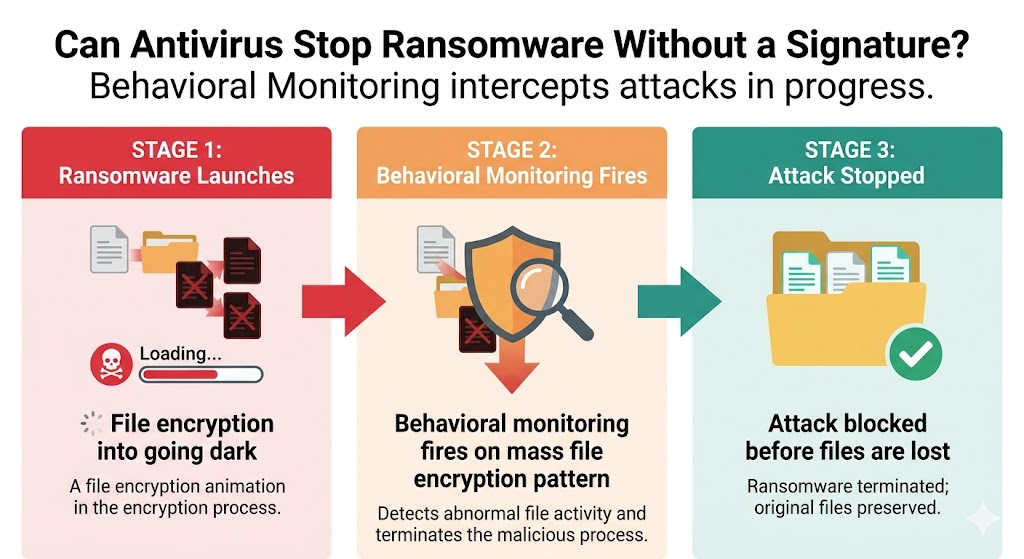
That real-time intervention is why behavioral monitoring is the most critical detection layer against novel ransomware variants — and why it remains effective even when attackers deliberately evade signature databases.
Behavioral monitoring works on-device — but cloud-based scanning adds a live global intelligence layer on top of it.
Cloud-Based Scanning: Checking a Live Threat Intelligence Database
When your antivirus encounters an unfamiliar file, it can send a query to the vendor’s cloud servers — not the file itself, but a hash. A hash is a short numerical fingerprint derived from the file’s contents. The vendor’s servers check that hash against a live global threat database, which updates continuously across millions of connected endpoints. Your device benefits immediately when another endpoint in the vendor’s network has already encountered and flagged that same file.
Cloud-based scanning sends a file’s hash — a short numerical fingerprint — to vendor servers for a reputation check, not the file itself; your personal documents are never uploaded during this process. This directly addresses a common concern: cloud scanning does not mean your antivirus is reading your files or uploading your personal data to vendor servers. One practical limitation: if your device is offline, cloud queries cannot reach vendor servers. Local signature and heuristic scanning continue to function, but the cloud reputation layer is unavailable until connectivity is restored.
Cloud scanning relies on known threat data — machine learning takes detection one step further by predicting threats that have not been catalogued yet.
Machine Learning and AI: Predicting Threats Before They Strike
Machine learning models are trained on millions of confirmed malware samples and millions of confirmed clean files. Through that training, the models learn to recognize patterns — code structures, system behaviors, network call sequences — that correlate with malicious intent. When the model encounters a new, unseen file, it scores it against those learned patterns. A high malicious-intent score triggers a flag, even with no signature and no prior sighting of that file anywhere in the world.
WatchGuard’s Q1 2025 Internet Security Report recorded a 171% increase in total unique malware detections compared to the prior quarter — the highest the company’s Threat Lab has ever recorded (WatchGuard Threat Lab, Q1 2025). Machine learning detection has become a core layer in modern antivirus engines as a result. Proactive machine learning detection surged 323% in the same period, underscoring how essential this layer has become. This volume is driven partly by AI-assisted malware tools generating new variants at scale — machine learning is the detection method best positioned to scale alongside that rate of novel threat creation.
Understanding the five detection methods is the foundation — now look at how and when these layers actually fire during your normal computer use.
How Real-Time Protection Works — And When It Actually Fires
Real-time protection does not scan your entire hard drive continuously — it fires on specific trigger events, including every file download, every program launch, and every USB device insertion. When none of those events are occurring, the antivirus sits quietly in the background with minimal CPU impact.
Yes, antivirus protection runs continuously in the background — but it does not perform a deep scan every second. The distinction matters for understanding both its effectiveness and its performance impact. Each trigger event initiates a rapid multi-layer check: the file’s hash is compared against the local signature database, heuristic rules are applied to the code structure, and — if the device is online — a cloud reputation query is sent. This entire process typically completes in milliseconds for most files.
| Trigger Event | What Antivirus Does |
|---|---|
| File downloaded from browser or email | Hash check + signature match + cloud query before file is accessible |
| File opened or double-clicked | Heuristic scan + behavioral pre-check before execution |
| Program launches | Full behavioral monitoring begins for the duration of the program’s runtime |
| USB device inserted | Automatic scan of all files on the device before any file is accessible |
The difference between real-time protection and a scheduled on-demand scan is depth. Real-time protection performs rapid, event-triggered checks optimized for speed. A full on-demand scan reads every file on the storage drive, decompresses archives, and applies all five detection layers — a process that takes longer but provides deeper coverage of dormant threats already present on the device.
For real-time protection to stay current, it needs a constantly updated threat database — which leads to the question of how virus definitions are built and pushed to your device.
How Virus Definitions Are Built and Updated
Virus definition updates begin when a new malware sample is discovered — reported by honeypot systems, a security researcher, or an infected user, and sent to a threat intelligence lab for analysis. Security researchers send the sample to the vendor’s threat intelligence lab, where analysts reverse-engineer the code to extract its unique signature and map its behavioral patterns. That signature is added to the global definition database and pushed to update servers.
Major antivirus vendors push virus definition updates multiple times per day — meaning a threat discovered and catalogued this morning may be detectable on your device within hours of its first appearance in the wild. Most antivirus programs download these updates automatically in the background without requiring any action from the user. Cloud-based antivirus tools reduce the local definition lag further: instead of waiting for a local database update, they query live vendor servers on every unfamiliar file, giving them access to real-time threat intelligence without waiting for a scheduled update cycle.
What happens when updates stop? A device with definitions that are days or weeks out of date becomes vulnerable to threats discovered during that gap — threats that signature-based detection cannot identify without the corresponding entry in the database. Behavioral and heuristic layers still function, but the fastest detection layer is compromised.
Even with multiple daily updates, some threats arrive before any signature exists — which leads to the most important limitation of antivirus protection.
What Antivirus Cannot Detect (And Why)
Antivirus software cannot protect against every type of threat — and the gaps are specific enough that every user should understand them. Four categories of threat consistently fall outside the reliable detection range of standard antivirus.
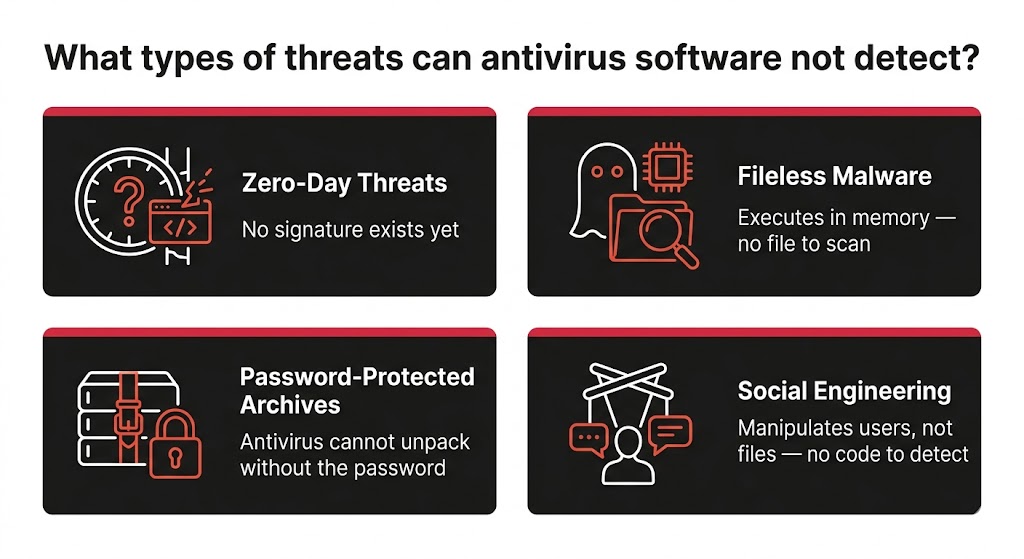
Knowing these four gaps helps you make informed decisions about layering safe browsing habits, VPN protection, and phishing awareness alongside your antivirus — and explains why no security tool should be treated as a complete solution on its own.
Zero-day threats. A zero-day is a vulnerability or piece of malware that has never been seen before. No signature exists. Heuristic and behavioral layers may catch it if it behaves like known malware, but a well-crafted zero-day exploit can evade all five detection methods until a signature is published — sometimes hours or days after the first attack.
Fileless malware. Fileless malware executes entirely within system memory and writes no files to disk — meaning traditional file-scanning detection engines never encounter it, and behavioral monitoring is the only layer capable of identifying it. This type of attack loads malicious code directly into RAM using legitimate system tools, leaving no file artifact for signature or heuristic scanning to find.
Password-protected archives. A ZIP, RAR, or 7z file protected by a password cannot be unpacked by antivirus without that password. The antivirus scans the container file itself but cannot inspect the contents. Malware delivered inside a password-protected archive remains hidden until the user extracts it — at which point real-time protection intercepts the extracted files.
Social engineering attacks. Phishing emails, fraudulent phone calls, and fake tech support websites do not contain malware — they manipulate users into providing credentials or transferring money voluntarily. No antivirus engine can intercept a human decision. Web protection features in some antivirus suites block known phishing URLs, but a convincing new phishing site may not yet be in any database.
Antivirus limitations explain why it sometimes errs in the other direction — flagging a safe file as dangerous.
Why Antivirus Sometimes Flags Safe Files
False positives occur most often with heuristic detection — when a legitimate program’s code structure happens to match the behavioral patterns the antivirus associates with known malware. This is not a malfunction. It is the expected trade-off of a detection method designed to catch threats it has never seen before: broader detection criteria identify more unknown threats and, occasionally, misclassify a harmless file.
The software categories most commonly affected include indie games (which often use code obfuscation to protect intellectual property), open-source command-line utilities (which interact directly with system processes in ways that resemble malware behavior), and custom business applications built by small development teams whose code has not been submitted to vendor whitelists. Follow these three steps when your antivirus quarantines a file you believe is safe:
Verify the file source. Confirm the file came from a trusted developer or official download page — not a third-party mirror or torrent. A false positive and an actual infection look identical in the quarantine list.
Search the vendor’s false positive database. Most major antivirus vendors maintain an online lookup tool or community forum where users report and confirm false positives. Strong confirmation comes when other users have already reported the same file as safe in the vendor’s database.
Whitelist the file if confirmed safe. Add the file or its parent folder to your antivirus exclusion list. This tells the engine to skip that specific file or location during future scans, eliminating repeated false positive alerts without disabling protection elsewhere.
Understanding detection methods and their limitations clarifies why antivirus and your network firewall serve completely different roles.
Antivirus vs. Firewall: Two Different Lines of Defense
Antivirus and a firewall protect your device at two different points — one inspects the content of files, the other controls the flow of network traffic. Neither replaces the other, and a device without both has a gap in its security posture.
| Antivirus | Firewall | |
|---|---|---|
| What it does | Scans files and running processes for malicious code | Controls which network connections are allowed in and out of the device |
| What it stops | Malware in files, programs, and memory | Unauthorized inbound connections and suspicious outbound traffic |
| When it acts | On file access, program launch, and download events | Continuously, at the network boundary |
A firewall cannot tell you whether a file is malicious — it only manages traffic. Antivirus cannot block an unauthorized network connection from a legitimate-looking program — it only inspects file and process content. Both layers are necessary for complete protection.
Both layers have a performance cost — which leads to the question most users ask before installing any security software.
Does Antivirus Slow Down Your Computer?
Yes — a full system scan causes a temporary performance dip, but real-time protection has minimal impact during normal use. The distinction between these two modes explains why some users notice slowdowns during scans and nothing at other times.
During a full on-demand scan, the antivirus engine reads every file on the storage drive, decompresses archives, and runs each file through multiple detection layers simultaneously. A full antivirus scan temporarily drives disk I/O to near-maximum because the engine reads, decompresses, and processes every file on the drive — scheduling scans overnight eliminates this as a practical concern for most users. Real-time protection operates differently: it fires only on trigger events and processes each file in milliseconds, causing a brief, barely perceptible CPU spike rather than a sustained load.
Three steps that eliminate antivirus performance as a practical issue:
Schedule full scans overnight or during off-hours. Most antivirus programs include a scan scheduler. Set it for a time when the device is on but unused.
Enable game mode or silent mode if your antivirus supports it. This suppresses background scans and notifications during full-screen applications.
Exclude known-safe, high-volume folders from real-time scanning — for example, a video render output folder or a software development build directory — to reduce unnecessary I/O during intensive work sessions.
Performance is one consideration when choosing a security solution — but the more fundamental question for most home users is whether the antivirus they already have is sufficient.
Is Windows Defender Enough for Your PC?
Microsoft Defender is a legitimate, lab-verified antivirus — not a placeholder. Microsoft Defender achieves a perfect 18/18 score in AV-TEST’s February 2026 evaluation — confirming it provides real, lab-verified malware protection, not a token security layer (AV-TEST, February 2026). That score matches the top-rated commercial products on the same test.
What Defender does not include is the additional security layer that third-party antivirus suites bundle alongside malware detection: dedicated ransomware shields with file rollback, unlimited VPN, identity theft monitoring and dark web scanning, parental controls, multi-device management from a single dashboard, and password managers. These features are not antivirus functions — they are security ecosystem features that vendors add to justify subscription pricing.
Two practical guidance points — not product recommendations:
Defender is adequate for low-risk single-device users who practice safe browsing, avoid downloading software from unofficial sources, and do not store sensitive financial or client data on the device.
Third-party antivirus adds meaningful value for households with children who need parental controls, small business owners handling customer or financial data, and anyone who wants ransomware-specific protection, identity monitoring, or multi-device coverage under a single plan.
Frequently Asked Questions
What Is the Difference Between Antivirus and Anti-Malware?
The terms are largely interchangeable in 2026. “Antivirus” is the legacy term from an era when the primary threat category was file-infecting viruses. “Anti-malware” covers all malicious software types — including spyware, adware, ransomware, trojans, and worms. Modern antivirus products detect and remove all of these categories. For a full breakdown of malware types, see our Types of Malware: Complete Guide.
Can Antivirus Stop Ransomware Attacks?
Yes — behavioral monitoring and dedicated ransomware shields can stop a ransomware attack mid-execution, before file encryption is complete, even without a signature for that specific strain. The initial execution may not be blocked when the attack exploits a vulnerability with no existing signature or behavioral rule. To understand ransomware from the attacker’s side, see our Ransomware Explained guide; for how the defensive shields work at the feature level, see our Ransomware Protection Features guide.
Does Antivirus Software Work on Phones and Tablets?
Yes, with important platform differences. Android antivirus apps have access to the file system and app behavior — they provide meaningful malware detection, web protection, and behavioral monitoring. iOS operates under a sandboxed architecture that restricts what antivirus apps can scan; most iOS antivirus focuses on web protection, VPN, and phishing detection rather than file scanning. For platform-specific recommendations, see our Best Antivirus for Android and Best Antivirus for iPhone guides.
The Bottom Line on How Antivirus Software Works
Modern antivirus uses five detection layers — signature matching, heuristic analysis, behavioral monitoring, cloud reputation lookup, and machine learning — because no single method catches every threat type. Signature detection handles known malware with speed and precision. Behavioral monitoring stops active threats like ransomware mid-execution, even without a prior signature. Machine learning identifies novel threats by pattern — a capability that matters given the 171% surge in unique malware detections recorded by WatchGuard’s Q1 2025 Internet Security Report.
The gaps are real and specific: zero-day threats before a signature is published, fileless malware living entirely in memory, files inside password-protected archives, and social engineering attacks all fall outside reliable detection range. Microsoft Defender covers the malware detection baseline with a verified 18/18 AV-TEST score (February 2026) — third-party antivirus adds ransomware shields, VPN, identity monitoring, and multi-device management for households and businesses that need those layers.
To go deeper on the individual defense layers covered here, see our Real-time Malware Protection Explained guide for the full real-time architecture and our Firewall and Network Protection Features guide for network-layer defense.
Understanding how antivirus works is the first step. The next step is choosing the right product for your specific devices and threat profile. Our How to Choose Antivirus Software guide walks through the decision framework, and our Best Antivirus Software 2026 guide provides independent test scores, current pricing, and recommendations by use case.