
An antivirus false positive is when security software flags a safe file as malware. It happens with every antivirus brand. The fix is straightforward: do not click Allow immediately. Instead, verify the file’s source, scan it on VirusTotal, and check for a definition update before restoring and whitelisting the file.
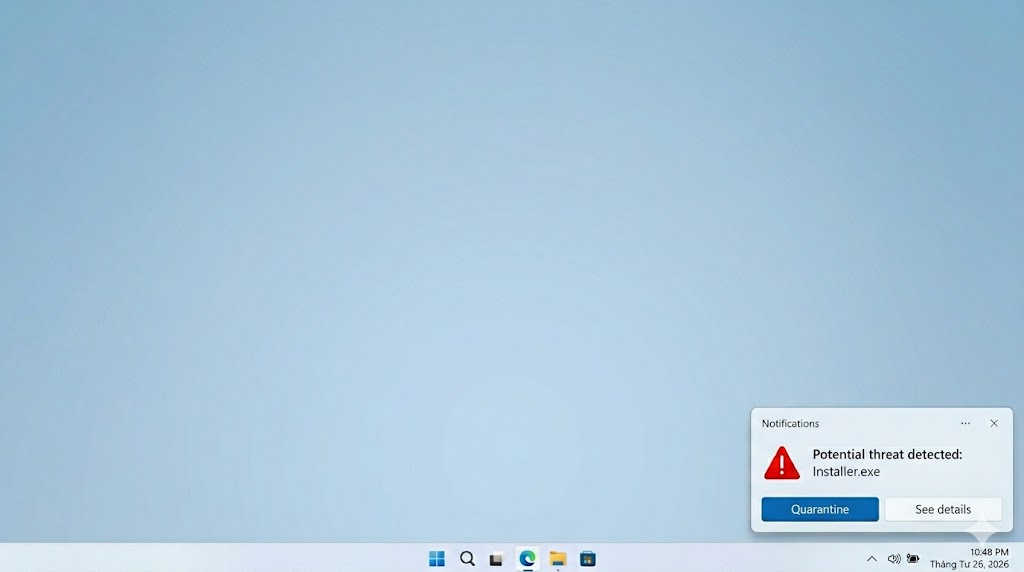
False positives are one of the most common antivirus complaints — and one of the easiest to mishandle. Clicking Allow on a genuine threat is a serious mistake. So is leaving a legitimate business tool quarantined during tax season. This guide walks you through exactly how to tell the difference, fix the problem, and prevent it from recurring. Every major antivirus product produces false positives — the question is how often, and what to do when it happens.
Table of Contents
What Is an Antivirus False Positive?
A false positive is when antivirus software incorrectly identifies a safe file as malware and blocks, quarantines, or deletes it. The file poses no actual threat — the antivirus simply misclassified it. False positives are a normal byproduct of aggressive threat detection, not a sign that your computer is infected.
Antivirus software uses behavioral and heuristic analysis to catch threats. These methods occasionally flag legitimate files that share code patterns with malicious ones. In AV-Comparatives’ March 2026 Malware Protection Test, every antivirus product tested produced at least some false alarms — the lowest count was 4, from Bitdefender, across 10,000 test cases.
A false positive is the opposite of a false negative. A false negative is when antivirus misses actual malware and reports a dangerous file as safe — the more serious error of the two. False positives disrupt your workflow. False negatives compromise your security. Neither is desirable, but they require different responses.
How to Tell If an Alert Is Real or a False Positive
Confirm a false positive before you take any action. Follow these four steps in order: check where the file came from, scan it on VirusTotal, update your antivirus definitions and rescan, then search the file name online. Do not restore or whitelist the file until you have completed at least the first two steps.
Check Where the File Came From
The source of a file is the single strongest indicator of its legitimacy. A file downloaded directly from a major publisher’s official website — intuit.com, quickbooks.intuit.com, store.steampowered.com — carries a fundamentally different risk profile than a file attached to an unsolicited email or downloaded from a file-sharing site.
That context strongly suggests a false positive when your antivirus flagged TurboTax immediately after a download from intuit.com, a publisher’s official website. Treat the alert as potentially real until proven otherwise when the same file arrives in an unsolicited email from an unknown sender.
Scan the File on VirusTotal
Go to virustotal.com and upload the flagged file or paste its hash. VirusTotal scans the file against over 70 antivirus engines simultaneously and shows you each engine’s verdict.
A VirusTotal result like the one below — where only 1 or 2 of 70+ engines flag the file — is the clearest evidence of a false positive you can get.
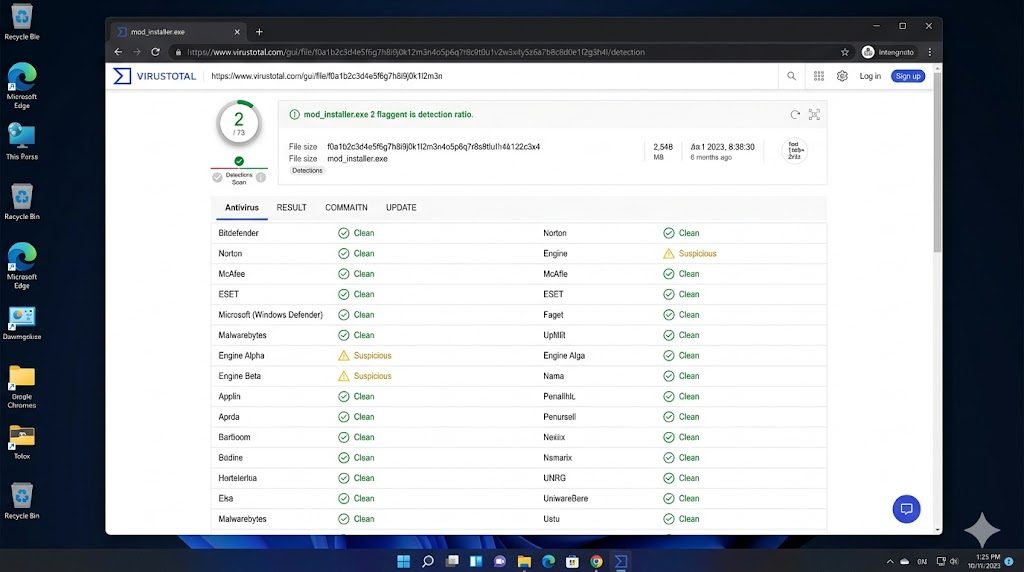
A file flagged by fewer than 5 of VirusTotal’s 70+ engines — with all major engines showing clean — points more strongly to a false positive than to a real threat. Treat the file as potentially dangerous regardless of context when 30 or more engines flag it.
Two common misconceptions to avoid: “only one engine flags it, so it’s definitely safe” is not always true — some new malware is caught first by a single engine. Equally, “any detection on VirusTotal means it’s dangerous” is wrong — obscure engines with aggressive heuristics routinely generate false alarms.
Check for a Recent Antivirus Definition Update
Many false positives self-correct within hours of a vendor releasing a corrected definition. Open your antivirus dashboard, run a manual update, and then rescan the quarantined file. A disappearing alert after the update confirms the vendor has already resolved the false positive.
In November 2025, Microsoft Defender produced a widespread false positive spike flagging powershell.exe and svchost.exe as threats. Microsoft resolved it with definition version 1.441.548.0 within hours — illustrating how quickly vendors correct confirmed false positives when users report them promptly. (Source: York University IT Security Advisory, November 28, 2025)
Search the File Name Online
Searching the exact file name plus “false positive” and your antivirus product name in Google takes under 60 seconds and reveals whether hundreds of other users are seeing the same alert. Widespread reports of the same detection across Reddit threads, vendor support forums, and tech publications — within the past 24–48 hours — mark the alert as almost certainly a false positive. A genuine malware outbreak produces very different search results — warnings, not user complaints about false alerts.
How to Fix a False Positive: Restore, Whitelist, and Report
Fix a false positive in three steps: restore the file from quarantine, add an exclusion to prevent re-flagging, and report it to your vendor. Complete all three — stopping after restoration alone causes the re-quarantine loop covered in the next section.
Restore the File from Quarantine
Open your antivirus dashboard and navigate to the Quarantine or Protection History section. Locate the flagged file, verify the detection name and file path, then select Restore or Allow on device. Do this only after completing the verification steps above.
The Windows Security Protection History screen below shows exactly where to find the Restore option after a false positive quarantine.
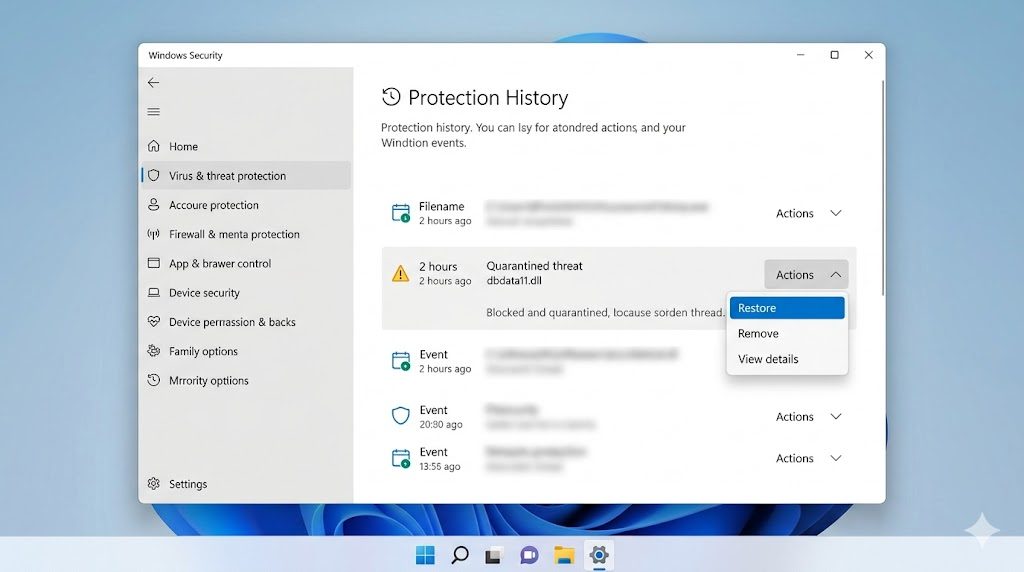
Windows Security (Defender) users: open Start → Windows Security → Virus & threat protection → Protection history. Find the blocked item and select Actions → Restore. On macOS with a third-party antivirus, open the antivirus dashboard and look for a Quarantine or Threats section in the main navigation.
Add the File to Your Exclusion List
Adding an exclusion tells your antivirus to permanently skip a specific file or folder during future scans. Without this step, the antivirus will re-quarantine the restored file the next time it runs a scan.
Three rules for safe exclusions: exclude the specific file path or folder — never exclude an entire drive or the Program Files directory. Only exclude files you have verified through the steps above. Revisit your exclusion list every 90 days to confirm each entry is still necessary and the file has not been replaced by something else.
Report the False Positive to Your Vendor
Reporting takes less than five minutes and fixes the problem for every user with the same antivirus product. Most vendors issue a corrected definition within 24 to 72 hours of receiving a confirmed false positive report.
Include the following in your report:
- Full file name and path (e.g., C:\Program Files\Intuit\TurboTax\ttax.exe)
- SHA-256 hash — right-click the file → Properties → Details on Windows; or run
shasum -a 256 [filename]in macOS Terminal - Your VirusTotal scan link showing the results
- Your antivirus product name and version number
- Steps to reproduce: where you downloaded the file and what action triggered the alert
Submit your report through your vendor’s false positive portal. VirusTotal maintains a directory of vendor submission contacts at docs.virustotal.com/docs/false-positive-contacts — it links directly to submission forms for all major antivirus brands, including ESET, McAfee, Malwarebytes, and Microsoft.
Common Situations That Trigger False Positives in the US
Certain software categories produce false positives far more often than others. Knowing which ones helps you move faster through the verification process — and set up the right exclusions before a false positive disrupts your work.
Tax and Accounting Software
TurboTax installers have been flagged by some antivirus engines as Trojans or adware during installation runs, later confirmed as false positives after definition updates. QuickBooks users frequently encounter repeated quarantining of specific DLLs — such as dbdata11.dll — which QuickBooks then regenerates on each launch, creating a loop.
QuickBooks users who exclude only the specific flagged DLL — rather than the entire QuickBooks directory — reduce their exposure while stopping the re-quarantine loop. Download tax and accounting software exclusively from official vendor websites, then run the verification steps above before adding any exclusion.
PC Games, Mods, and Trainers
Game trainers and mods use memory injection and code-patching techniques that are behaviorally identical to malware. Antivirus engines cannot distinguish intent — they flag the behavior, not the purpose. This makes false positives in this category nearly unavoidable for certain tool types.
Before whitelisting any gaming file, check the game’s official community page, mod repository, or developer’s site for a pinned false positive notice. Proceed with the exclusion steps above when the developer has documented the detection and it matches yours exactly. Complete the full VirusTotal check first when no such notice exists and the file came from an unofficial source.
Small Business and Remote-Work Tools
Remote desktop agents, backup clients, and endpoint management software such as Workspace ONE frequently exhibit behaviors that resemble malware. Persistent network connections, registry modifications, and background process management all trigger heuristic suspicion. Most enterprise software vendors publish recommended exclusion lists in their documentation — install these exclusions before deploying the software, not after the first quarantine event.
Open-Source and Indie Software
Unsigned binaries from smaller developers have low file prevalence in antivirus databases, which triggers heuristic suspicion automatically. Verify the file hash against the checksum published on the developer’s official download page or GitHub release. Check the repository’s Issues or Discussions tab — false positive reports from other users appear there quickly when a new version triggers a wave of detections.
What to Do When Your Antivirus Keeps Deleting the Same File
The re-quarantine loop happens because restoring a file from quarantine does not prevent the antivirus from flagging it again — only adding a path exclusion before restoring stops the cycle. Follow these steps in order to break the loop permanently.
- Open your antivirus dashboard and navigate to Exclusions or Exceptions settings
- Add the full file path of the quarantined file to your exclusion list before restoring it
- Navigate to Quarantine and restore the file
- Immediately run a manual VirusTotal scan on the restored file to confirm the exclusion is safe
- Check whether the file path is being regenerated to a temp folder location when the loop continues. QuickBooks and similar apps recreate DLLs in system temp directories on each launch. Your exclusion path may need to target the temp folder, not the installation directory.
One caution: Do not add an exclusion when your antivirus keeps flagging a file that arrived from an unfamiliar source or unknown sender. Complete the verification steps in the How to Tell If an Alert Is Real section above before taking any action.
Which Antivirus Software Has the Fewest False Positives?
Bitdefender produced the fewest false alarms among all six brands reviewed on migendeals.com. In AV-Comparatives’ March 2026 Malware Protection Test — 10,000 real-world malware samples — Bitdefender produced 4 false alarms, the lowest count in the test. Norton produced 9. McAfee and ESET produced 14 and 16 respectively. Malwarebytes produced 23, and Webroot did not participate in this test.
The chart below shows false alarm counts from AV-Comparatives’ March 2026 Malware Protection Test — 10,000 real-world test cases.
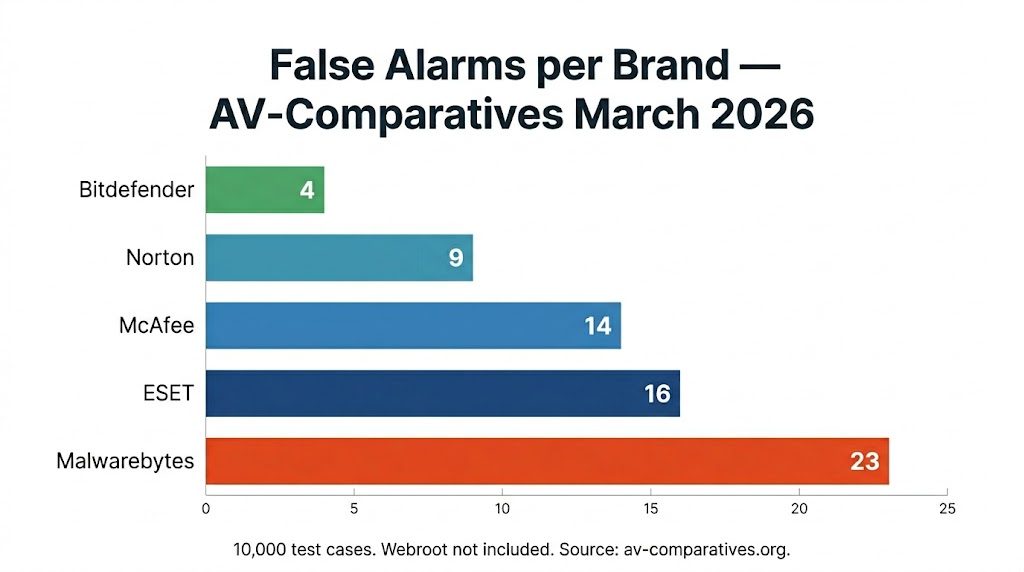
A lower false alarm count means fewer interruptions — not necessarily better malware detection. All four brands tested by AV-TEST in February 2026 — Norton, Bitdefender, McAfee, and ESET — achieved 6/6 on usability, the category that measures how often the product interferes with legitimate software. A score of 6/6 confirms minimal false positive impact in that test series. The next section covers what to do when your product’s false positive behavior makes a switch worth considering.
When to Consider Switching Your Antivirus
An antivirus product that repeatedly flags the same legitimate software after multiple definition updates signals a systematic tuning problem — not a one-time database error. A single false positive on an unusual file is expected behavior. Repeated false positives on common, widely used software — tax tools, business applications, mainstream games — indicate the product’s detection engine is poorly calibrated for your environment.
Consider switching if your antivirus meets any of these three conditions:
- It flags the same software categories — tax tools, business apps, gaming files — repeatedly across multiple definition versions, not just once
- False positives persist even after you update definitions, wait 72 hours, and update again, suggesting systematic over-detection rather than a correctable database error
- Its false alarm count or usability score consistently falls below the field average across multiple lab test rounds — see our AV-TEST Rankings guide for how each brand scores on usability
If false positives arrive alongside system slowdowns, the two problems often share a cause — see our guide on antivirus performance issues. Not sure which product to move to? Our how to choose antivirus software guide walks through the key criteria, and to compare first-year and renewal pricing when you decide to switch, see current antivirus deals.
Frequently Asked Questions
Is a False Positive Dangerous?
A false positive itself causes no security harm — the flagged file is safe, and the antivirus has simply misidentified it. The danger comes from responding incorrectly: whitelisting a file that is actually malware, or disabling your antivirus entirely while troubleshooting. Follow the verification steps in the How to Tell If an Alert Is Real section before taking any action on a quarantined file.
Can a Trojan Detection Be a False Positive?
Yes. A “Trojan” label on an antivirus alert describes a behavioral pattern — not a confirmed infection — and is one of the most common false positive categories for gaming and modding software. Antivirus engines categorize suspicious files by what they do, not what they are. A game trainer that injects into a process behaves like a Trojan even when it is completely harmless. Run the VirusTotal check and file source verification before concluding the detection is real.
Does Windows Defender Give More False Positives Than Other Antivirus Software?
No. In controlled lab testing, Windows Defender (Microsoft Defender) performs at parity with leading third-party products on false positive rates. In practice, Defender’s cloud-intelligence system occasionally produces short-lived spikes — such as the November 2025 incident that flagged powershell.exe and svchost.exe — that resolve with a definition update, typically within hours of widespread user reports.
What Is the Difference Between a False Positive and a False Negative in Antivirus?
A false positive means antivirus flags a safe file as malware. A false negative means antivirus misses actual malware and reports a dangerous file as clean. False negatives are the more serious error — they allow real threats to execute undetected. False positives are more disruptive to daily use but carry no security risk when handled correctly: verify first, whitelist second, report third.
The Bottom Line on Antivirus False Positives
False positives are a normal part of how antivirus software works — every product produces them, and every user encounters them eventually. The correct response follows a fixed sequence: verify the file’s origin and scan it on VirusTotal before taking any action, update your antivirus definitions and rescan, then restore the file from quarantine, add a narrow path exclusion, and submit a false positive report to your vendor. Most vendors resolve confirmed false positives with a corrected definition within 24 to 72 hours.
When comparing brands on false positive rates, lab data provides the clearest picture: Bitdefender produced 4 false alarms across 10,000 test cases in AV-Comparatives’ March 2026 Malware Protection Test, the lowest among all brands reviewed here, while Malwarebytes produced 23. Repeated false positives on the same legitimate software across multiple definition updates signal a product-level issue worth addressing. To understand the detection methods behind these alerts, read our how antivirus software works guide, and see our best antivirus software guide to compare your options.