
Norton 360 for Gamers, Bitdefender Total Security, and ESET HOME Security are the best antivirus options for gaming PCs in 2026. All three include dedicated gaming modes that suppress notifications and defer background scans, keeping FPS impact below 5% during active gameplay while delivering independent lab-verified malware protection.
Game mode capability, CPU overhead during active gameplay, and malware detection strength against gaming-specific threats determine which antivirus works best for a gaming PC.
A gaming antivirus earns its place on a gaming rig by meeting a specific set of criteria — a dedicated game mode that defers scans and suppresses alerts during active sessions, low CPU overhead, and detection strong enough to catch the infostealer malware distributed through game mods and cracked installers. Modern products designed for gaming satisfy all three: independent testing confirms FPS impact stays under 5% with game mode active, and several register no measurable drop at all.
Norton 360 for Gamers leads for game mode depth, with a Game Optimizer that actively redistributes CPU resources across all running processes — not just the antivirus itself. Bitdefender Total Security auto-detects fullscreen gaming and earns the lowest CPU footprint of the three picks, with testing showing a 9% FPS improvement in CS:GO with its Game Profile active. ESET HOME Security Essential runs the lightest antivirus engine of the group, with a Silent Mode that defers every background task the moment a game launches — and renews at the same annual price every year, with no first-year discount spike.
The sections below cover what to look for, how each pick performs under testing, a direct comparison across six gaming-relevant criteria, and a five-step configuration guide that takes under five minutes.
Table of Contents
What Features Should a Gaming Antivirus Have?
A gaming antivirus must have a dedicated game mode that suppresses scans and notifications during active gameplay, combined with low CPU overhead during gaming and strong detection against gaming-specific malware including infostealers distributed through mods and cracked game installers.
What separates a true game mode from a basic notification silencer — and why does that distinction matter for your frame rate?
Game mode capability, CPU overhead during active gameplay, and malware detection strength against gaming-specific threats determine which antivirus works best for a gaming PC. The 5 features below are ordered by their direct impact on gaming session quality:
- Dedicated game mode — A true game mode does more than silence pop-ups. It actively defers scheduled scans, pauses virus definition downloads, and reduces the CPU priority of background antivirus processes the moment a fullscreen application is detected. An antivirus that only mutes notifications still runs full background scans during your gaming session, consuming CPU cycles that belong to the game.
- Low CPU overhead during gaming — The target is under 5% CPU usage during active gameplay with game mode enabled. Products that stay within this threshold deliver no perceptible frame-rate degradation in the vast majority of gaming scenarios, including competitive titles where every frame counts.
- Near-zero FPS impact with mode active — FPS impact, the direct measure of that CPU overhead in gaming terms, should approach zero when a proper gaming mode is running. Independent testing in 2026 confirms that all three top picks stay well within acceptable limits with game mode engaged.
- Gaming-threat detection — Antivirus protection for a gaming PC must cover the specific malware vectors gamers face: infostealer malware embedded in game mods, cheat software, and cracked game installers. Generic signature-based detection is insufficient; heuristic and behavioral analysis catches the zero-day variants targeting gaming credentials and cryptocurrency wallets.
- Trial and money-back flexibility — Testing an antivirus on your specific hardware configuration before committing ensures no unexpected compatibility or performance issues. A 30-day trial with no credit card required — or a 60-day money-back guarantee — removes the financial risk entirely.
Any gaming antivirus that passes all five criteria protects your session without becoming the reason for a low frame rate. How much do these criteria translate into real-world FPS numbers — and what do independent gaming benchmarks show?
Does Antivirus Software Slow Down Your Gaming PC?
Modern gaming antiviruses with an active game mode cause under 5% FPS impact during active gameplay — and several cause no measurable drop at all when their gaming profiles are properly enabled.
How do these figures compare between Norton, Bitdefender, and ESET — and when does antivirus have the highest performance cost?
Performance, in the context of antivirus software for gaming, refers to the CPU and frame-rate impact on the host system during active gameplay — not the antivirus engine’s malware detection speed. With that distinction clear, the data across the three picks is consistent: game mode is the single variable that determines whether FPS impact is noticeable.
Independent testing from security.org (May 2026) recorded a 2–3% FPS decrease for Norton 360 in Cyberpunk 2077 at 1440p with ray tracing enabled — one of the most demanding benchmark conditions available. In a separate study, Kaspersky Research ran Norton across five game titles and found no statistically significant FPS drop in four of them. — “Gaming FPS Impact Test” (Kaspersky Research, 2023, 5 game titles tested.) The ceiling for Norton’s performance cost, under real gaming conditions, sits below 3%.
Bitdefender’s results are more striking. Testing by Cybernews across gaming scenarios found that Bitdefender’s Game Profile increased FPS by 9% in CS:GO compared to running without it active — a function of CPU resource reallocation that benefits the game process, not just the antivirus. — “Gaming performance evaluation” (Cybernews, 2023–2025.) Bitdefender also earned ADVANCED+ in the AV-Comparatives Malware Protection Test (March 2026), confirming that performance efficiency does not come at the expense of detection quality.
ESET HOME Security operates with the lightest resource footprint of the three picks by design. Its engine architecture prioritizes minimal background CPU usage, and its Silent Mode defers all antivirus tasks completely in fullscreen — no scans, no definition updates, no interruptions. Quantified FPS benchmarks for ESET specifically are available in the AV-Comparatives Performance Test (April 2026), which covers 20 consumer antivirus products with full system impact scores.
The performance cost of running antivirus is highest during a full system scan — not during the passive real-time monitoring that runs between scans. Enabling game mode eliminates the scan-timing spike entirely by deferring any scheduled scan until the gaming session ends. Norton’s Game Optimizer demonstrates how this translates into a purpose-built gaming antivirus — including what it does that a standard Norton 360 plan’s silent mode does not.
Norton 360 for Gamers — Best Overall Gaming Antivirus
Norton 360 for Gamers delivers the most comprehensive gaming-optimized protection in 2026, with a Game Optimizer that actively redirects CPU resources to the game process — not merely silencing notifications — starting at $44.99/yr for 3 devices.
What makes the Game Optimizer different from a standard antivirus silent mode — and does that difference show up in gaming benchmarks?
Game Optimizer, in the context of Norton 360 for Gamers, refers to Norton’s active resource management tool — distinct from Norton’s standard Silent Mode, which only suppresses notifications. When a fullscreen game launches, Game Optimizer identifies all active background processes — not just Norton’s own — and reprioritizes CPU allocation toward the game executable. The result is a measurable improvement in available resources, not just the absence of pop-up interruptions.
In practice, this distinction shows in testing. Security.org’s in-house benchmark (May 2026) recorded CPU usage staying under 5% during gaming sessions, with RAM consumption between 300 and 400 megabytes. In Kaspersky Research’s independent 2023 five-game study, Norton produced no FPS drop in four out of five titles measured. Norton 360 for Gamers also earned 18/18 in the AV-TEST January–February 2026 round — the maximum TOP PRODUCT score across protection, performance, and usability. — “AV-TEST January–February 2026” (AV-TEST Institute, Feb 2026.) SE Labs rated Norton 360 at 100% Total Accuracy in its EPS Home Q1 2026 test, the highest tier available. — “SE Labs EPS Home” (SE Labs, Q1 2026.) Norton also earned ADVANCED+ in the AV-Comparatives Malware Protection Test (March 2026), confirming top-tier detection across all three major independent lab frameworks.
Norton 360 for Gamers starts at $44.99/yr for 3 devices (first-year rate; renews at $119.99/yr). A 7-day free trial is available — a credit card is required to start it — and a 60-day money-back guarantee covers the full subscription period. The 60-day guarantee is the longest of the three picks and removes the financial risk of testing the product on a specific gaming rig before committing. Bitdefender Total Security approaches the same challenge from a different angle — focusing on automatic fullscreen detection and the lowest CPU draw of the three picks, without requiring manual game mode activation.
Bitdefender Total Security — Best for Low CPU Impact
Bitdefender Total Security earns the lowest CPU footprint of the three gaming picks, with its Game Profile automatically activating when a fullscreen game is detected and reducing scan intensity without any manual setup, starting at $59.99/yr for 5 devices.
Does reducing scan intensity during gaming compromise Bitdefender’s malware detection — and what do independent lab tests show?
Scan intensity, in Bitdefender’s Game Profile context, refers to the depth of real-time scanning operations — not the overall protection coverage level, which remains active throughout. When the Game Profile triggers on fullscreen detection, Bitdefender postpones database updates, suspends non-critical background tasks, and lowers the resource allocation of its own scanning processes. Protection against active threats does not pause. What pauses is the overhead-generating maintenance work that consumes CPU cycles without contributing to real-time defense.
The FPS result is measurable. Cybernews’ testing found Bitdefender’s Game Profile increased FPS by 9% in CS:GO compared to sessions without the profile active — a gaming performance improvement, not just a neutral outcome. — “Gaming performance evaluation” (Cybernews, 2023–2025.) CPU usage was rated among the lowest across all tested products in the same evaluation. In independent lab terms, Bitdefender earned 18/18 in AV-TEST January–February 2026 — the maximum TOP PRODUCT score — and ADVANCED+ in the AV-Comparatives Malware Protection Test (March 2026), confirming that its gaming-oriented resource management does not weaken detection rates.
Bitdefender Total Security starts at $59.99/yr for 5 devices (first-year rate; renews at $109.99/yr). A 30-day free trial is available with no credit card required — a stronger trial offer than Norton’s 7-day window — and a 30-day money-back guarantee applies to purchased subscriptions. Five devices per plan makes it the best-value option per device if a gamer protects a desktop, a laptop, and a mobile device simultaneously. ESET HOME Security takes a different approach — its Silent Mode carries the lightest system footprint of the three picks, and unlike Norton and Bitdefender, its annual price never spikes at renewal.
ESET HOME Security — Best Budget Gaming Antivirus
ESET HOME Security Essential carries the lightest system footprint of the three gaming picks, with a Silent Mode that defers all scheduled tasks and virus definition updates the moment a fullscreen game is detected, starting at $59.99/yr for 3 devices — at the same rate every year.
How does ESET’s AV-TEST performance score compare to Norton and Bitdefender in practice — and does the difference matter for most gaming PC users?
Footprint, in the context of antivirus software for gaming, refers to the CPU and RAM resources the process consumes during a gaming session — not the software’s installed file size on disk. ESET’s engine architecture has consistently prioritized minimal background resource consumption, and Silent Mode operationalizes that design choice for gaming: the moment fullscreen is detected, all scheduled tasks defer, all definition downloads pause, and all pop-ups suppress. The antivirus process continues running but draws near-zero active CPU cycles for the duration of the session.
ESET HOME Security Essential earned 17.5 out of 18 in AV-TEST January–February 2026, qualifying as an AV-TEST TOP PRODUCT. — “AV-TEST January–February 2026” (AV-TEST Institute, Feb 2026.) The performance subscore sits at 5.5 out of 6 — marginally below Norton and Bitdefender’s perfect 6 — reflecting a slight difference in system speed impact during non-gaming tasks. In AV-Comparatives’ Malware Protection Test (March 2026), ESET earned an ADVANCED (★★☆) rating — consistently top-rated across multiple independent labs, with a 99.93% online protection rate. For gaming purposes, where the antivirus is in Silent Mode during active sessions, this performance gap is not relevant to frame rate.
ESET HOME Security Essential renews at the same annual rate — no first-year discount spike to watch for. This is ESET’s most significant advantage over Norton and Bitdefender for budget-conscious gamers: the $59.99/yr price for 3 devices stays stable year over year, without the sharp renewal increases that apply from the second year on the other two picks. A 30-day free trial with no credit card required is available for Essential and Premium plans, and a 30-day money-back guarantee applies to purchased subscriptions. Seeing how Silent Mode, Game Profile, and Game Optimizer compare directly — alongside lab scores and pricing — clarifies which of the three picks best fits a specific gaming setup and budget.
Norton vs. Bitdefender vs. ESET for Gaming PCs: Side-by-Side Comparison
Norton leads for game mode comprehensiveness, Bitdefender delivers the most efficient CPU management, and ESET suits budget-conscious gamers who need stable annual pricing without a renewal spike.
Which of those advantages matters most for a specific gaming setup — and does the price difference justify any protection gap between the three?
The table below compares Norton, Bitdefender, and ESET across the six criteria most relevant to gaming PC users, including both gaming desktops and laptops:
| Brand | Game Mode Name | AV-TEST /18 | FPS Impact (Mode On) | First-Year Price | Renewal |
|---|---|---|---|---|---|
| Norton | Game Optimizer | 18/18 | ~2–3% max | $44.99/yr · 3 devices | Spikes to $119.99/yr |
| Bitdefender | Game Profile | 18/18 | ~0% (9% gain CS:GO) | $59.99/yr · 5 devices | Spikes to $109.99/yr |
| ESET | Silent Mode | 17.5/18 | <1% est. | $59.99/yr · 3 devices | Same rate — no spike |
Overall, Norton wins on game mode depth — Game Optimizer actively redirects CPU from all background processes, not just antivirus tasks. Bitdefender wins on per-device value and the lowest measured CPU footprint, with the only documented FPS gain of the three. ESET wins on total cost of ownership: the same $59.99/yr rate at renewal makes it the most budget-predictable option over a two- or three-year gaming rig lifecycle. ESET’s quantified FPS benchmark is pending AV-Comparatives’ April 2026 Performance Test full publication — system footprint design confirms near-zero gaming impact. All three apply equally to gaming laptops — no platform-specific limitations exist for any of them on current Windows builds.
Whichever pick fits your setup, configuring it correctly takes under 5 minutes and eliminates the most common sources of in-game performance cost.
How to Set Up Your Antivirus for Maximum Gaming Performance
Setting up a gaming antivirus correctly takes under 5 minutes and eliminates the three primary sources of FPS interference — enabling game mode, scheduling scans off-hours, and excluding game folders from active monitoring.
Which of these steps delivers the biggest single improvement to frame rates — and which do most gamers overlook?
The 5 steps below apply to Norton, Bitdefender, and ESET, and work equally on gaming desktops and laptops:
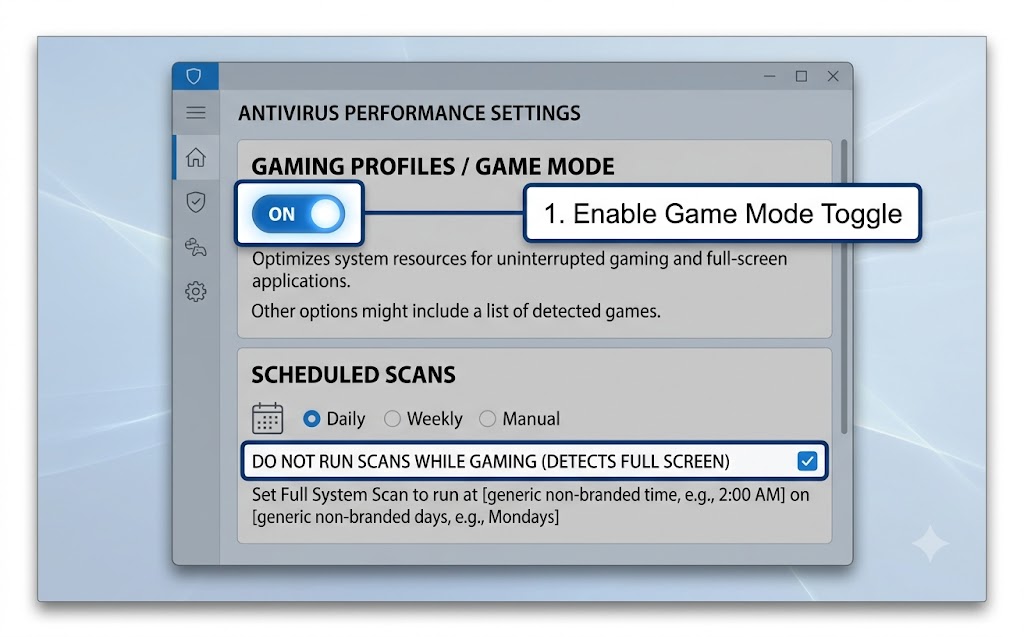
- Enable Game Mode or Silent Mode first — This is the highest-impact step. For Norton: open the main dashboard, navigate to Settings → Silent Mode → Gaming. For Bitdefender: Game Profile activates automatically on fullscreen detection — verify it is enabled under Preferences → Profiles → Game Profile. For ESET: go to Setup → Tools → Gaming Mode and confirm it is on. Each toggle defers scans, pauses definition updates, and suppresses all pop-ups for the duration of any fullscreen session.
- Schedule full scans for off-gaming hours — Set scheduled scans to run between 3:00 AM and 6:00 AM, when the machine is idle. Full scans consume significant CPU and disk I/O; running one mid-session is the single most common cause of antivirus-related FPS drops. All three picks support scheduled scans under their settings or maintenance panels.
- Add your game install folder to the exclusion list — Excluding the folder where Steam, Epic Games, or GOG installs games (typically C:\Program Files\Steam\steamapps\common) prevents the antivirus from scanning game files during load screens. Exclusions, in antivirus configuration, refer to folders or processes the scanner skips during real-time monitoring — not a bypass of active threat protection for those files.
- Update virus definitions before your session, not during — Trigger a manual definition update 10 minutes before launching a game. All three picks download and apply updates in the background automatically, but doing it manually before play eliminates the chance of an auto-update starting during a competitive match. This is the step most gamers overlook.
- Disable hardware-intensive extras during play — If your plan includes a VPN (Norton 360 and Bitdefender Premium Security do), disable it before launching games. VPN encryption adds latency and network overhead that affects online multiplayer performance. Re-enable it after your session. Dark web monitoring and cloud backup features, where present, can also be paused during play without affecting real-time protection.
The settings panel below shows the key configuration options shared across Norton, Bitdefender, and ESET’s gaming modes — all three follow the same 5-step sequence.
With game mode enabled and scans scheduled correctly, the antivirus running in the background becomes invisible to the game. The question of whether any antivirus protection is actually necessary for a gaming PC has a definitive answer — and 2026 threat data makes it direct.
Are Gaming PCs Really at Risk Without Antivirus Protection?
Yes — gaming PCs face a distinct and growing threat landscape in 2026, with 41.47% of all infostealer malware infections traced to gaming-related files, including unofficial mods, cheat software, and cracked game installers. — “Gaming: A Rising Target” (Flare Research, November 2025, 50,000+ infected devices analyzed.)
What specific threats are targeting gaming PCs right now — and what do they actually steal from infected systems?
WeedHack, identified by McAfee in early 2026, logs between 2,000 and 3,000 new infections per day. It distributes through fake YouTube videos promoting popular free Minecraft mods, including Meteor Client and Wurst Client. Once installed, it harvests Discord tokens, browser-stored cryptocurrency wallet credentials, and active Minecraft session IDs. Void Stealer uses actual Steam profile SteamIDs as its command-and-control infrastructure, routing its traffic through a platform that network-level detection tools treat as legitimate. The FBI’s Seattle Division confirmed in March 2026 that seven Steam games installed information-stealing malware between May 2024 and January 2026, with strains including Vidar and a custom infostealer called Fickle Stealer. These are precisely the threat vectors that Norton 360 for Gamers, Bitdefender Total Security, and ESET HOME Security are configured to detect through behavioral and heuristic analysis, not signature matching alone. Windows Defender’s role in defending against these specific threats deserves a direct evaluation.
Is Windows Defender Good Enough for Gaming in 2026?
Windows Defender does not provide adequate gaming-specific protection for most PC gamers in 2026 — it lacks a dedicated game mode, a CPU-aware scan scheduler, and detection tuned for the mod and crack malware vectors that account for over 41% of gaming PC infections.
What specific gaps does Windows Defender have compared to a purpose-built gaming antivirus — and did Microsoft itself acknowledge this?
Windows Defender’s three core gaps for gaming are consistent and structural. First, it carries no dedicated game mode — no CPU reprioritization, no scan deferral triggered by fullscreen detection, and no automated notification suppression during a session. Defender runs background scans on its own schedule regardless of what the host machine is doing. Second, its detection architecture is optimized for broad threat categories and Windows ecosystem threats, not for the behavioral patterns specific to infostealer malware delivered through gaming channels. WeedHack and Void Stealer both exploit distribution vectors outside Defender’s primary detection focus. Third, Microsoft published an article in its Windows Learning Center in January 2026 stating Defender was sufficient for many users “without additional software” — by April 2026, that article was removed and replaced with language positioning Defender as “a strong baseline,” a public retraction that weakens the case for relying on it alone. For a full comparison across all brands ranked by protection score, our guide to the best antivirus software overall covers every product in independent lab-tested depth.
Can Gaming PCs Get Viruses from Mods and Cracks?
Yes — gaming PCs contract viruses and malware primarily through unofficial game mods, cheat software downloads, and cracked game installers, with infostealers designed specifically for gamers representing the fastest-growing malware category in 2026.
Which specific malware families are targeting gamers right now — and what makes gaming-focused infostealers different from general malware?
The Flare Research November 2025 study analyzed over 50,000 infected devices and found that 41.47% of all infostealer infections originated from gaming-related files. The top five infection sources were unofficial mods and cheats for GTA, Roblox, Valorant, Counter-Strike: GO, and Fortnite — with aimbots, mod menus, and skin changers accounting for over half of gaming-specific infections. What distinguishes gaming-focused infostealers from general malware is target specificity: these tools are built to extract game account credentials, in-game item ownership data, and session tokens alongside the cryptocurrency wallet and browser cookie harvesting that general infostealers also perform. A gaming PC running no dedicated antivirus protection treats every mod download and every cracked installer as a trusted executable. Norton 360 for Gamers, Bitdefender Total Security, and ESET HOME Security all apply behavioral analysis at the point of execution — catching the malware at installation before credential harvesting begins. For full system impact scores across 20 antivirus products in 2026 testing conditions, the antivirus performance benchmarks guide covers the AV-Comparatives April 2026 Performance Test results in complete detail.
Norton 360 for Gamers detects all three primary gaming threat categories — mod-distributed infostealers, Steam-linked credential stealers, and cracked-installer crypto-miners — through real-time behavioral scanning that runs without FPS cost when Game Optimizer is active. For gamers who want the top-rated protection with the most comprehensive game mode available:
Norton 360 for Gamers — Best Overall Gaming Pick
- ✓ Detects infostealer malware in game mods via real-time behavioral scan
- ✓ Game Optimizer keeps FPS impact under 3% during active gameplay
→ Rated best overall gaming antivirus for 2026.
See Norton 360 for Gamers DealsWhat Is Gaming Mode in Antivirus Software?
Gaming mode, in antivirus software, is a set of behaviors that activates automatically when a fullscreen game is detected — suppressing pop-up alerts, deferring scheduled scans, and reducing background CPU usage to protect frame rates during active play.
Does every antivirus that claims a game mode actually reduce system load — or do some only silence notifications?
The distinction matters because not all gaming modes are equivalent. Norton’s Game Optimizer, Bitdefender’s Game Profile, and ESET’s Silent Mode all defer scans, pause definition downloads, and suppress notifications simultaneously — operating as a complete reduction in antivirus CPU overhead. Some products use the term differently. TotalAV’s Game Booster, for example, is a system resource optimizer that clears RAM and closes background applications before or during gaming. It does not defer real-time scans or reduce the antivirus engine’s own CPU draw during a session, which means the protection overhead continues at full intensity regardless of whether a game is running. A product that only clears RAM is not offering a true gaming mode — it is offering a system maintenance tool marketed to gamers. For a full breakdown of how Norton’s Game Optimizer functions in extended real-world gaming sessions, the Norton 360 for Gamers review covers all features and configuration options in complete detail.
The Right Antivirus Features Make Your Gaming PC Safer and Faster
Norton 360 for Gamers leads on game mode depth and overall protection, Bitdefender Total Security delivers the lowest CPU footprint with documented FPS improvements, and ESET HOME Security offers the most budget-predictable option with stable annual pricing and no renewal spike. Compare all three at migendeals.com and find the best deal for your gaming setup today.