
To install antivirus software, download the installer directly from the official brand website, run the setup file, and follow the on-screen steps. Before you start, remove any existing antivirus using the brand’s official removal tool. After installing, activate your subscription, run a full scan, and confirm real-time protection is active. The entire process takes under 10 minutes.
Installing antivirus software is a straightforward process — but two common mistakes trip up most users. The first is skipping the removal of an old antivirus before installing a new one. The second is downloading from an unofficial site. Get both right, and the rest of the install takes less time than making coffee.
This guide covers every step for Windows 10, Windows 11, and macOS. It also covers activation, post-install setup, installing on multiple devices under one subscription, and the three errors users hit most often.
Table of Contents
Remove Your Old Antivirus First
Use the official removal tool — not just the standard Windows uninstall — before you install anything new. Running two antivirus programs simultaneously causes severe system slowdowns and blocks real-time protection from working correctly. It also prevents the new installer from registering with Windows Security Center.
Always remove your existing antivirus using the brand’s official removal tool before running a new installer. Standard uninstall via Windows Apps leaves behind registry entries and kernel-level drivers. Those remnants conflict with the incoming software and produce install errors, duplicate protection warnings, or a partially active product that protects nothing.
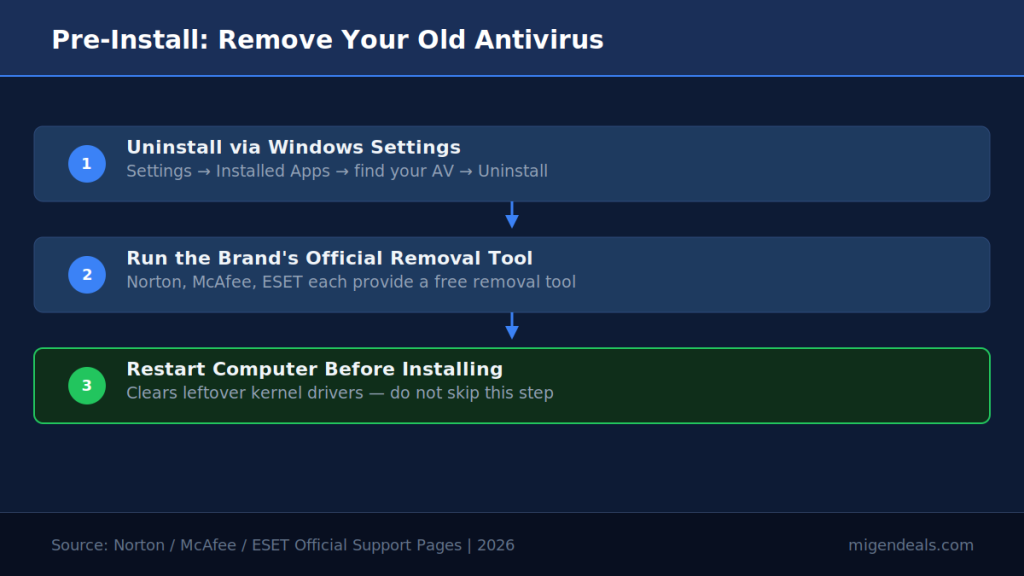
Follow these three steps before installing:
- Uninstall your current antivirus via Windows Settings → Apps → Installed Apps → find your current AV → Uninstall.
- Run the brand’s official removal tool (see table below).
- Restart your computer before launching any new installer.
| Brand | Removal Tool Name | Where to Get It |
|---|---|---|
| Norton | Norton Remove & Reinstall Tool | support.norton.com/sp/en/us/home/current/solutions/v60392881 |
| McAfee | MCPR (McAfee Consumer Product Removal) | mcafee.com/support — search “MCPR” |
| Bitdefender | Bitdefender Uninstall Tool | bitdefender.com/links/uninstall_consumer_paid.html |
| ESET | ESET Uninstaller | support.eset.com/en/kb2289 — Safe Mode required — tool will not run in Normal Mode |
| Malwarebytes | Standard Windows uninstall sufficient | Windows Settings → Apps |
| Webroot | Standard Windows uninstall sufficient | Windows Settings → Apps |
Norton, McAfee, and ESET each provide a free official removal tool — use it before installing any new antivirus software.
Installing a second antivirus without removing the first causes Windows Security Center to display conflicting protection status — leaving your computer partially unprotected. You may also see a hard install block: the new wizard detects an active competing engine and refuses to continue.
Where to Download Antivirus Software Safely
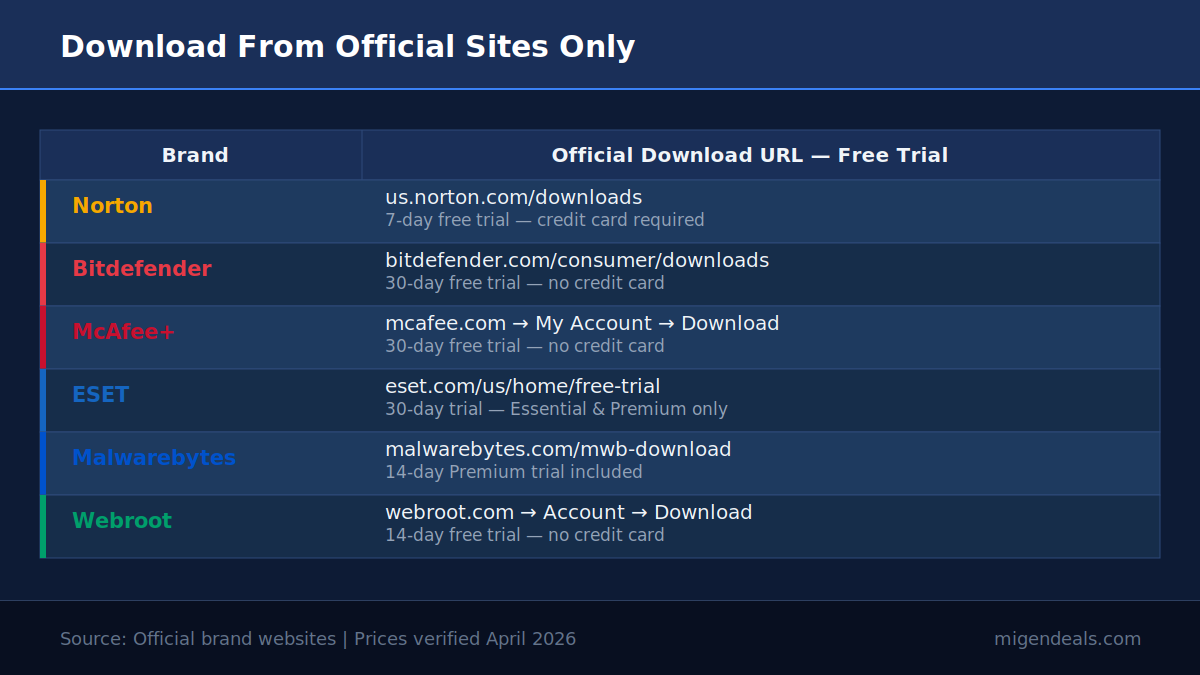
Always download from the brand’s official website — never a third-party download site. Downloading antivirus software from a third-party site exposes your computer to the exact threats you are trying to stop. Fake installers bundle malware, adware, and browser hijackers alongside the real software. One wrong click undoes everything.
Use only these official download sources:
- Norton → us.norton.com/downloads
- Bitdefender → bitdefender.com/en-us/consumer/downloads
- McAfee+ → mcafee.com (click “Download” after signing into your account)
- ESET → eset.com/us/home/free-trial (trial) or your ESET account portal
- Malwarebytes → malwarebytes.com/mwb-download
- Webroot → webroot.com/us/en/home/products/trials (trial) or your Webroot account
Windows installers are .exe files. Mac installers are .dmg or .pkg files. If the file you downloaded has a different extension — especially .zip or .rar — do not open it.
How to Install Antivirus on Windows 11 and Windows 10
The install process on Windows 11 and Windows 10 follows the same core steps — with minor differences in how Windows presents security prompts.
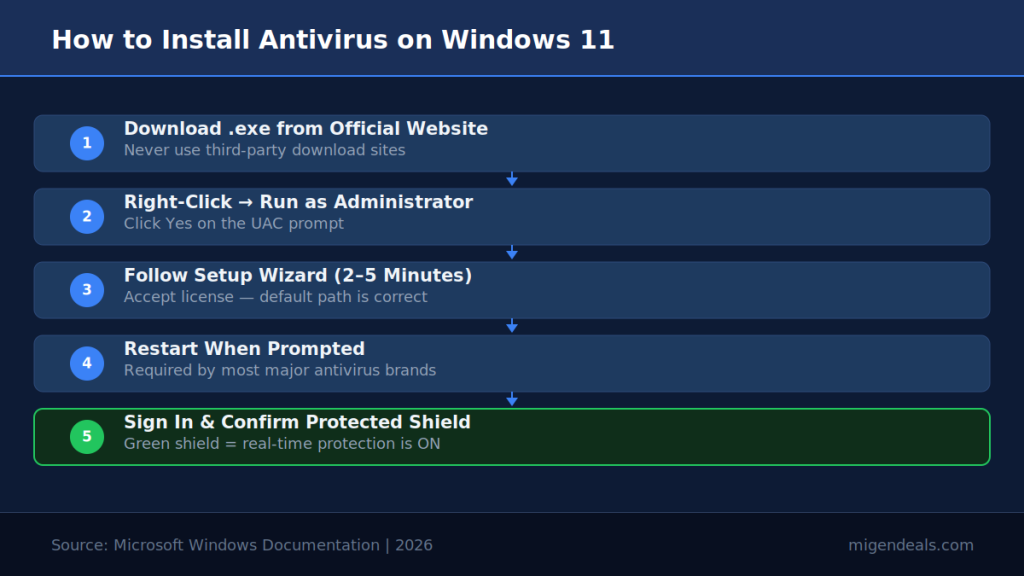
To install antivirus on Windows 11: download the installer from the brand’s official website, double-click the .exe file, click “Yes” on the Windows User Account Control prompt, follow the on-screen setup wizard, restart your computer when prompted, then sign in to activate your subscription. Real-time protection turns on automatically.
Step-by-Step: Install on Windows 11
- Open your Downloads folder and locate the .exe installer.
- Right-click the file and select “Run as administrator.”
- Click “Yes” on the Windows User Account Control (UAC) prompt. If Windows SmartScreen appears, click “More info” then “Run anyway.”
- Follow the setup wizard. Accept the license agreement and choose your install location (the default is correct for most users).
- Wait for the installation to complete. A progress bar tracks the process — typical install time is 2–5 minutes.
- Restart your computer when prompted. Some brands require a restart; others don’t.
- Sign in to your account or enter your license key to activate.
- Confirm the dashboard shows “Protected” — a green shield or status indicator means real-time protection is active.
Step-by-Step: Install on Windows 10
The steps are identical to Windows 11 with two differences:
- SmartScreen wording differs. Windows 10 shows “Windows protected your PC” instead of the Windows 11 dialog. Click “More info” → “Run anyway” — same action.
- Windows Security Center updates more slowly. After install, wait 30–60 seconds before checking that your new antivirus appears as the active provider. On Windows 11, this handoff is near-instant.
What Happens to Windows Defender After You Install?
Windows 11 automatically disables Microsoft Defender Antivirus real-time protection when a registered third-party antivirus — such as Norton, Bitdefender, or McAfee — is installed and active.
Defender continues to receive definition updates silently, but it does not run real-time scans while your third-party antivirus is active. Users frequently see Defender listed in Task Manager and assume something is wrong — it isn’t.
Open Windows Security and confirm the third-party product appears as the active protection provider — not Microsoft Defender — after installing antivirus on Windows. If Defender still shows as your primary protection after install, the new software did not register correctly. Uninstall it, restart, and reinstall.
How to Install Antivirus on Mac
The Mac install process differs from Windows in one key way: macOS requires you to grant explicit system permissions before protection is fully active.
Download the .dmg or .pkg installer from the brand’s official website. Then follow these steps:
- Open the .dmg file from your Downloads folder. A virtual drive mounts on your desktop.
- Drag the app icon to your Applications folder when prompted — or double-click the .pkg to launch the installer wizard directly.
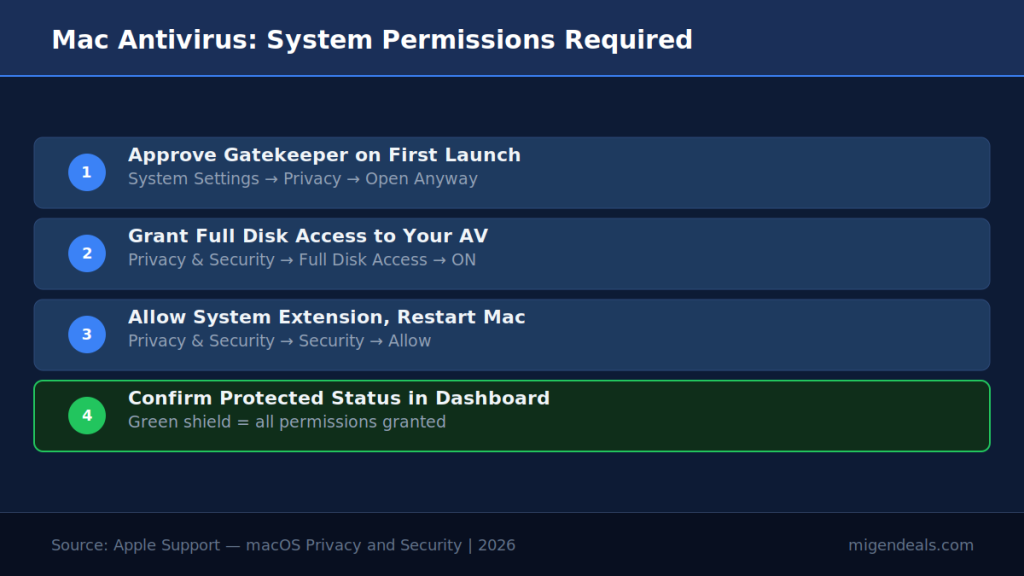
- Open the app from your Applications folder. macOS Gatekeeper may block it on first launch.
- If Gatekeeper blocks the app: Go to System Settings → Privacy & Security → Security → scroll down → click “Open Anyway” → confirm with Touch ID or your Mac password.
- Follow the setup wizard inside the app. It will walk you through the required permission grants.
- Grant Full Disk Access when prompted: System Settings → Privacy & Security → Full Disk Access → toggle your antivirus app to ON.
- Allow the System Extension if asked: System Settings → Privacy & Security → Security → click “Allow” next to your antivirus vendor name → restart your Mac.
- Sign in or enter your license key to activate.
- Confirm the app dashboard shows “Protected.”
Why Mac Asks for Full Disk Access and System Extensions
macOS requires Full Disk Access because, without it, your antivirus cannot scan system folders, hidden files, or user data — leaving large portions of your drive unprotected.
This is not a red flag. It is Apple’s standard privacy gate — Gatekeeper and the System Extension framework. Every reputable Mac antivirus — including Bitdefender, Norton, and Malwarebytes — requires Full Disk Access in macOS System Settings to scan all files and folders on your computer.
System Extensions replace the older kernel extensions (kexts) Apple began deprecating in macOS Catalina (10.15) — with Big Sur (11) blocking deprecated kexts from loading by default. Approving a System Extension is safe when the software comes from a trusted vendor downloaded from the official website.
How to Activate Your Antivirus After Installing
Activation method depends on your brand — most use account login, not a product key.
Check your confirmation email if Norton keeps asking for a product key after an online purchase. Norton activates through account login at account.norton.com — not a standalone key entry screen. This is the most common activation confusion reported by new users.
| Brand | Activation Method | Where to Find Your Credentials | If Activation Fails |
|---|---|---|---|
| Norton | Account login | Confirmation email → account.norton.com | Reset password at account.norton.com |
| Bitdefender | Account login | Confirmation email → central.bitdefender.com | Check spam folder for activation email |
| McAfee+ | Account login | Confirmation email → account.mcafee.com | Re-send activation email from mcafee.com |
| ESET | License key OR account login | Confirmation email or purchase receipt | Contact support at support.eset.com |
| Malwarebytes | Account login OR license key | Confirmation email | Log in at my.malwarebytes.com |
| Webroot | License keycode | Printed on retail box or in confirmation email | Contact support at webroot.com/support |
Norton, Bitdefender, and McAfee+ activate through account login — not a product key — so your confirmation email and account password are all you need.
What to Do in the First 10 Minutes After Install
Do these four things immediately after your antivirus is activated — before you do anything else online.
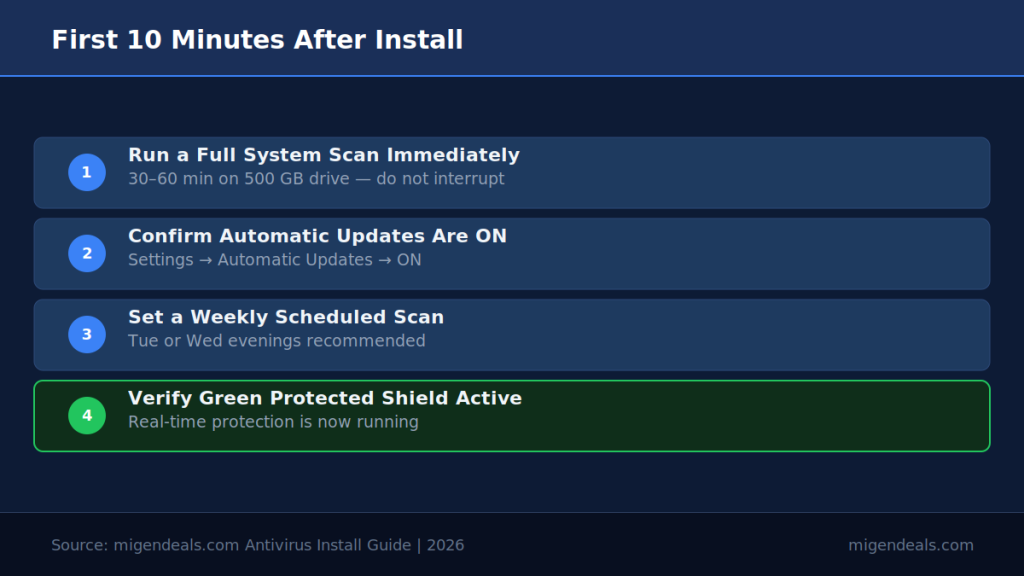
Activation turns on real-time protection automatically. But real-time protection only blocks threats going forward. It does not scan files already on your computer. Running a full system scan immediately after installation detects any existing malware that was present before real-time protection was active.
- Run a full system scan. Open your antivirus dashboard → click “Full Scan” or “Deep Scan.” Expect 30–60 minutes on a standard Windows PC with a 500 GB drive. Let it complete without interruption.
- Confirm automatic updates are on. Open Settings or Preferences inside your antivirus app → locate “Automatic Updates” or “Virus Definition Updates” → verify the toggle is ON. All six brands enable this by default — but confirm it manually.
- Set a weekly scan schedule. Most brands default to weekly scheduled scans. Find the scheduler in Settings and confirm a day and time that works for you. Tuesday or Wednesday evenings are ideal — your PC is on but not in heavy use.
- Check real-time protection is active. Your dashboard should show a green shield, a “You’re Protected” banner, or equivalent. If it shows yellow or red, click the alert and follow the on-screen resolution steps.
How to Install Antivirus on Multiple Devices
Your existing subscription covers additional devices — you don’t need to buy a new plan. Log in to your account on each new device and download the installer from there.
The number of devices your plan covers depends on the tier you purchased. Entry-level plans cover fewer devices; mid-tier plans cover three to five. Check the table below before adding a second device.
| Brand | Entry Plan | Devices Covered | How to Add a Device |
|---|---|---|---|
| Norton AntiVirus Plus | 1 device | 1 | Upgrade to Norton 360 Standard (3 devices) for more |
| Bitdefender Antivirus Plus | 1 or 3 devices | 1 or 3 | Log in at central.bitdefender.com → My Devices → Add Device |
| McAfee+ Essential | 5 devices | 5 | Log in at account.mcafee.com → My Account → Add Device |
| ESET Home Essential | 1–10 devices | Your chosen tier | Log in at my.eset.com → Licenses → Add Device |
| Malwarebytes Standard | 1 device | 1 | Malwarebytes Plus and Total start at 3 devices minimum |
| Webroot Essentials | 1 or 3 devices | 1 or 3 | Log in at my.webrootanywhere.com → Add Device |
Malwarebytes Plus and Total plans require a minimum of 3 devices — the 1-device option covers Standard only. Norton AntiVirus Plus starts at $29.99/yr for the first year and covers 1 device; protecting more devices requires a 360-tier plan.
Common Installation Errors and How to Fix Them
Most install errors fall into three categories — and all three have a quick fix.
Installer Blocked by Windows Security
The fix: re-download from the official website, right-click the .exe, and select “Run as administrator.”
Windows SmartScreen blocks unfamiliar software on first run. This is normal for freshly downloaded installers. Click “More info” → “Run anyway” to proceed.
Run a Microsoft Defender offline scan before retrying if an antivirus installer is blocked after downloading from the official website — existing malware on your computer may be actively preventing installation. To run a Defender offline scan: Windows Security → Virus & threat protection → Scan options → Microsoft Defender Antivirus (offline scan) → Scan now. This runs a pre-boot scan that removes malware before Windows fully loads.
“Another Antivirus Is Running” Error
The fix: re-run the official removal tool for your old brand, restart, and retry the install.
This error means your previous antivirus left active registry entries or kernel drivers behind. The standard Windows uninstall did not finish the job. Run the official removal tool (see the table in the Remove Your Old Antivirus First section above), restart your computer, and retry the install.
Mac Says the App Is from an Unidentified Developer
The fix: System Settings → Privacy & Security → Security → “Open Anyway.”
macOS Gatekeeper blocks apps that haven’t been explicitly approved yet — even legitimate ones from major vendors. This happens on first launch only. After you click “Open Anyway” and confirm with Touch ID or your password, Gatekeeper remembers your approval permanently.
Frequently Asked Questions About Installing Antivirus
Can I Install Antivirus Without a CD or Disc?
Yes — all six brands deliver their software as a download-only installer. Norton, Bitdefender, McAfee+, ESET, Malwarebytes, and Webroot no longer sell physical discs in the US market. Download directly from the brand’s official website using the links in the Where to Download section above. The installer file downloads in seconds on any broadband connection.
Does Installing Antivirus Slow Down My Computer?
No — modern antivirus has minimal impact on system performance. Norton, Bitdefender, and McAfee each scored 6 out of 6 on AV-TEST February 2026 performance testing — meaning installation adds no measurable system slowdown. (Source: AV-TEST, February 2026.) For full performance benchmark data across all six brands, see our AV-TEST rankings 2026 page.
What Is the Easiest Antivirus to Install for Beginners?
Bitdefender and McAfee+ are the easiest starting points — both offer 30-day free trials with no credit card required. You can install, test the full product, and cancel before paying anything. Bitdefender scored 18 out of 18 on AV-TEST February 2026, making it the strongest no-risk option for first-time users. (Source: AV-TEST, February 2026.) For a closer look at the brands before you commit, see our Norton review and the rest of our brand review series.
Can I Install Antivirus on a Phone or Tablet?
Yes — all six brands support Android, and most support iOS. Download the app from the Google Play Store or Apple App Store using your existing subscription account. Your plan’s device count determines how many phones or tablets you can add. See our best antivirus for Android guide for a ranked list of mobile options.
The Bottom Line on Installing Antivirus Software
Installing antivirus software takes under 10 minutes — but skipping the pre-install removal step causes the most common errors. Always remove your existing antivirus using the brand’s official removal tool before running a new installer. If your old software leaves remnants behind, our complete antivirus uninstall guide walks through every brand’s removal process. Download only from the brand’s official website. On Windows 11, the system automatically disables Microsoft Defender real-time protection once a registered third-party antivirus is active — verify this in Windows Security settings after install.
For first-time installers, Bitdefender offers a 30-day free trial with no credit card required and scored 18 out of 18 on AV-TEST February 2026. After installing, run a full system scan immediately, enable automatic updates, and confirm your real-time protection shield is active. That 10-minute setup protects your PC from that moment forward. When you’re ready to choose a plan, see our best antivirus software guide for a full comparison, or check current discounts across all six brands on our best antivirus deals page below.
Ready to Install? Grab the Best Price First
Current first-year discounts on Norton, Bitdefender, McAfee+, ESET, Malwarebytes, and Webroot — updated monthly with renewal-price warnings.
See Today’s Antivirus Deals →