Phishing attacks use deceptive emails, texts, or QR codes to trick you into revealing passwords, financial data, or downloading malware. In 2026, 82.6% of phishing emails show some degree of AI use — clean prose no longer signals legitimacy. Verify the sender’s domain, never click unexpected links, and enable multi-factor authentication on every account.
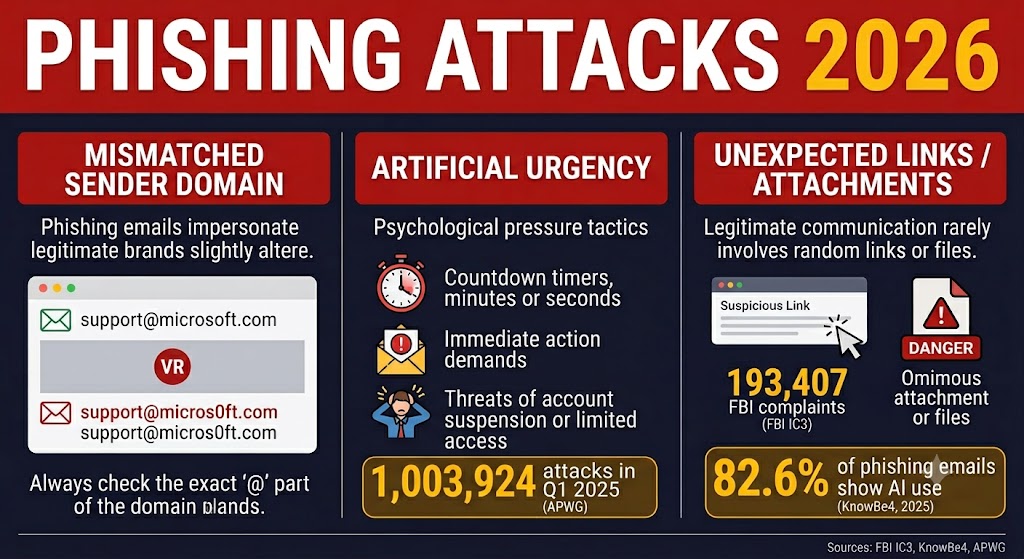
Phishing overtook every other cybercrime category in 2024, accounting for 193,407 complaints and over $70 million in reported losses according to the FBI’s Internet Crime Complaint Center. It is the leading way attackers break into personal accounts, drain bank accounts, and access small business networks — not because it exploits sophisticated software flaws, but because it exploits human trust.
This guide walks you through how phishing campaigns work in 2026, what the warning signs actually look like today, and exactly what to do in the first 15 minutes after clicking a link you shouldn’t have.
Table of Contents
What Is a Phishing Attack?
Phishing is a social engineering attack in which criminals send deceptive messages — via email, text, or phone — to trick recipients into revealing passwords, financial data, or other sensitive information. The name refers to “fishing” for victims: attackers cast lures at scale and wait for someone to bite.
The goal varies by campaign. Attackers may want your login credentials, your banking password, your Social Security number, or access to your employer’s network. What all phishing attacks share is a common mechanism: they exploit human psychology rather than software vulnerabilities. A phishing email doesn’t need to crack your device — it only needs to convince you to type your password into a form that looks like the real thing.
Why Phishing Is Harder to Spot in 2026
The advice you heard five years ago — “look for bad spelling and grammar” — no longer applies. Research by KnowBe4 found that 82.6% of phishing emails analyzed between September 2024 and February 2025 showed some degree of AI use, including AI-assisted text generation, obfuscation, and personalization — making grammatical errors an unreliable detection signal (KnowBe4 Phishing Threat Trends Report, 2025). A 2026 phishing email can perfectly mimic a DocuSign request, complete with the recipient’s correct name, employer, and formatting scraped from LinkedIn — all generated in seconds.
Two widely trusted signals no longer mean what most people think they mean.
The HTTPS Padlock Myth
The padlock in your browser’s address bar confirms that your connection is encrypted — not that the website is legitimate. Phishing sites obtain a free HTTPS certificate from services like Let’s Encrypt in under 60 seconds, meaning the padlock confirms only that your data travels securely to the attacker’s server. Always check the full domain name, not just whether a padlock appears.
How AI Makes Phishing Emails Indistinguishable
Attackers now use AI writing tools to generate personalized lures in bulk. In 2025, Kaspersky researchers documented campaigns in which attackers abused Google’s OAuth system to send phishing messages from no-reply@accounts.google.com — a verified Google address — with legitimate DKIM signatures intact, giving spam filters no technical basis to flag them. The email looked exactly like a real Google security alert because, technically, it came from Google’s own infrastructure.
The 7 Most Common Phishing Attack Types in 2026
The Anti-Phishing Working Group recorded 1,003,924 phishing attacks in Q1 2025 alone — the highest single-quarter volume since late 2023 — with financial services accounting for 30.9% of all targeted sectors (APWG Q1 2025 Report). Those volumes mean every phishing type in the comparison below reaches US inboxes daily — knowing the category is the first step to recognizing the lure before it lands.
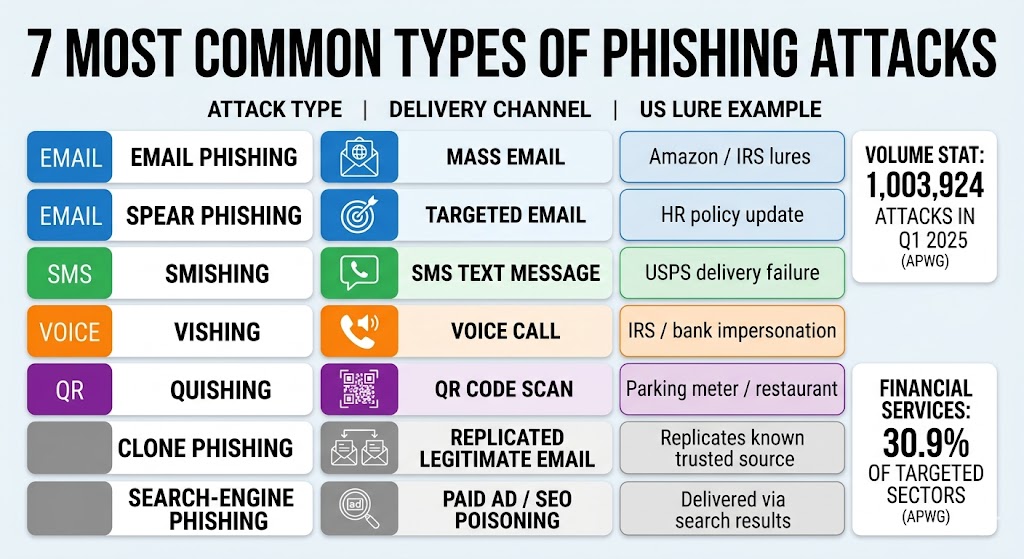
| Attack Type | What It Looks Like | Common US Lure |
|---|---|---|
| Email phishing | Mass-sent email impersonating a trusted brand | Amazon account locked, IRS refund notice |
| Spear phishing | Targeted email using personal details about the recipient | Fake HR policy update with your manager’s name |
| Smishing (SMS) | Text message with a malicious link; may appear in your real carrier’s SMS thread | USPS package delivery failure, bank fraud alert |
| Vishing (voice) | Phone call impersonating a bank, IRS, or tech support agent | “Your Social Security number has been suspended” |
| Quishing (QR code) | QR code directing to a harvesting page; sticker placed over a legitimate code | Parking meter, restaurant menu, package label |
| Clone phishing | Exact copy of a legitimate email you previously received, with the link swapped | DocuSign request for a document you already signed |
| Search-engine phishing | Paid ad or SEO-poisoned result ranking above the real brand’s website | Fake bank login page appearing above the real one |
Quishing deserves particular attention: QR code phishing attacks increased 400% between 2023 and 2025, with attackers placing sticker overlays on legitimate codes in high-traffic public locations (Abnormal Security, 2025).
8 Warning Signs You’re Looking at a Phishing Attempt
Check for these eight red flags before clicking any link: a mismatched sender domain, artificial urgency, a generic greeting, an unexpected link or attachment, a request for sensitive information, an offer that seems too good to be true, a slightly wrong URL, and pressure to act before verifying with the sender directly.
Each of these signals exists because attackers deliberately engineer it to override your critical thinking. Here is what to look for — and why it works on the attacker’s side:
- Mismatched sender domain. The display name says “Amazon” but the email address reads orders@amazon-alerts-secure.net. Attackers register lookalike domains because most email clients show the display name first.
- Artificial urgency. “Your account will be closed in 24 hours unless you verify now.” Panic reduces the time you spend checking whether the message is real. Security researchers who study social engineering note that urgency is the attacker’s most reliable tool — it compresses the verification window to near zero.
- Generic greeting. “Dear Customer” or “Dear Account Holder” signals a mass-blast campaign. Attackers can’t personalize millions of emails, though spear phishing campaigns now use your name — which is why a personalized greeting alone doesn’t confirm legitimacy.
- Unexpected link or attachment. You didn’t request a password reset, but one arrived. You have no open orders with this shipper. Treat any message as suspicious if you didn’t initiate it.
- Request for sensitive information. Legitimate banks, employers, and government agencies never request passwords, Social Security numbers, or payment information via email or text message.
- Too-good-to-be-true offer. Unexpected prize notifications, unclaimed refunds, and overpayment requests follow the same playbook attackers have used for decades — they still work because reward overrides caution.
- Slightly wrong URL. Phishing URLs frequently substitute one letter in a trusted domain — such as “arnazon.com” or “paypa1.com” — a technique that works because the human eye skips familiar patterns. Hover over any link before clicking to see the full destination URL.
- Pressure to act before verifying. Any message that discourages you from calling the sender directly or checking your account through the company’s official app is a red flag. Legitimate organizations have no reason to prevent you from verifying.
The checklist below condenses all eight signals into a single scannable reference you can keep on hand.
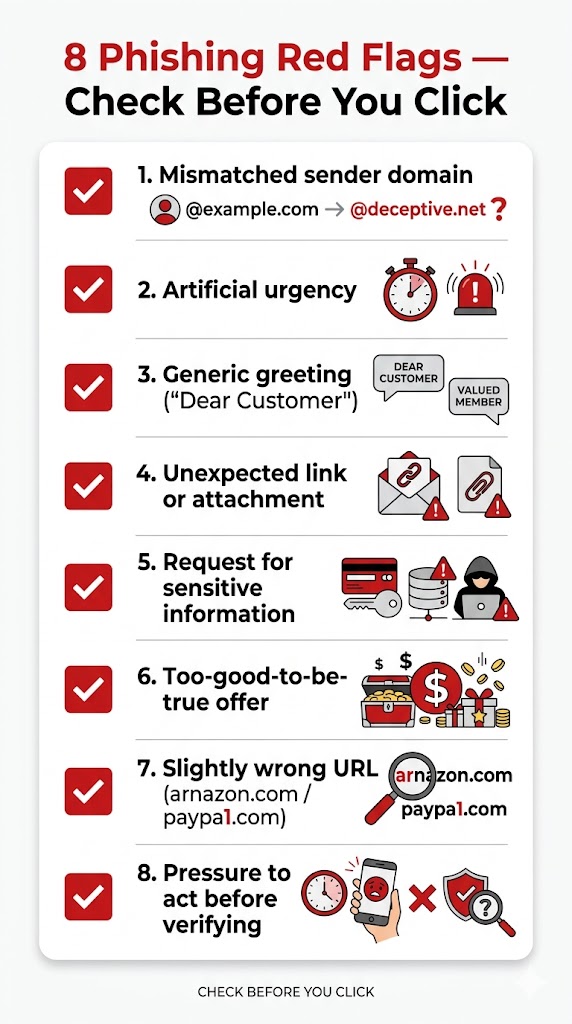
Where email phishing relies on sender impersonation, smishing exploits the same trust gap in text threads — the checklist above applies to both channels equally.
Inside the Attacker’s Playbook: How Phishing Campaigns Work
Understanding how attackers build a phishing campaign makes every warning sign more recognizable. A modern campaign follows five steps.
Acquire the target list. Attackers buy email and phone lists from dark web data breach dumps. In January 2024, researchers discovered the “Mother of All Breaches” — an unprotected database aggregating 26 billion previously leaked records — giving attackers near-unlimited targeting data at minimal cost.
Select the lure and clone the brand. Attackers choose a high-recognition brand — USPS, Amazon, or your bank — and copy its login page HTML exactly. Free browser developer tools make cloning a website a 10-minute task.
Register a lookalike domain and add HTTPS. A domain like usps-delivery-notice.com costs under $15/year. Adding a free Let’s Encrypt certificate takes under 60 seconds. The finished page looks identical to the real one.
Send at scale. Phishing emails go out through compromised email servers, bulletproof hosting providers, or platforms with weak abuse controls. A campaign can reach 100,000 inboxes within an hour.
Harvest and monetize. Stolen credentials arrive in real time on a dashboard the attacker monitors. Attackers sell stolen banking credentials on dark web markets, turning each successful phish into a direct financial return regardless of the victim’s account balance. When the target is a business network, the harvested access frequently becomes the entry point for a ransomware deployment.
A phishing campaign can be operational within hours — attackers register a lookalike domain, clone the target brand’s login page, obtain a free HTTPS certificate, and begin sending lures before most security tools have flagged the domain. The diagram below traces that timeline from domain registration to credential harvest.
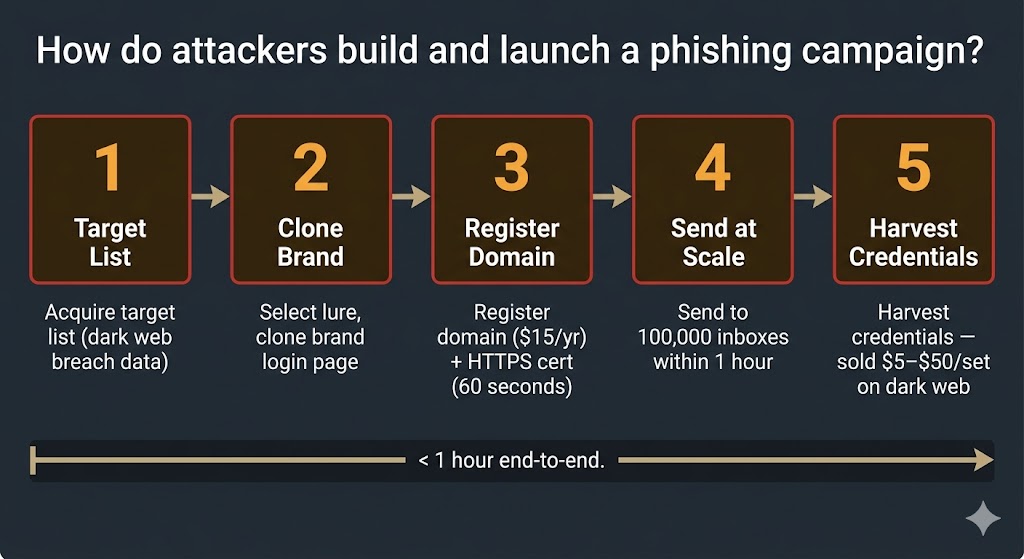
That speed makes recognition the only defense with a meaningful lead time — stopping the click is faster than recovering from it.
The Phishing Lures Most Likely to Target You in the US
Attackers concentrate on brands and agencies that every American interacts with regularly — because familiarity lowers suspicion.
Homeowners are most likely to receive these four lures in their inbox or on their phone: a USPS package delivery failure text (high package volume makes unexpected delivery notices credible), an IRS refund or verification notice (fear and financial gain are the two strongest emotional triggers), an Amazon account security alert (behavioral urgency — you don’t want to lose account access), and a Geek Squad auto-renewal email (auto-billing anxiety — you’re not sure whether you signed up for something).
Small business owners face more targeted and more expensive threats. Business email compromise — a phishing variant in which attackers impersonate executives or vendors — caused 21,442 complaints and approximately $2.77 billion in losses in 2024 according to the FBI’s Internet Crime Complaint Center, averaging $130,000 per incident. Common small business lures include a fake vendor invoice with updated bank routing details, a CEO or HR impersonation requesting an urgent wire transfer, a DocuSign request for a document you never sent, and a fake Zoom meeting invitation with a credential-harvesting login page.
Can You Get Hacked Just by Opening an Email?
Opening a phishing email in a modern, updated email client — Gmail, Outlook, or Apple Mail — does not install malware. The attack requires you to click a link, open an attachment, or enter credentials on a harvested page. HTML emails can load tracking pixels that log your IP address and confirm the email was opened, but a tracking pixel is a privacy signal, not a malware vector.
Attachments are the primary delivery mechanism for malware: PDFs with embedded scripts, Microsoft Office documents with macros, and .zip files containing executable files all require you to open them before they can do anything. Zero-click exploits — attacks that compromise a device without any user interaction — exist but are nation-state-grade tools targeting enterprise endpoints, not consumer email accounts on updated devices.
What to Do If You Clicked a Phishing Link
Act immediately. Changing the compromised account’s password within 15 minutes of clicking a phishing link significantly reduces the window in which attackers can use harvested credentials before they are invalidated.
- Close the tab immediately. Do not interact further with the page — don’t click “back,” don’t submit any forms, and don’t enter any information.
- Change the targeted account’s password now. Then identify every other account that uses the same password and change those too. Password reuse is how a single phished account cascades into a full account takeover.
- Enable MFA on the compromised account if it isn’t already active. Even if an attacker has your new password, MFA blocks login without the second factor.
- Run a full antivirus scan on the device you used within the hour. The immediate risk is low if you clicked but did not enter any information — but a full scan rules out drive-by download attempts that can occur through exploit kits hosted on compromised pages.
- Check your bank and card statements — call your bank immediately if you entered any financial information. Do not wait for a statement. Ask them to flag your account for suspicious activity.
- Report the phishing attempt. See the reporting channels in the next section.
6 Steps to Protect Yourself from Phishing Attacks
These six steps reduce your risk before an attack reaches you — not after.
- Enable MFA on every account. Start with email, banking, and cloud storage. Multi-factor authentication prevents attackers from accessing an account even when a phishing attack successfully captures a password, making it the single highest-impact protection step available to consumers.
- Use a password manager. Unique passwords on every site mean a stolen credential from one account cannot unlock any other. A password manager generates and stores unique passwords automatically — you don’t need to remember them.
- Verify the sender’s domain before clicking. Hover over the “from” address in any email that asks you to act. The domain after the @ symbol must exactly match the company’s real domain — “paypal.com” is legitimate; “paypal-security-alert.com” is not.
- Never scan a QR code from an unknown source. Check parking meters and restaurant menus for sticker overlays placed on top of the original code. Use your phone’s camera app to preview the destination URL before opening it — do not proceed if the URL doesn’t match the expected brand’s domain.
- Keep your OS, browser, and apps updated. Software patches close the exploit kits that phishing pages use to deliver malware. Enable automatic updates on every device you own.
- Use antivirus with anti-phishing web protection. Antivirus software with web filters automatically blocks known malicious URLs before the page loads — stopping many phishing attacks before you ever see the fake page.
How to Report a Phishing Attempt in the US
Reporting takes under two minutes and helps shut down active campaigns. Forwarding phishing emails to reportphishing@apwg.org allows the Anti-Phishing Working Group to identify and request takedown of malicious domains within hours of a campaign launch — protecting other users from the same message you just received.
- Email phishing: Forward the message to reportphishing@apwg.org
- Text/SMS phishing: Forward the message to 7726 (spells SPAM — works on all major US carriers: AT&T, Verizon, T-Mobile)
- FTC complaint: ReportFraud.ftc.gov
- FBI cybercrime report: ic3.gov
- Your email provider: Use the native “Report phishing” or “Report spam” button — this trains the provider’s filter to block the same campaign for other users
Frequently Asked Questions About Phishing
What Are the 4 P’s of Phishing?
The 4 P’s is a recognition framework used by the FTC and VA: Pretend (the sender pretends to be someone you trust), Problem (they claim there is an urgent problem with your account), Pressure (they pressure you to act immediately), and Pay (they request money, gift cards, or credential information).
A message that hits all four signals is almost certainly a phishing attempt.
Can a Text from My Bank’s Real Number Still Be a Scam?
Yes. Attackers spoof sender IDs to inject messages into the same SMS thread as your bank’s legitimate alerts — a technique called SMS spoofing. Ignore any link in the message and call the number on the back of your debit or credit card instead.
Can Macs and iPhones Get Phished?
Yes. Phishing attacks target credentials, not operating systems — a convincing fake login page is equally effective on a Mac, iPhone, Windows PC, or Android device. No operating system protects you from typing your password into a fake form. For whether standalone security software adds meaningful protection beyond built-in tools, see the guide on whether antivirus is worth it in 2026.
How Do I Know If a QR Code Is Safe to Scan?
Inspect the physical code before scanning — look for sticker overlays on top of an existing code, a common quishing technique on parking meters and restaurant menus. Use your phone’s built-in camera app to preview the URL before opening it. Do not proceed if the URL doesn’t match the expected brand’s domain.
The Bottom Line on Phishing Attacks
Phishing is the most reported cybercrime in the United States, generating 193,407 FBI complaints and over $70 million in losses in 2024 alone — and those numbers are rising. The key shift in 2026 is that AI has eliminated the “look for typos” shortcut: KnowBe4 research found that 82.6% of phishing emails analyzed between September 2024 and February 2025 showed some degree of AI use, meaning clean, professional prose is no longer evidence of legitimacy. Phishing is also only the delivery mechanism — the payloads it carries are covered in the complete guide to types of malware.
The most reliable defenses are behavioral, not technical. Verify the sender’s domain before clicking any link. Enable multi-factor authentication on every account — especially email, banking, and cloud storage. Multi-factor authentication prevents attackers from accessing an account even when a phishing attack successfully captures a password, making it the single highest-impact protection step available to consumers.
Act within 15 minutes after clicking a suspicious link: close the tab, change the compromised password, enable MFA, run an antivirus scan, and check your financial accounts. Report the attempt to APWG at reportphishing@apwg.org and to the FTC at ReportFraud.ftc.gov. For automatic protection against known phishing URLs, see the guide to phishing and web protection features — and to pick a suite that includes those filters, start with the best antivirus software guide.