
Norton 360 Deluxe is the best antivirus for most families — 5 devices with parental controls, 18/18 on AV-TEST’s February 2026 Windows evaluation, and $49.99/yr in the first year ($124.99/yr at renewal), backed by a 60-day money-back guarantee. McAfee+ Advanced Family ($119.99/yr, unlimited devices) is the stronger pick for larger households or those needing $1 million in identity theft protection.
A family antivirus plan is not the same as an individual subscription. The right plan covers every device in the house — not only the parent’s laptop — and must include parental controls, cross-platform support across Windows, macOS, Android, and iOS, and transparent renewal pricing so the year-two cost is never a surprise. It also needs a central management dashboard, so one parent account can install, monitor, and adjust protection on every household device remotely. Because most households run devices across several platforms, cross-platform coverage is the single most important criterion when choosing a family antivirus plan.
The four picks below cover every major household setup: Norton 360 Deluxe for up to 5 devices, McAfee+ Advanced Family for unlimited devices, Bitdefender Total Security Family for 25 devices at $3.20 per device per year, and Webroot Total Protection for older or budget hardware. All recommendations are filtered through family-specific criteria — parental controls, device count, cross-platform coverage, and renewal pricing transparency — not just raw lab scores. The guide also covers how Windows Defender compares for families, why renewal pricing matters more than year-one deals, and what parents need to know about parental control limitations.
Table of Contents
4 Best Antivirus Plans For Families In 2026 At A Glance
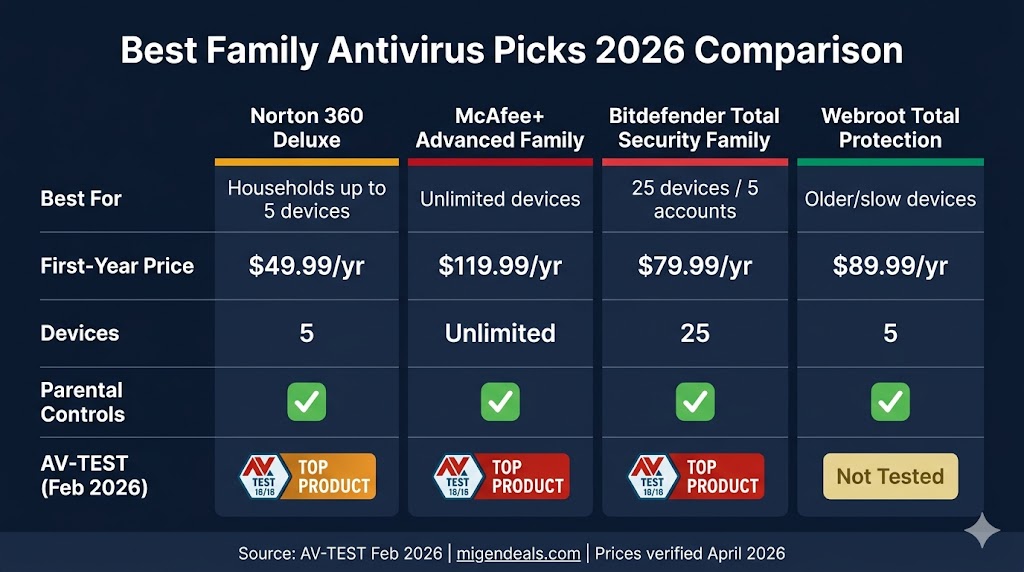
The table below compares all four picks across the criteria that matter most for a household with children and multiple devices.
| Norton 360 Deluxe | McAfee+ Adv. Family | Bitdefender TS Family | Webroot Total Prot. | |
|---|---|---|---|---|
| Best For | Up to 5 devices | Unlimited devices | 25 devices / 5 accounts | Older / slow devices |
| First-Year Price | $49.99/yr | $119.99/yr | $79.99/yr | $89.99/yr |
| Devices Covered | 5 | Unlimited | 25 | 5 |
| Parental Controls | ✅ | ✅ | ✅ | ✅ |
| AV-TEST Score (Feb 2026) | 18/18 ✅ | 18/18 ✅ | 18/18 ✅ | Not tested |
All prices are first-year promotional rates. Renewal rates are significantly higher — see the renewal pricing section below. AV-TEST data: February 2026 round (av-test.org).
Norton 360 Deluxe, McAfee+ Advanced Family, and Bitdefender Total Security Family each achieve 18/18 on AV-TEST’s February 2026 evaluation — the highest possible score — making all three independently validated choices for household security. Webroot does not participate in AV-TEST; that trade-off is covered in full in the Webroot section below.
For most families with up to 5 devices, Norton 360 Deluxe is the right starting point. Families with 6 or more devices, or those needing $1 million in identity theft coverage, should go directly to McAfee+ Advanced Family.
5 Things Families Actually Need From Antivirus Software
A family antivirus plan needs five features beyond raw malware detection: parental controls, multi-device coverage, cross-platform support, transparent renewal pricing, and a central management dashboard. Most antivirus marketing focuses on detection rates alone — but for a household with children online, these five criteria determine whether the software actually protects the family.
Parental controls built into the plan. Web content filtering, screen time limits, and app supervision must be included in the subscription tier you actually buy — not as a paid add-on. Bitdefender and McAfee+ include parental controls only on their Family plan tiers, not on any Individual plan — making it essential to check the specific tier, not just the brand name, before purchasing. Parental controls technology — how each antivirus enforces content filtering, screen time limits, and app supervision at the device level — is examined in detail in our parental controls feature guide.
Multi-device coverage of 5 or more devices. A household with two parents and children quickly accumulates laptops, phones, and tablets across multiple people. Plans capped at 3 devices rarely cover an entire household without overlap or gaps.
Cross-platform support across Windows, macOS, Android, and iOS. Most families don’t run a single operating system. A suite that excels on Windows but delivers a stripped-down iOS app provides false confidence. Note: Apple’s sandboxing limits what any antivirus can do on iPhone and iPad — iOS coverage means web protection, VPN, and phishing alerts, not traditional malware scanning.
Transparent renewal pricing. First-year promotional rates drop sharply at renewal. The gap ranges from $60.00 per year (Bitdefender) to $150.00 per year (McAfee+ Advanced Family). Knowing the year-two cost before you buy prevents the most common complaint in family antivirus — the renewal price shock.
A central management dashboard. One parent account that controls all household devices, pushes installations to kids’ devices remotely, and adjusts web filtering without physically touching the child’s phone or laptop.
Norton 360 Deluxe — Best Overall Family Antivirus In 2026
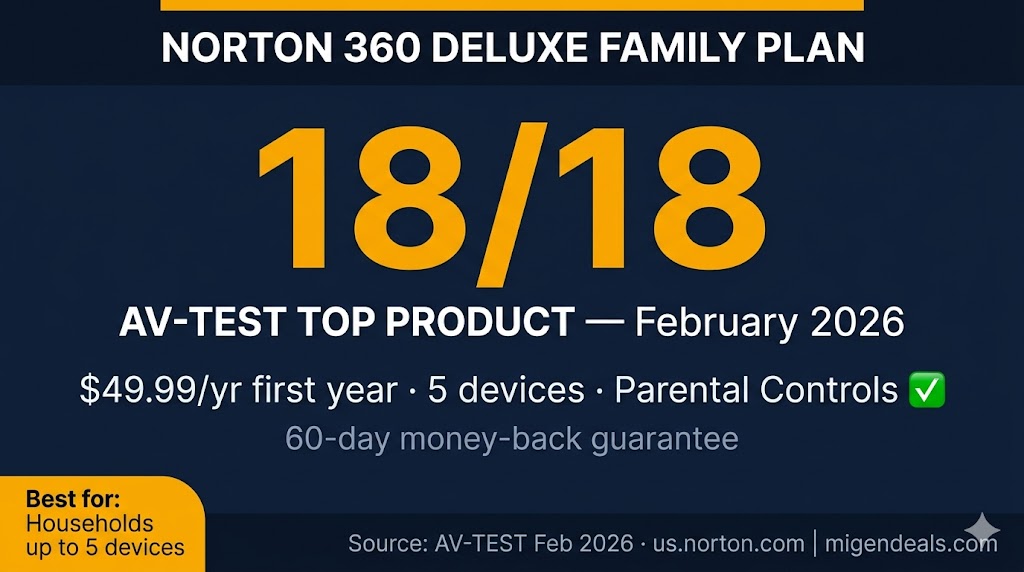
Norton 360 Deluxe is the right choice for most families with up to five devices — parental controls included, 18/18 on AV-TEST’s February 2026 Windows evaluation, $49.99/yr first year ($124.99/yr at renewal), and backed by a 60-day money-back guarantee that no other lab-tested pick in this guide matches.
Norton 360 Deluxe covers 5 devices — including parental controls via Norton Family — for $49.99/yr in the first year ($124.99/yr at renewal), earning 18/18 in AV-TEST’s February 2026 Windows evaluation, according to av-test.org.
The parental controls included in Norton 360 Deluxe cover web content filtering, screen time scheduling, and app supervision across all 5 devices from one parent dashboard. The controls work on Windows, macOS, Android, and iOS. A technical comparison of how Norton’s parental controls enforce restrictions at the device level appears in our parental controls feature guide.
One important distinction: Norton AntiVirus Plus and Norton 360 Standard do not include parental controls. Families must purchase Norton 360 Deluxe or above to access them. Norton 360 Deluxe also adds 50 GB of cloud backup (Windows only), Dark Web Monitoring, and Scam Protection — none of which are available on lower-tier plans.
The free trial is 7 days and requires a credit card — the shortest in this group. Norton’s 60-day money-back guarantee is the longest among the three lab-tested family picks in this guide, giving households two full months to evaluate the software before committing.
A comprehensive performance breakdown across all Norton plan tiers and devices appears in our Norton 360 review. Current first-year discounts are listed on our Norton discount codes page.
Who Should NOT Buy Norton 360 Deluxe
Norton 360 Deluxe is not the right pick for every household. Skip it if:
- Your household has 6 or more devices — the 5-device cap will leave someone unprotected. Consider Norton 360 with LifeLock Select Plus (10 devices, $99.99/yr first year) or McAfee+ Advanced Family (unlimited devices).
- You need $1M identity theft insurance — Deluxe includes Dark Web Monitoring but no stolen funds reimbursement. Upgrade to Norton 360 with LifeLock Select Plus ($99.99/yr first year) or McAfee+ Advanced Family.
- You want a credit-card-free trial before committing — Norton requires a card for its 7-day trial. McAfee+ and Bitdefender both offer 30-day trials with no credit card required.
Families who need broader protection than 5 devices will find McAfee+ Advanced Family covers every device in the house without a cap. Current Norton 360 Deluxe pricing and verified first-year discount rates are available on our Norton deals page.
McAfee+ Advanced Family — Best For Unlimited Devices
McAfee+ Advanced Family is the right choice for households with six or more devices or those needing identity theft protection — unlimited device coverage, $1 million in identity theft coverage, and $119.99/yr in the first year ($269.99/yr at renewal), with a 30-day money-back guarantee and a 30-day free trial that requires no credit card.
McAfee+ Advanced Family covers unlimited devices for $119.99/yr in the first year — the only plan among the four picks with no device cap — making it the logical choice for households with six or more devices. It includes up to $1 million in identity theft coverage and automated personal information removal, features absent from Norton 360 Deluxe and Bitdefender Total Security Family at comparable price points.
The parental controls in McAfee+ Advanced Family are confirmed — but they are available exclusively on McAfee+ Family plan tiers, not on any Individual plan. McAfee+ Essential ($39.99/yr, 5 devices) is a budget option for families who need basic malware protection across multiple devices, but it includes no parental controls. Families who need parental controls must select a Family-tier plan.
McAfee+ Advanced Family also includes automated personal information removal from data broker sites, credit score monitoring, bank and credit card transaction monitoring, and identity restoration support — a meaningful upgrade over standard antivirus protection for families concerned about identity theft. The $1 million coverage ceiling applies per subscriber on the household account.
McAfee+ scores 18/18 on AV-TEST’s February 2026 Windows evaluation, according to av-test.org. The free trial is 30 days with no credit card required — the strongest trial offer in this group and a meaningful advantage for families who want to test the full suite before paying.
Full plan details, feature breakdowns, and lab test results appear in our McAfee+ review. Current first-year pricing and coupons are on our McAfee+ coupon page.
Who Should NOT Buy McAfee+ Advanced Family
- Your household has 5 or fewer devices and doesn’t need identity theft coverage — Norton 360 Deluxe is $70.00/yr cheaper in year one and covers the same core use case.
- You want parental controls only, without the identity theft and data broker removal features — Bitdefender Total Security Family delivers strong parental controls and 25-device coverage for $40.00/yr less.
- You are on a strict budget — at $119.99/yr first year ($269.99/yr at renewal), McAfee+ Advanced Family carries the highest year-two renewal cost of any pick in this guide.
McAfee+ Advanced Family plans — including the Advanced and Ultimate Family tiers — are listed with current verified pricing on our McAfee+ coupon page, updated monthly.
Bitdefender Total Security Family — Best Value For Multi-Device Homes
Bitdefender Total Security Family is the lowest per-device family antivirus available — 25 devices across 5 user accounts for $79.99/yr in the first year ($139.99/yr at renewal), at $3.20 per device per year, with a 30-day free trial and 18/18 on AV-TEST’s February 2026 evaluation.
Bitdefender Total Security Family covers 25 devices across 5 user accounts for $79.99/yr in the first year — a per-device cost of $3.20/yr, the lowest among all four family picks in this guide. Each of the 5 accounts gets its own login, making it practical for multi-generational households or families where each parent wants separate dashboard control.
There is one critical distinction every buyer must know: Bitdefender Total Security Individual ($59.99/yr) does not include parental controls. Families must purchase the Total Security Family tier ($79.99/yr) or above to access content filtering and screen time management. This is one of the most common purchasing mistakes in the Bitdefender lineup.
Bitdefender earns 18/18 on AV-TEST’s February 2026 Windows evaluation, according to av-test.org. The free trial is 30 days with no credit card required — matching McAfee+ as the strongest trial offer in this group.
Families who want Unlimited VPN alongside parental controls can upgrade to Bitdefender Premium Security Family ($99.99/yr first year, $169.99/yr MSRP). That tier adds AI Scam Protection, Anti-tracker, and Email Protection on top of everything in Total Security Family — plus a VPN without the 200 MB/day limit that applies to Total Security plans.
A detailed review of Bitdefender’s plan tiers, lab performance, and parental controls implementation appears in our Bitdefender review. Current promotional pricing is on our Bitdefender promo code page.
Who Should NOT Buy Bitdefender Total Security Family
- You need identity theft insurance — neither Total Security Family nor Premium Security Family includes stolen funds reimbursement or credit monitoring. McAfee+ Advanced Family is the right upgrade.
- You need more than basic parental controls — Bitdefender’s controls cover content filtering and screen time; families who need app-level supervision or location tracking should evaluate Norton’s parental control tier closely.
- You need more than a 30-day money-back window — Webroot’s 70-day guarantee gives more than twice the evaluation period for households that need longer to test across all devices.
Webroot Total Protection — Best Lightweight Pick For Families
Webroot Total Protection is the right choice for families running older or budget hardware — 5 devices with parental controls, a VPN, and up to $1 million in fraud reimbursement for $89.99/yr in the first year ($179.99/yr at renewal), backed by a 70-day money-back guarantee that is the longest in this group.
Webroot Total Protection covers 5 devices with parental controls, a VPN, and up to $1 million in fraud reimbursement for $89.99/yr in the first year ($179.99/yr at renewal), backed by a 70-day money-back guarantee — the longest in this group. Its primary advantage is system footprint: Webroot processes most of its scanning in the cloud rather than on the device, which means it runs faster and uses significantly less RAM and CPU than any of the three heavier suites in this guide.
For families whose kids use a 4-year-old Windows laptop or a budget device that slows noticeably under Norton or Bitdefender, Webroot Total Protection is the practical solution. The lighter footprint matters most on devices with 4 GB of RAM or less.
There is one mandatory caveat: Webroot does not participate in AV-TEST or AV-Comparatives independent lab testing. Third-party lab validation is not available for Webroot Total Protection. Families who require independently verified malware detection scores should choose Norton 360 Deluxe, McAfee+ Advanced Family, or Bitdefender Total Security Family instead. Webroot’s protection is built on a cloud-based architecture with a strong track record among its user base, but it cannot be compared directly to the other three picks on a lab-score basis.
The $1 million fraud reimbursement is underwritten by American Bankers Insurance Company of Florida (Assurant). The 70-day money-back guarantee is the longest in this guide — 10 days longer than Norton’s 60-day window and 40 days longer than McAfee+ and Bitdefender.
Full performance details and a system impact comparison appear in our Webroot review. Current promotional pricing is on our Webroot coupon page.
Who Should NOT Buy Webroot Total Protection
- Your family needs independently lab-validated malware protection — Webroot has no AV-TEST or AV-Comparatives data. Norton, McAfee+, and Bitdefender all hold 18/18 AV-TEST TOP PRODUCT status.
- You have more than 5 devices — Webroot Total Protection covers 5 devices only. McAfee+ Advanced Family is the only pick in this guide with no device cap.
- You need identity theft coverage for multiple individuals — Webroot Premium and Total Protection cover 1 individual identity per plan. McAfee+ Advanced Family extends coverage across the household.
Which Antivirus Is Right For Your Family’s Device Mix?
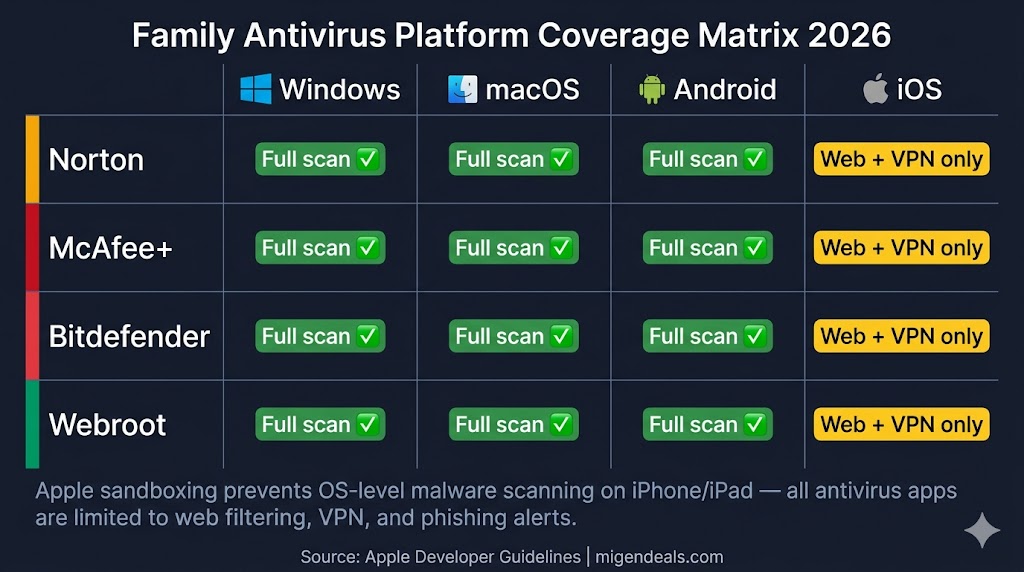
The right pick depends on what platforms your household actually uses — not what a generic review list assumes you own. Norton 360 Deluxe and McAfee+ Advanced Family both cover Windows, macOS, Android, and iOS. On iPhone and iPad, all four picks deliver web protection, VPN, and phishing alerts — not traditional malware scanning, due to Apple’s sandboxing. No pick in this guide provides OS-level protection for school-issued Chromebooks.
All four family antivirus picks in this guide support Windows and Android with full malware protection, but iOS apps are limited by Apple’s sandboxing restrictions to web threat filtering, VPN, and phishing alerts — not traditional virus scanning.
Windows Laptops And iPhones — The Most Common US Family Setup
This is the most common household configuration in the US: one or two Windows laptops (work or school), two or more iPhones, and possibly an iPad for younger kids. All four picks in this guide support both Windows and iOS — but iOS coverage works differently than Windows coverage, and families should know the distinction before purchasing.
Apple restricts third-party apps from scanning iOS at the operating system level. What you get on an iPhone or iPad with any antivirus suite is web threat protection, a VPN, phishing and scam alert detection, and dark web monitoring — not malware removal. That coverage is genuinely valuable, but it is not equivalent to what the same app does on a Windows device.
For a household with 5 or fewer devices using this setup, Norton 360 Deluxe is the strongest choice: 18/18 on AV-TEST, parental controls on all 5 devices, and full iOS web protection. For 6 or more devices, McAfee+ Advanced Family removes the device cap entirely.
Families With Android Kids’ Devices And iPhone Parents
Android devices carry meaningfully higher malware exposure than iPhones — particularly for kids who download games, mods, or apps outside the Google Play Store. All three lab-tested picks in this guide cover Android with full malware scanning: Norton, McAfee+, and Bitdefender all earn 18/18 on AV-TEST’s January 2026 Android evaluation, according to av-test.org.
The practical challenge for mixed Android-and-iPhone households is parity: the Android app does full malware scanning while the iPhone app delivers web filtering and VPN. Set that expectation with your family up front — the iPhone is not unprotected, but it is protected differently.
For this device mix, McAfee+ Advanced Family is the most practical choice because it covers unlimited devices across both operating systems with a single subscription and no per-device math required.
Families With School-Issued Chromebooks
School-issued Chromebooks are the one device type where all four picks in this guide provide limited protection. ChromeOS runs in a sandboxed environment that most antivirus suites cannot penetrate at the OS level. What the antivirus does provide on a Chromebook is browser-based web filtering through a Chrome extension — blocking malicious URLs and phishing sites — but not full malware scanning.
For households with school-issued Chromebooks, the practical approach is to use your family antivirus subscription on the Windows, Mac, Android, and iOS devices at home — and rely on ChromeOS’s built-in security sandbox plus your school district’s device management for the Chromebook itself.
This is not a reason to skip a family antivirus subscription — it is a scope clarification. The Chromebook represents one device in a household of five to ten. The rest still need protection.
For Windows-specific guidance on antivirus performance and compatibility, our best antivirus for Windows guide covers all major brands in depth. For iPhone-specific picks, our best antivirus for iPhone guide ranks options by iOS web protection quality and VPN performance.
Will My Teenager Be Able To Bypass The Parental Controls?
Tech-savvy teenagers can bypass software-based parental controls through common methods — installing a VPN app, changing the device’s DNS settings, or using private browsing — and software alone is not enough to prevent every circumvention attempt. The most effective countermeasure any parent can take alongside any paid tool is removing administrator access from children’s accounts on their devices, which prevents the parental control software from being disabled.
Our parental controls in antivirus software guide provides a full technical comparison of how each suite enforces restrictions at the device and browser level — including the specific bypass methods each brand’s implementation does and does not resist.
Is Windows Defender Good Enough For A Family In 2026?
Windows Defender protects one Windows PC — it does not cover iPhones, Android devices, Macs, or Chromebooks, and it includes no parental controls, VPN, or identity monitoring. For a single-Windows household with no children and no cross-platform needs, it provides adequate malware protection. For any family with multiple devices or children online, it is not sufficient.
Microsoft Defender earns 18/18 on AV-TEST’s February 2026 evaluation for Windows — the highest possible score — placing it on equal footing with Norton, McAfee+, and Bitdefender on pure malware detection, according to av-test.org. That score is worth acknowledging honestly: Windows Defender is not weak antivirus software.
What it cannot do for a family:
- Cross-platform coverage — Windows Defender does not install on iPhones, Android devices, Macs, or Chromebooks. Each non-Windows device in your household is unprotected.
- Parental controls — Windows Defender includes no web content filtering, screen time management, app supervision, or activity reporting for children’s accounts.
- VPN — No built-in VPN for secure browsing on public Wi-Fi or kids’ devices.
- Identity theft monitoring — No dark web monitoring, credit monitoring, or stolen funds reimbursement.
- Central family dashboard — No single interface to manage protection across multiple household devices.
Microsoft Defender earns 18/18 on AV-TEST’s February 2026 evaluation for Windows — but it provides no parental controls, no cross-platform coverage, and no identity monitoring, making it insufficient as a standalone solution for households with children or multiple device types. For a household with two parents on Windows laptops and no children, Windows Defender is a reasonable free baseline. For any family with kids online, a mixed device ecosystem, or identity theft concerns, a paid family plan closes the gaps that Defender leaves open.
Whether paid antivirus is worth it for your specific household situation — including cost-benefit comparisons — is covered in our guide on whether antivirus software is worth it in 2026.
How To Avoid The Family Antivirus Renewal Price Trap
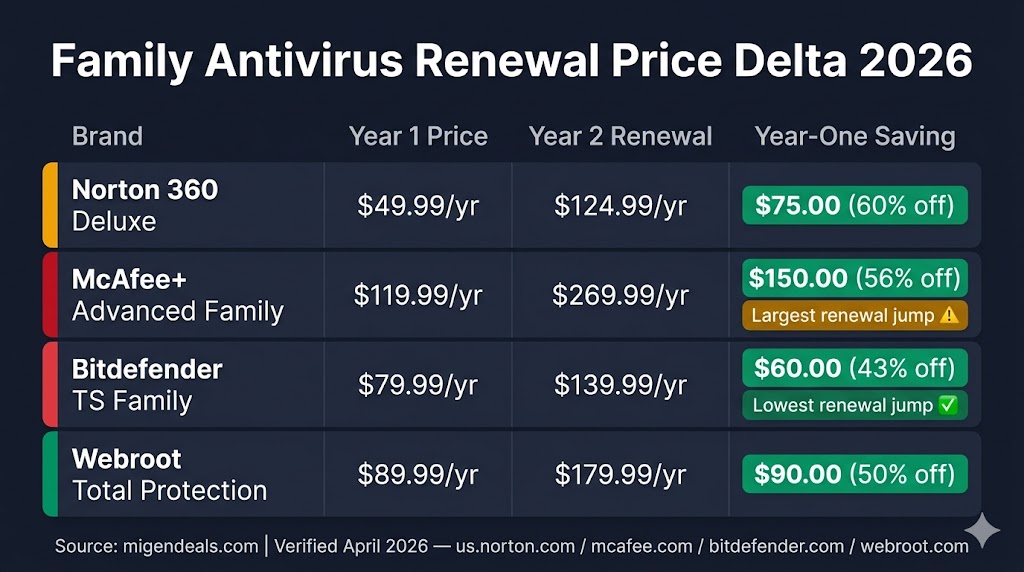
Every pick in this guide uses introductory pricing in year one — and every pick increases significantly at renewal. The table below shows the first-year price and renewal price for each plan so you can plan ahead before committing.
McAfee+ Advanced Family carries the largest first-to-renewal price increase among the four picks: $119.99/yr in year one rises to $269.99/yr at renewal — an increase of $150.00. Bitdefender Total Security Family has the smallest renewal jump at $60.00/yr — the most predictable long-term cost of any pick in this guide.
| Plan | First-Year Price | Renewal Price (MSRP) |
|---|---|---|
| Norton 360 Deluxe | $49.99/yr | $124.99/yr |
| McAfee+ Advanced Family | $119.99/yr | $269.99/yr |
| Bitdefender Total Security Family | $79.99/yr | $139.99/yr |
| Webroot Total Protection | $89.99/yr | $179.99/yr |
Prices verified April 2026. Renewal rates are MSRP — actual renewal offers may vary.
Canceling before the auto-renewal date and repurchasing as a new subscriber is the most effective cost-reduction strategy for all four brands — complete brand-specific instructions appear in our antivirus renewal pricing guide. The questions below address the remaining device-specific concerns families raise most often before choosing a plan.
Frequently Asked Questions
Does My Family Need Antivirus On iPhones And iPads?
Yes — but for different reasons than Windows. Apple’s sandboxing prevents any third-party app from scanning iOS for malware the way a Windows antivirus does. What a family antivirus delivers on iPhone and iPad is web threat filtering (blocking malicious URLs), a VPN for secure browsing, phishing and scam alert detection, and dark web monitoring for personal data. Those protections are worth having, especially for children’s devices where clicking a phishing link in a game chat is a realistic risk.
For a ranked comparison of iOS-compatible antivirus options with VPN and web filtering quality scores, see our best antivirus for iPhone guide.
Is There A Family Plan For Norton Or McAfee?
Norton: Norton 360 Deluxe (5 devices, $49.99/yr first year) is the primary family plan with parental controls. Norton 360 with LifeLock Select Plus (10 devices, $99.99/yr first year) adds LifeLock identity protection and a larger device count. Lower-tier plans — AntiVirus Plus and 360 Standard — do not include parental controls.
McAfee+: McAfee+ Advanced Family (unlimited devices, $119.99/yr first year) and McAfee+ Ultimate Family (unlimited devices, $199.99/yr first year) both include parental controls. No McAfee+ Individual plan includes parental controls — the Family tier is mandatory for this feature. McAfee+ Essential ($39.99/yr, 5 devices) is an Individual plan with no parental controls.
Do Macs And Chromebooks Need Antivirus?
Mac: yes. macOS-specific malware is real, well-documented, and growing. Norton 360 and Bitdefender Antivirus for Mac both earn 18/18 on AV-TEST’s December 2025 macOS evaluation — confirming that paid antivirus adds meaningful protection beyond what macOS provides natively, according to av-test.org. All four picks in this guide cover macOS.
Chromebook: limited. No antivirus suite in this guide provides OS-level protection for ChromeOS. What they deliver on a Chromebook is browser-based web filtering via a Chrome extension. ChromeOS’s built-in sandbox provides a baseline — but families should not rely on their antivirus subscription as active protection for a Chromebook the way they would for a Windows or Mac device.
For Mac-specific recommendations ranked by macOS lab scores and system impact, see our best antivirus for Mac guide.
Which Antivirus Works On Windows, Mac, Android, And iPhone?
All three lab-tested picks cover all four platforms: Norton 360 Deluxe, McAfee+ Advanced Family, and Bitdefender Total Security Family each install on Windows, macOS, Android, and iOS. Webroot Total Protection also covers all four platforms. On iOS specifically, all four picks deliver web protection, VPN, and phishing alerts — not traditional malware scanning, due to Apple’s sandboxing restrictions.
For a full comparison of all six antivirus brands including ESET and Malwarebytes, see our best antivirus software guide.
Family Antivirus Reviews And Current Deals
Full Reviews For Each Recommended Brand
Each of the four picks in this guide has a detailed review covering independent lab test results and plan-by-plan feature breakdowns. The reviews include complete pricing tables for every tier and links to verified first-year discounts.
- Our Norton 360 review covers lab performance across all plan tiers, cloud backup limits, and LifeLock identity protection details.
- Our McAfee+ review provides a full breakdown of Individual vs. Family plan differences, including the parental controls and data removal features.
- Our Bitdefender review compares all Individual and Family tiers with lab scores and VPN bandwidth details.
- Our Webroot review covers the cloud-based scanning architecture, system performance benchmarks, and the Assurant insurance terms.
Current Discount Codes And Deals
All four brands offer first-year promotional pricing that resets if you cancel and repurchase as a new subscriber. The deal pages below are updated monthly with the current lowest verified rates.
Norton 360 Deluxe — the top overall family pick in this guide for its 5-device parental controls and 60-day money-back window — has its current verified rates summarized in the card below.
- Our Norton discount code page lists current first-year rates and verified deal links for all Norton plan tiers.
- Our McAfee+ coupon page covers savings on Advanced Family and Ultimate Family plans.
- Our Bitdefender promo code page shows current rates on Total Security Family and Premium Security Family.
- Our Webroot coupon page lists the current promotional price on Total Protection.
Additional Resources
For households that want brand-by-brand cancellation steps and confirmation of which providers allow unlimited cancel-and-rebuy cycles, the full renewal guide covers all six antivirus brands in detail. Families evaluating how each suite enforces parental controls at the device and router level can find a technical feature comparison in the dedicated guide.
- Our antivirus renewal pricing guide explains how to avoid price hikes on Norton, McAfee+, Bitdefender, Webroot, ESET, and Malwarebytes.
- Our parental controls in antivirus software guide compares how each suite enforces content filtering and screen time at the device level.
- Our guide on whether antivirus software is worth it in 2026 covers cost-benefit analysis for different household situations.
Is One Antivirus Plan Enough To Protect Every Family Device?
Yes — one well-chosen plan protects every device in a typical household, provided it matches your device count and platform mix. Norton 360 Deluxe is the best antivirus for most families — it covers 5 devices with parental controls, scores 18/18 on AV-TEST’s February 2026 evaluation, and costs $49.99/yr in the first year ($124.99/yr at renewal), backed by a 60-day money-back guarantee. For households with 6 or more devices, McAfee+ Advanced Family removes the device cap entirely at $119.99/yr first year ($269.99/yr at renewal) and adds $1 million identity theft coverage and automated personal information removal. Families who want the lowest per-device cost should choose Bitdefender Total Security Family — 25 devices across 5 accounts for $79.99/yr first year ($139.99/yr at renewal), at $3.20 per device per year. Households running older or budget hardware will find Webroot Total Protection ($89.99/yr first year) the smoothest performer, with a 70-day money-back guarantee and parental controls included. Norton, McAfee+, and Bitdefender all hold 18/18 AV-TEST TOP PRODUCT status as of February 2026; Webroot does not participate in independent lab testing. Whichever plan you choose, canceling before auto-renewal and repurchasing as a new subscriber keeps the long-term cost at first-year rates — full instructions are in the renewal pricing guide linked above.