
An internet security suite is worth the upgrade if three or more of the six scorecard questions in this guide apply to your household — for most single-device Windows 11 users, basic antivirus or Microsoft Defender is enough.
Basic antivirus and an internet security suite from the same vendor use the identical malware detection engine. The suite adds five tools on top — anti-phishing URL scanning, a two-way firewall, a VPN, parental controls, and dark web monitoring — so the upgrade is worth the extra cost only if those tools close real gaps in your situation. You are not buying better virus-catching when you move up a tier.
This guide maps what the basic tier covers and where it stops, what a suite adds, and where Microsoft Defender fits as a free third option. A six-question decision scorecard then converts your household profile — children on shared devices, remote work, breach history, and device count — into a tier verdict, with three or more yes answers moving the case for a suite from preference to confirmed need. The guide also weighs suite bundles against buying tools separately, checks whether a full suite slows down older hardware, and matches tiers to families, remote workers, and small business owners.
By the end, you will know exactly which tier fits your household — and which one would be money spent on marketing rather than risk.
Table of Contents
What Basic Antivirus Actually Covers — and Where It Stops
Basic antivirus covers three things: real-time file scanning as threats arrive on your device, on-demand or scheduled scans of stored files, and basic web protection that blocks access to known malicious domains. That is the complete scope of the basic tier across every major vendor.
The Core Protection Every Basic Tier Includes
Every basic antivirus plan — including Norton AntiVirus Plus, Bitdefender Antivirus Plus, and ESET HOME Essential — provides real-time malware scanning, on-demand scanning, and basic web protection. These three features handle the majority of straightforward malware threats on Windows for most home users.
Three Critical Gaps Basic Antivirus Leaves Open
The gaps in basic antivirus are not about detection rates — they are about what happens before malware reaches your device and what happens to your data when it does not.
No anti-phishing URL scanning: Basic antivirus does not check links in real time before you click them, which leaves credential-theft attempts on fake login pages unaddressed.
No two-way firewall: Basic antivirus relies on the Windows Firewall for network filtering and does not add independent outbound traffic monitoring for programs on your device.
No dark web monitoring: Basic antivirus does not scan breach databases for your email address, passwords, or Social Security number — credentials exposed in a corporate breach will not trigger an alert.
What an Internet Security Suite Adds on Top
An internet security suite uses the same malware detection engine as the basic tier from the same vendor. What it adds is a layer of tools that address threats before malware reaches your device and protect your data when a breach occurs elsewhere.
The Five Features That Separate a Suite From Basic Antivirus
| Feature | Basic Antivirus | Internet Security Suite |
|---|---|---|
| Real-time malware detection | ✅ Included | ✅ Included |
| Anti-phishing URL protection | ❌ Not included | ✅ Included |
| Two-way firewall | ❌ Not included | ✅ Included |
| VPN | ❌ / ⚠️ Limited | ✅ Included |
| Parental controls | ❌ Not included | ✅ Included |
| Dark web monitoring | ❌ Not included | ✅ Included |
Feature availability reflects the majority of vendors reviewed — see individual brand review pages for plan-specific exceptions.
Note on VPN: Bitdefender Antivirus Plus includes a VPN capped at 200MB per day — sufficient for checking email but not for daily browsing or streaming. Bitdefender Total Security also caps VPN at 200MB per day. Full unlimited VPN access requires upgrading to Bitdefender Premium Security or above.
The Engine Myth: Why Both Tiers Detect Malware at the Same Rate
The most common misconception about antivirus tiers is that a suite catches more viruses than a basic plan. It does not. An internet security suite from Bitdefender, Norton, or ESET uses the same malware detection engine as the basic antivirus tier — the suite adds tools, not a stronger scanner.
The virus definition database, the heuristic detection algorithms, and the behavioral monitoring engine are identical across basic and suite tiers from the same vendor. You are not buying better virus detection when you upgrade to a suite. You are buying additional tools.
This distinction reframes the buying decision entirely. The question is not “which tier protects me better?” The question is “do I need these five additional tools?”
Is Windows Defender Enough — or Do You Need a Paid Suite?
For many Windows 11 users in 2026, Windows Defender is a legitimate third option — not just a fallback. Microsoft Defender Antivirus achieves 100% Total Accuracy in SE Labs’ Endpoint Protection (Home) Q1 2026 test of 10 Windows home security products — the same top tier as Norton 360 and McAfee Total Protection. That puts Defender on equal footing with paid antivirus for the one task both do: detecting and blocking malware.
The three-tier comparison below shows exactly where Defender aligns with paid antivirus and where the meaningful gap between Windows Defender, basic antivirus, and an internet security suite emerges.

Where Defender matches paid products on detection, it falls short on anti-phishing URL scanning, VPN access, and dark web monitoring — the features that move users from Path 1 to Path 3 in the decision framework below. Defender is a reasonable baseline for a technically competent Windows 11 user with strong password habits and multi-factor authentication on key accounts. It is not a substitute for a suite when the scorecard below returns three or more yes answers.
The practical decision tree:
- Path 1 — Windows Defender only: Appropriate for single-device Windows 11 users with good digital hygiene, no children on the device, no history of data breach exposure, and no remote work requiring VPN access.
- Path 2 — Basic paid antivirus: Adds independent threat intelligence not tied to Microsoft’s ecosystem. Best for Windows 10 users, macOS users, and users who want a second-opinion scanner alongside Defender.
- Path 3 — Full internet security suite: Justified when the additional tools — phishing protection, VPN, parental controls, dark web monitoring — address real gaps in your specific situation.
Does Basic Antivirus Protect Against Phishing Emails?
Most basic antivirus plans do not include anti-phishing URL scanning — a suite-tier feature in Norton, Bitdefender, McAfee+, and ESET HOME. Basic antivirus detects malware after it reaches your device; it does not stop you from entering credentials on a fake website before any malware runs. Users who regularly click links in emails, social media messages, or text messages without scrutinizing the sender have the single strongest argument for upgrading to a suite in this gap alone.
The Decision Scorecard: 6 Questions That Reveal Your Protection Tier
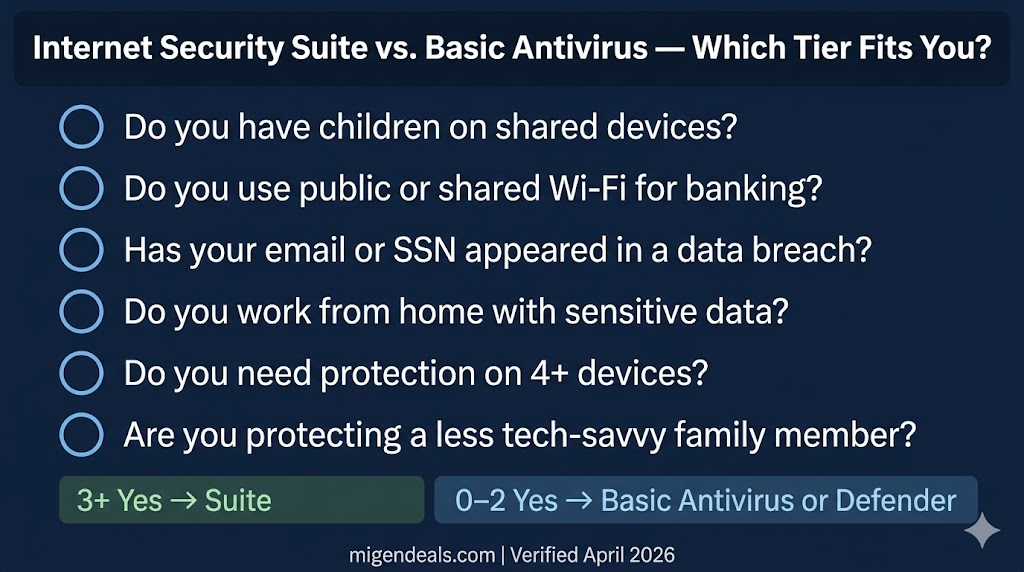
Answer these six yes/no questions honestly. Your answers determine which tier is right for you — not marketing copy or feature lists.
- Do you have children who use any of your devices — phones, tablets, or computers?
- Do you do online banking or shopping from a shared or public Wi-Fi network?
- Has your email address, password, or SSN appeared in a known data breach in the last three years?
- Do you work from home and access company files, client data, or a work network remotely?
- Do you need protection across four or more devices — phones and computers combined?
- Is the person you are buying for someone who clicks links without scrutinizing the sender — a parent, a child, or a less technical family member you manage devices for?
Households that answer yes to three or more questions — covering children on shared devices, remote work access, data breach exposure, or managing four or more devices — meet the threshold where an internet security suite addresses a confirmed risk, not a hypothetical one.
The flowchart below maps each yes-or-no answer to one of three protection tiers — Windows Defender, basic paid antivirus, or a full internet security suite.
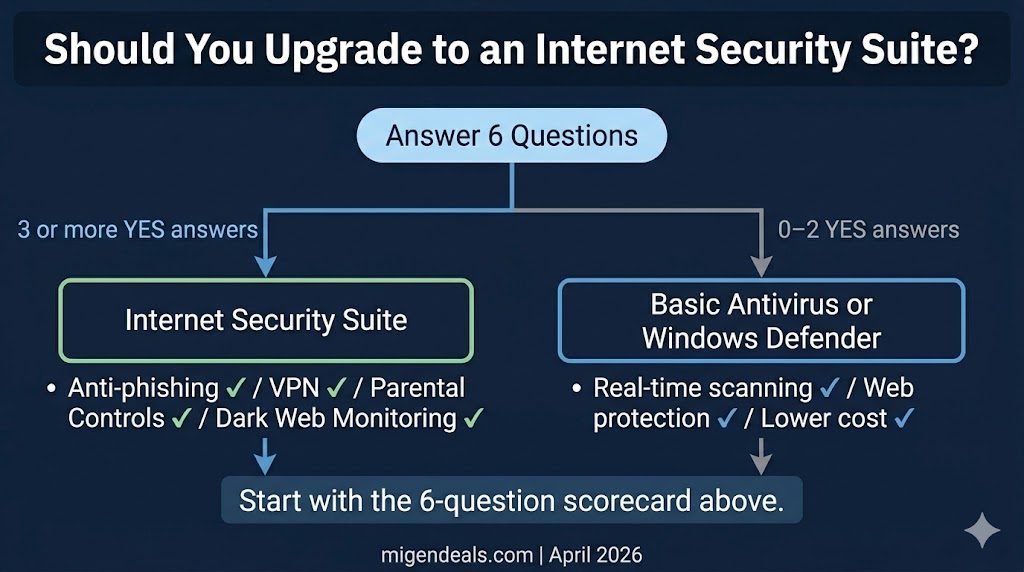
The scorecard makes the tier decision automatic: three or more yes answers removes the question of whether a suite is worth paying for and converts it into a question of which suite fits best.
Your result:
| Yes Answers | Verdict | Next Step |
|---|---|---|
| 0–1 | Windows Defender is sufficient | Windows Defender or a free antivirus covers your risk profile — review your installed protection settings. |
| 2 | Basic paid antivirus is the right tier | Basic paid antivirus from Norton, Bitdefender, or ESET covers your risk level. |
| 3–6 | A full internet security suite is justified | An internet security suite is the correct call — compare family and multi-device plans from Norton, McAfee+, and Bitdefender. |
Who Should Upgrade to a Suite — and Who Definitely Shouldn’t
The Decision Scorecard gives you a score. This section explains the reasoning behind each outcome.
Five Situations That Justify the Cost of a Suite
You have children on shared devices. Parental controls in a suite let you filter websites, set screen time limits, and monitor activity across every device on the plan — from one dashboard. Basic antivirus includes none of this. A household with children sharing a family laptop or phone has a concrete, non-optional use case for a suite.
You work from home and handle sensitive data. A remote worker who accesses company files over a home network without a hardware firewall gains a measurable security layer from the two-way firewall and VPN included in a suite. Basic antivirus leaves outbound traffic unmonitored and provides no encrypted tunnel for work connections.
Your email or SSN has appeared in a data breach. Dark web monitoring — included in suite tiers from Norton 360 Deluxe and McAfee+ Advanced — scans breach databases in real time and alerts you when your credentials appear. The suite’s monitoring tools are a direct response to a confirmed risk.
You manage protection for four or more devices across platforms. Suite plans typically cover five or more devices across Windows, macOS, Android, and iOS under one subscription. For a household running multiple laptops, phones, and a tablet, the per-device cost of an internet security suite is often lower than buying separate basic plans for each device.
You are managing protection for a less technical family member. The phishing auto-block in suite tiers is the most valuable tool for users who click links without scrutinizing the sender. Managing a parent’s or grandparent’s device remotely means the suite removes the human error variable entirely.
Four Situations Where Basic Antivirus Is Enough
You are a single-device Windows 11 user with good digital habits. Strong unique passwords, multi-factor authentication on all key accounts, and no habit of clicking unverified links means Windows Defender plus a standalone password manager covers your actual risk surface. A suite adds cost without adding meaningful protection.
You already pay for a standalone VPN and password manager. Subscribers to dedicated VPN and password manager services receive no additional value from the VPN and password manager bundled in most antivirus suites. Paying for a suite to get tools already owned is the most common way buyers overspend on antivirus.
You use macOS as a single user with no shared access. macOS has significantly fewer active malware threats than Windows, and no children or less-technical users share the device. Basic antivirus provides adequate coverage.
You are technically literate and monitor your own accounts. Users who check breach notification services, review bank statements weekly, and use a hardware security key for critical accounts already perform the monitoring a suite automates. The automation value diminishes when the task is handled manually.
The two-column checklist below contrasts the five household profiles that justify a suite against the four profiles where basic antivirus is the correct choice.
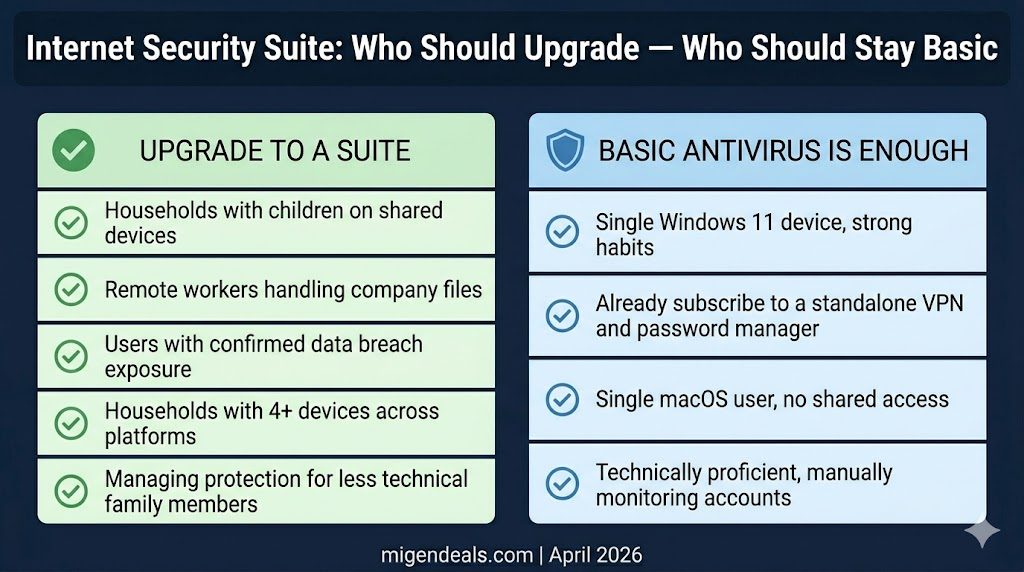
This per-device math flips the value case for large households: the internet security suite becomes the budget-conscious choice once device count reaches four, even before factoring in the additional tools it bundles.
Suite Bundles vs. Buying Tools Separately: A Simple ROI Check
The financial case for a suite depends on what you are already paying for. The suite wins when its bundled tools replace tools you would otherwise buy separately.
When the all-in-one suite is actually cheaper: A suite that bundles VPN, dark web monitoring, and parental controls alongside malware protection delivers three separate services under one subscription. For a household that genuinely needs all three — confirmed by the scorecard — the suite is typically more economical than purchasing each tool separately. The parental controls calculation is particularly clear: dedicated parental control apps exist as standalone subscriptions, and a suite that bundles equivalent controls adds no incremental cost for a household that needs them.
When you are paying for tools you already have free: The suite loses its ROI case the moment its bundled tools duplicate what you already own or what free alternatives cover equally well.
Bitdefender Antivirus Plus and Bitdefender Total Security both include a VPN capped at 200MB per day — enough for checking email but insufficient for all-day remote work or streaming. Verify that the VPN included in any suite you are considering has no daily data cap before counting it as a cost replacement. Google Password Manager and Apple Keychain are free, sync across devices, and cover the majority of password management needs for non-enterprise users. The password manager bundled in a suite adds nothing to users already on either platform.
The honest ROI test: list every suite feature beyond malware scanning, check which ones you already have covered, and count only the ones that remain uncovered. Two or more uncovered tools justify the suite upgrade. Zero uncovered tools means basic antivirus is the correct call.
Current suite pricing from all six brands is updated seasonally — compare first-year and renewal rates before committing to a subscription.
Does an Internet Security Suite Slow Down Your Computer?
On modern hardware — any PC or Mac purchased in the last five years — a full internet security suite causes no perceptible performance difference in daily use. Bitdefender Total Security and Norton 360 each earn 6/6 performance scores in AV-TEST’s January–February 2026 evaluation, indicating negligible system impact on standard hardware.
A device running smoothly today will not be affected by a modern suite. A device already running slow calls for a lightweight option — basic antivirus with a high performance score often serves aging hardware better than a full suite.
Users on PCs more than five years old should prioritize vendors with high AV-TEST performance scores. Webroot’s cloud-based architecture processes most threat analysis remotely, which reduces local CPU and RAM usage significantly compared to traditional suites. ESET is consistently rated among the lighter antivirus options on system resources, with minimal background CPU and RAM usage.
The right tier ultimately depends on which household profile you match — families, remote workers, and small business owners each cross the suite threshold for distinct reasons.
Which Protection Tier Fits Your Situation
Best Tier for Families With Children at Home
Families with children on shared devices should look for a suite that includes parental controls, cross-platform device coverage, and a web shield that blocks phishing links automatically. Parental controls vary significantly in depth across vendors — some offer full content filtering and screen time scheduling, while others provide only basic category blocking. For a feature-by-feature breakdown of parental controls in each major suite, see our parental controls in antivirus guide.
Best Tier for Remote Workers and Home Offices
Remote workers handling company files or client data over a home network should look for a suite with a functional two-way firewall and an unlimited VPN — not a capped one. Both Bitdefender Total Security and Bitdefender Antivirus Plus cap their VPN at 200MB per day, which is insufficient for all-day remote use. Verify that the VPN included in any suite you are considering has no daily data cap before purchasing. For a full comparison of VPN coverage, data caps, and logging policies across all six brands, see our VPN in antivirus guide.
Best Tier for Small Business Owners
Small business owners handling customer data should prioritize a suite with centralized device management and multi-seat licensing. Consumer suites cover up to five or ten devices per plan but lack the endpoint management console that business deployments typically require. For a full breakdown of where consumer suites end and dedicated business antivirus begins, see our antivirus for business vs. personal use comparison.
Is an Internet Security Suite Worth the Price in 2026?
A full internet security suite is worth the price if at least three of the six scorecard questions above produced a yes answer. For users below that threshold, basic antivirus — or Windows Defender on updated Windows 11 — provides adequate malware protection.
Microsoft Defender Antivirus achieves 100% Total Accuracy in SE Labs’ Endpoint Protection (Home) Q1 2026 test of 10 Windows home security products — the same result as Norton 360 and McAfee Total Protection in that round. Paying for a suite without a genuine use case for its tools is a purchase driven by marketing, not risk.
For users above the threshold, the suite is not optional — it is the correct response to a confirmed risk profile. Anti-phishing protection, dark web monitoring, and parental controls address categories of harm that basic antivirus structurally cannot. An internet security suite is worth the extra cost for households with children, remote workers handling sensitive data, and users who have experienced a data breach — and is unnecessary for single-device users on updated Windows 11 with strong password habits.
Frequently Asked Questions
What’s the Difference Between Norton AntiVirus Plus and Norton 360?
Norton AntiVirus Plus covers one device with malware protection, a password manager, and scam detection — without a VPN, parental controls, or dark web monitoring. Norton 360 Deluxe covers five devices and adds a VPN, parental controls, and dark web monitoring, using the same underlying malware detection engine as AntiVirus Plus. For current pricing and plan details on both, see our Norton 360 review.
What’s the Difference Between an Internet Security Suite and Total Security Software?
An internet security suite is the mid-tier product — it adds a firewall, VPN, parental controls, and dark web monitoring over the basic antivirus tier. Total security software is the top tier — it typically adds cross-platform device coverage, system optimization tools, and expanded identity theft protection. All three tiers use the same malware detection engine from the same vendor.
Can You Run Basic Antivirus and a Security Suite on the Same Device at the Same Time?
No. Running two real-time antivirus programs simultaneously causes conflicts, false positives, and significant performance degradation. Both programs attempt to intercept the same system processes, which creates instability. Choose one product. Switching from a basic plan to a suite — or between vendors — requires running the original vendor’s dedicated removal tool before installing the new software. Brand-specific removal tools are available from each vendor’s official support page.
The Bottom Line on Internet Security Suite vs. Basic Antivirus
Basic antivirus and internet security suites use the same malware detection engine — the suite adds five tools: anti-phishing URL scanning, a two-way firewall, a VPN, parental controls, and dark web monitoring. That distinction reframes the entire buying decision. You are not choosing between better and worse malware protection. You are choosing whether you need those five tools.
The six-question scorecard in this article identifies whether you do. Three or more yes answers — children on shared devices, remote work, data breach exposure, four or more devices, a less technical family member to protect — justify the upgrade. Fewer than three, and basic antivirus or Windows Defender covers your actual risk surface.
The lab data supports the engine-parity point. In SE Labs’ Endpoint Protection (Home) Q1 2026 test of 10 Windows home security products, Microsoft Defender, Norton 360, and McAfee Total Protection each achieve 100% Total Accuracy. In AV-TEST’s January–February 2026 Windows home user evaluation, Norton 360, Bitdefender Total Security, and McAfee Total Protection each earn a perfect 18/18 TOP PRODUCT rating, while ESET Security Ultimate earns 17.5/18 TOP PRODUCT — a strong result, though not a perfect score. Paying for a suite without a genuine use case for its tools is overspending. For households that do meet the threshold, the suite is the correct call — not because it catches more viruses, but because phishing, unmonitored outbound traffic, and credential exposure are threats basic antivirus structurally cannot address. For a full technical overview of how the real-time malware detection engine works at both the basic and suite tier, see our real-time malware protection guide. For a detailed breakdown of how anti-phishing filters catch credential-theft attempts before you click, see our phishing and web protection guide.
Start with the scorecard, follow the outcome, and buy the tier your situation actually requires.
Once you know which tier fits, compare the top picks across all tiers and brands in one place: