
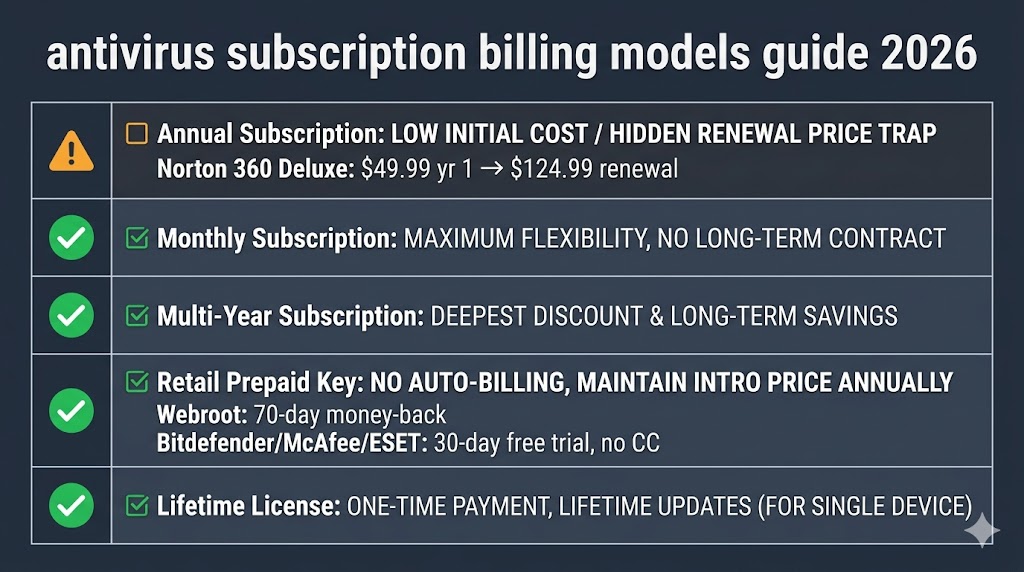
Antivirus software uses five billing models: annual, monthly, multi-year, retail prepaid code, and lifetime license. Understanding each model before you buy is the simplest way to avoid renewal surprises and choose the kind of billing control you actually want.
The model you choose determines not just what you pay today, but how much control you keep later. Most US buyers encounter the annual plan first, then discover renewal charges, auto-renewal settings, and cancellation timing only after a card has already been billed. This guide explains how each subscription type works, how free trials convert into paid plans, what actually happens when a subscription expires, and which legal protections US subscribers can rely on — so you can pick the model that fits your situation before you subscribe.
Table of Contents
The Five Types Of Antivirus Subscription Models
Five billing models cover nearly every antivirus purchase, and each one handles renewal differently. The main differences are commitment length, billing automation, and whether you control renewal manually or leave it on autopilot.
Annual plan. You pay once per year. The headline price is usually lower than the later renewal price, and auto-renewal is often on by default.
Monthly plan. You pay month to month with no long commitment. The tradeoff is a higher annual cost in exchange for flexibility.
Multi-year plan. You pay upfront for two or three years. The total can be lower than renewing annually, but you give up flexibility.
Retail prepaid code. You buy an activation key from a retailer and redeem it on the brand’s site. This usually avoids automatic billing.
Lifetime license. You pay once for permanent access to a product version, not a forever guarantee. Major antivirus brands do not currently market a true lifetime license.
Annual Plans — How The Standard Billing Cycle Works
An annual plan renews once every 12 months unless you cancel or turn off auto-renewal. The first charge is often promotional, while the later charge can be much higher.
That gap is why annual plans feel cheap at checkout and expensive later. The safe habit is to review the renewal date as soon as you buy and set a reminder well before billing happens again.
Some brands also process renewal before the subscription fully expires, so the charge can land while your current term still has time left. That makes an early reminder more useful than waiting until the last day.
Read the billing terms carefully so you know whether the plan renews automatically, how the renewal notice works, and where cancellation must happen.
Monthly Plans — When Paying More Per Year Makes Sense
A monthly plan costs more over a full year, but it gives you the most flexibility. You can leave after a month instead of being tied to a full annual cycle.
This model makes sense if you are testing a product, using a new device for a short period, or want to avoid a long commitment while you compare options.
One important detail: some brands advertise monthly pricing but still lock you into a one-year contract paid in installments. Always check whether the plan is truly month to month or only billed monthly.
Multi-Year Plans — How To Judge The Savings
Multi-year plans can lower the effective yearly cost, but only if you keep the product for the full term. The longer commitment is the reason the price looks attractive.
Before buying, compare the full multi-year total against the cost of renewing year by year. That comparison tells you whether the discount is real or just a marketing shortcut.
The main risk is lock-in. If you cancel early, most brands do not refund the unused portion, so the savings disappear if your needs change.
Use multi-year plans only when you already trust the product and are comfortable staying with it for the whole term.
Retail Codes And Prepaid Keys — The Cheaper Option Most Buyers Miss
A retail prepaid key is an activation code sold through a third-party retailer and redeemed on the brand’s website. You usually get the same software, but the purchase path is different.
The main benefit is control. A retail key typically does not trigger automatic billing, so the subscription ends when the term ends unless you choose to renew manually.
That makes retail codes especially useful for buyers who want a one-year license without signing up for recurring charges. The tradeoff is that redeemed retail keys are usually non-refundable.
If you want the lowest-friction way to avoid a surprise charge, retail codes are usually the easiest route.
How Free Trials Work And When You Get Charged
A free trial gives you temporary access to a paid antivirus plan before you commit. Whether you get charged at the end depends on how the trial is set up.
If a trial requires a credit card, it usually converts automatically unless you cancel before the deadline. If no card is required, the trial normally ends without billing and you choose whether to subscribe afterward.
The safest trial is the one that ends cleanly and does not ask for payment details up front. That gives you time to test the interface and decide whether the product fits your needs.
Once the trial ends or you buy a paid plan, renewal rules take over, so read the account settings before the trial finishes.
How Auto-Renewal Works
Auto-renewal means the subscription renews automatically at the end of the term. The charge happens on the account side, not inside the desktop app.
That distinction matters because turning off app notifications does not stop billing. You have to log in to the account on the vendor’s website and change the renewal setting there.
If you want to keep control, check the account setting immediately after purchase and confirm whether renewal is still enabled. A few minutes now can prevent a surprise later.
The Loyalty Penalty — Why New Customers Pay Less
The loyalty penalty is the gap between an introductory offer and the later renewal price for the same subscription. New buyers often get the best deal, while returning customers pay more.
That pattern is common across subscription software, so the key is not to assume the first checkout price is permanent. Instead, focus on the renewal term before you buy.
The most effective countermeasure is to compare the renewal terms before the first year ends and decide whether to keep the plan, switch to a retail key, or move to a different model. Renewal pricing has its own set of tactics worth understanding separately, especially if you plan to stay with the same brand for several years.
What Happens When Your Antivirus Subscription Expires
When a subscription expires, real-time protection and definition updates stop, but the software may remain installed on the device.
That means the interface can still open even though active protection is gone. The app may look present while the defense layer is no longer working.
In practice, expiration is the point at which you need to decide whether to renew, switch products, or rely on another security setup.
The safest approach is to treat the renewal notice as the real deadline, not the last day of coverage.
Which Subscription Model Is Right For You
The best model depends on how long you plan to stay with the same product, how much billing control you want, and whether you prefer convenience or flexibility.
| Buyer Type | Best Model | Reason |
|---|---|---|
| Long-term user, price-conscious | Retail prepaid code | Usually avoids auto-renewal and keeps billing manual. |
| Household covering several devices | Annual plan | Balanced cost and coverage if you manage renewal dates carefully. |
| Short-term or uncertain commitment | Monthly plan | Lowest commitment and easiest exit. |
| Tech-confident buyer staying with one product | Multi-year plan | Can lower the yearly average if you keep the product for the full term. |
Choosing the right model is only part of the job. The other part is knowing when to act so the billing system does not decide for you.
Who Should Not Let Their Subscription Auto-Renew
Three types of buyers should disable auto-renewal right away, because the default setting is likely to cost them more than it should.
Buyers nearing the end of the first year. Check your renewal price now and compare options before the next charge, since the second-year rate often differs from the first.
Buyers paying for unused device slots. Switch to a smaller plan if your subscription covers more devices than you actually protect.
Buyers who have already moved on. Cancel immediately if you no longer use the product or have switched to another security setup.
Your Rights As A US Antivirus Subscriber
US antivirus subscribers have legal protections around disclosure, consent, and cancellation, especially for recurring billing. Those protections make it easier to challenge unclear renewal terms and hidden auto-renewal settings.
California’s Automatic Renewal Law requires clear renewal terms, affirmative consent, and an online cancellation path for covered subscriptions. That standard is important for national sellers because online software companies operate across state lines.
Your practical protection is simple: save the confirmation email, review the renewal date, and keep a screenshot of the billing terms.
The sooner you document the purchase, the easier it is to compare what was promised with what actually happens later.
Three steps every US antivirus subscriber should take:
- Disable auto-renewal at the account level if you do not want recurring billing.
- Save the order confirmation showing the plan name, price, and renewal date.
- Set a reminder before the next billing cycle so you have time to act.
Understanding the model is step one. Watching the billing settings is step two.
Frequently Asked Questions About Antivirus Subscriptions
Can I Cancel My Antivirus Subscription At Any Time?
Yes — but the timing determines what happens next. Canceling usually stops future renewals, but it does not always trigger a refund for the current term. Always cancel through the account on the brand’s website rather than only uninstalling the software.
Are Lifetime Antivirus Licenses Legitimate?
Some offers use the word “lifetime,” but that usually means the life of the product version, not your lifetime. Support can end, features can change, and the vendor can discontinue the offer. Treat “lifetime” as a marketing label, not a guarantee of permanent support.
Is A Family Antivirus Plan Worth It?
For households with several devices, a family or multi-device plan is usually more efficient than buying separate subscriptions. The important comparison is per-device cost, not just the headline total.
What Does “Unlimited Devices” Mean In Practice?
“Unlimited devices” usually means a very high device ceiling with fair-use limits. It is best understood as generous household coverage rather than an open-ended commercial license.
The Bottom Line On Antivirus Subscription Models
The safest way to buy antivirus is to choose the billing model first and the product second. Annual plans are convenient, monthly plans are flexible, multi-year plans can lower the average cost, and retail keys usually give you the most billing control.
If you hate surprise charges, prefer manual control, or only need coverage for a fixed period, retail codes and monthly plans are the easiest ways to avoid renewal pressure. If you want longer coverage with less ongoing effort, annual and multi-year plans can work well as long as you watch the renewal terms. For a full breakdown of how second-year pricing works and how to lower it, see the antivirus renewal pricing guide.
No matter which model you choose, the real protection comes from knowing when renewal happens and where cancellation lives. That is the part most buyers miss.
When you are ready to compare current rates, the antivirus deals hub tracks the best available prices across all six major brands in one place.