
Webroot Essentials is a cloud-based antivirus starting at $29.99/yr first year ($49.99/yr renewal) for one device — the lowest first-year entry price among the six brands reviewed on migendeals.com — with the smallest local install in this comparison, and a structural offline limitation that is the key variable in determining whether it suits your setup.
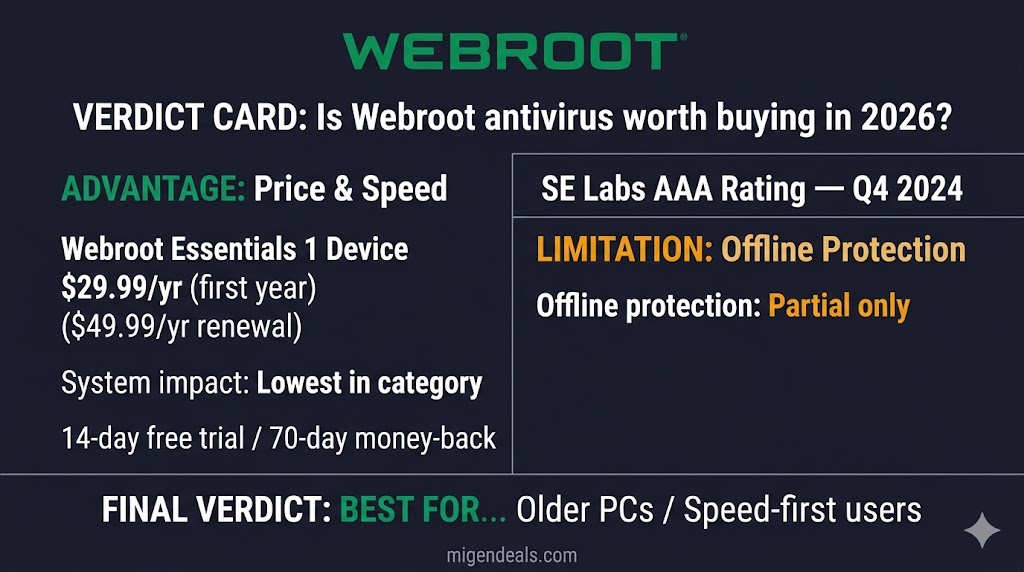
Webroot Essentials costs $29.99/yr first year ($49.99/yr renewal) for one device, per webroot.com April 2026. Webroot scored 95% Total Accuracy in SE Labs’ EPS Home Q1 2026 evaluation; Webroot has not submitted to AV-TEST or AV-Comparatives since 2019. Its local agent is tiny — PCMag’s March 2025 review measured the download at under 12MB. Every Webroot plan includes real-time antivirus, text scam detection, breach monitoring, and a password manager. Webroot’s strongest differentiator is its 70-day money-back guarantee — the longest among the six brands reviewed on migendeals.com. Its primary structural limitation is reduced offline protection and absent AV-TEST participation since 2019. Always-connected users on older or lower-powered hardware benefit most from Webroot’s cloud engine; frequent offline workers and users requiring AV-TEST validation should choose Norton 360 Standard ($39.99/yr first year) or Bitdefender Total Security ($59.99/yr first year) instead, per AV-TEST February 2026. All four Webroot plans increase 67–100% at renewal — Essentials 3 Devices doubles from $34.99/yr to $69.99/yr MSRP, per webroot.com April 2026.
Webroot takes a fundamentally different approach to malware detection than Norton, Bitdefender, or McAfee. Understanding that engine difference is the starting point for evaluating everything else — pricing, lab scores, and real-world performance included.
Table of Contents
How Does Webroot’s Cloud-Based Engine Differ from Traditional Antivirus?
Webroot uses a cloud-based scanning engine that stores its threat database on remote BrightCloud servers rather than your device, producing a small local agent and no local signature update overhead.
Traditional antivirus programs — including Norton, Bitdefender, and McAfee — maintain a local signature database of 100MB to 500MB on your device, requiring continuous updates and on-device processing during every scan. Webroot offloads that classification to remote servers, which is why its local install is so small. That cloud dependency is also why Webroot’s protection is meaningfully reduced when your internet connection is unavailable — a structural trade-off that applies consistently across all four Webroot plan tiers.
That offline limitation is the architectural variable that determines Webroot’s fit for your setup. Everything that follows — pricing, lab results, performance data, and buyer recommendations — becomes clearer once you know it.
What Are Webroot’s Plans and Prices in 2026?
Webroot offers four plans in 2026 — Essentials at 1 or 3 devices, Premium, and Total Protection — with first-year promotional prices that increase significantly at renewal.
All prices below are verified from the official Webroot pricing page, April 2026. Both the first-year promotional rate and the renewal MSRP are shown — because the renewal price is what you pay from year two onward.
Webroot Essentials vs. Premium vs. Total Protection — Which Plan Do You Need?
The right Webroot plan depends on how many devices you cover and whether you need identity protection features. Webroot Essentials 3 Devices covers three Windows, Mac, Android, iOS, or Chromebook devices at $34.99/yr first year ($69.99/yr renewal) — $5 more than the single-device plan, making it the stronger per-device value for multi-machine households.
| Plan | Devices | First-Year Price | Renewal (MSRP) | Key Addition |
|---|---|---|---|---|
| Essentials 1 Device | 1 | $29.99/yr | $49.99/yr | Core AV only |
| Essentials 3 Devices | 3 | $34.99/yr | $69.99/yr | Core AV only |
| Premium | 5 + 1 identity | $64.99/yr | $129.99/yr | Identity + $1M fraud coverage |
| Total Protection | 5 + 1 identity | $89.99/yr | $179.99/yr | VPN + parental controls + cloud backup |
Prices verified April 2026 from webroot.com/us/en/home/products/compare.
The image below shows the four Webroot tiers side by side with first-year and renewal rates compared:
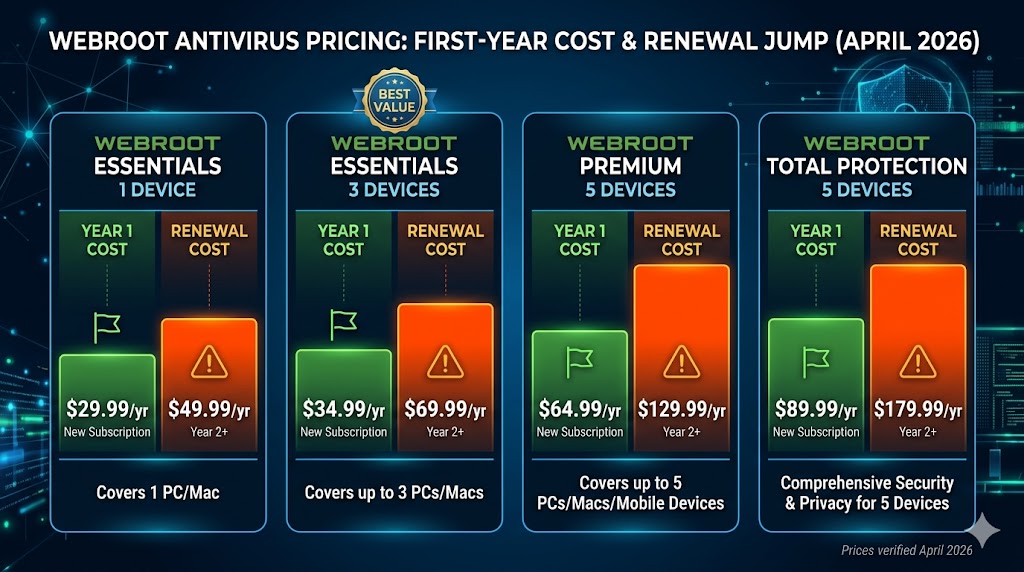
Essentials 1 Device — Best For: Single-device users who prioritize speed and system impact over additional features.
Essentials 3 Devices — Best For: Households covering up to three machines on a budget.
Premium — Best For: Solo users who want identity theft monitoring and $1M fraud reimbursement without paying Norton LifeLock prices.
Total Protection — Best For: Families who need antivirus, a VPN, parental controls, and cloud backup under one subscription below $90/yr first year.
Free Trial and Money-Back Guarantee
Webroot offers a 14-day free trial with no credit card required. Among the six brands covered on migendeals.com, Norton is the only brand that requires a credit card for its 7-day trial — Bitdefender, ESET, McAfee, Malwarebytes, and Webroot all offer no-CC trial options, per official brand pages April 2026.
Webroot’s 70-day money-back guarantee exceeds Norton’s 60-day guarantee by 10 days and Bitdefender’s and McAfee’s 30-day guarantees by 40 days — the longest return window among the six brands reviewed. This extended window gives you real time to evaluate the product on your specific hardware before committing.
Before committing to a plan, the lab test data in the next section directly affects whether these prices represent good value.
Why Does Webroot’s Lab Score Look Different from Other Brands?
Webroot has not participated in AV-TEST or AV-Comparatives since 2019 — but absence from a lab test is not the same as failing one, and the architectural reason for that absence is documented and specific.
Why Webroot Is Not Tested by AV-TEST or AV-Comparatives
AV-TEST and AV-Comparatives use protocols designed around instant local detection. A file is introduced; the antivirus must block it immediately using its local engine. Webroot’s cloud-journaling model polls a remote database and journals unknown files rather than blocking them on the spot, which registers as a missed detection in standard lab environments — producing its 2/6 protection score in 2019, a result of a test built for a different engine type.
Five-plus years of non-participation remains a legitimate concern regardless of the methodology argument. Webroot has had ample time to either adapt for lab testing or re-engage with these labs, and that choice reflects either a genuine architectural incompatibility or a preference to avoid unfavorable benchmarks — both interpretations deserve acknowledgment.
SE Labs Q1 2026: Webroot’s Current Independent Score
Webroot scored 95% Total Accuracy in SE Labs’ EPS Home Q1 2026 evaluation — placing it in the Green tier, SE Labs’ highest rating category, per SE Labs Q1 2026. That result compares to Norton and McAfee at 100% and Malwarebytes at 97% in the same test. SE Labs’ methodology tests real-world threat scenarios including full attack chains, which is more compatible with cloud-based products than the isolated file-detection protocols used by AV-TEST and AV-Comparatives. Webroot’s 95% is a meaningful independent data point — read alongside the absence from AV-TEST, not as a replacement for it.
PCMag Hands-On Results: Where Webroot Actually Performs
Webroot Essentials demonstrated strong phishing protection and real-world connected-environment threat performance in hands-on testing, per PCMag March 2025. Independent testing has consistently documented lower detection rates on novel general malware samples than traditional signature-based engines achieve — a structural limitation of cloud-based engines that classify threats remotely rather than matching against a comprehensive local database.
Lab scores measure threat detection in isolation. The next section measures what Webroot does to your system’s speed while running.
How Fast Does Webroot Scan Compared to Norton and Bitdefender?
Webroot’s full scan is not faster than Norton’s or Bitdefender’s in independent testing: PCMag’s March 2025 review measured it at just under two hours, in line with the category average. Webroot’s advantage is install size — under 12MB — not scan time.
Scan Speed and System Load: The Real Advantage
PCMag’s March 2025 review timed Webroot’s full scan at just under two hours on its standard test system — in line with the category average, not faster. What PCMag does credit is size: the download is under 12MB because threat classification happens on remote BrightCloud servers rather than on your device. Traditional engines — including Norton 360 Standard and McAfee+ Essential — keep large local signature databases instead.
Why Full Scans Slow Your Internet Connection
Full scans reduce internet speed. Because Webroot queries its cloud database for every file fingerprint during a scan, sustained cloud communication puts load on your network connection. On fast broadband connections the impact is minimal. On slower DSL or mobile hotspot connections, the drop is more pronounced. Schedule full scans for off-peak hours if your internet speed is a concern during the scan window.
Speed matters, but what the software includes at each tier matters equally. The next section breaks down what each plan actually delivers.
What Features Do You Get with Each Webroot Plan?
Every Webroot plan includes real-time antivirus, a firewall and network monitor, Web Threat Shield, a password manager, text scam detection, and breach monitoring — features that Bitdefender and McAfee lock behind higher-priced tiers at comparable entry points.
Feature Comparison by Plan
The image below shows the full feature tier breakdown across all three Webroot plan levels for 2026:
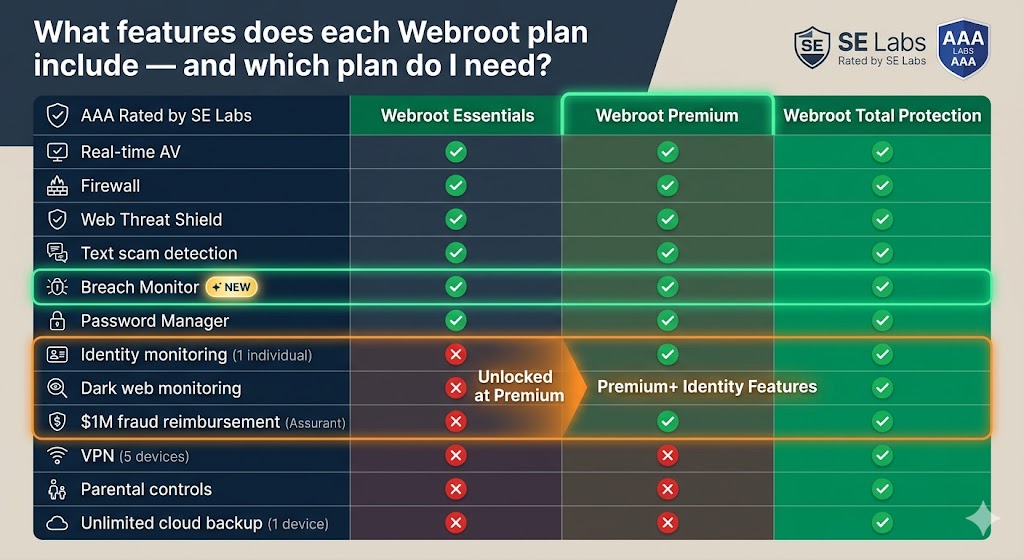
The table below provides the complete feature list with plan availability, verified from webroot.com April 2026:
| Feature | Essentials | Premium | Total Protection |
|---|---|---|---|
| Real-time antivirus (Win/Mac/Android/iOS/Chromebook) | ✅ | ✅ | ✅ |
| Firewall and network monitor | ✅ | ✅ | ✅ |
| Web Threat Shield | ✅ | ✅ | ✅ |
| Text scam detection 🆕 | ✅ | ✅ | ✅ |
| Breach monitor 🆕 | ✅ | ✅ | ✅ |
| Password Manager | ✅ | ✅ | ✅ |
| Eliminates traces of online activity | ❌ | ✅ | ✅ |
| Cleans up digital clutter | ❌ | ✅ | ✅ |
| Identity monitoring (1 individual) | ❌ | ✅ | ✅ |
| Dark web monitoring | ❌ | ✅ | ✅ |
| Financial and credit bureau monitoring | ❌ | ✅ | ✅ |
| 24/7 identity restoration support | ❌ | ✅ | ✅ |
| Up to $1M fraud expense reimbursement | ❌ | ✅ | ✅ |
| VPN (5 devices) | ❌ | ❌ | ✅ |
| Parental controls | ❌ | ❌ | ✅ |
| Unlimited cloud backup (1 device) | ❌ | ❌ | ✅ |
Feature data verified April 2026 from webroot.com/us/en/home/products/compare. The $1M fraud reimbursement is underwritten by American Bankers Insurance Company of Florida (Assurant).
Text Scam Detection and Breach Monitor: Webroot’s New 2026 Features
Text scam detection and breach monitoring are included in all three Webroot plan tiers at no extra cost. Text scam detection identifies and flags fraudulent text messages — phishing links sent via SMS, fake package delivery notifications, and spoofed account-locked texts. Breach monitoring alerts you when your personal data appears in a known breach. Many US seniors receive Webroot as a pre-installed product and are primary targets for SMS-based scams, making both additions practical value at no increase to the base entry price.
Premium and Total Protection: Identity Coverage Details
Premium adds identity monitoring for one individual, including dark web monitoring, financial and credit bureau monitoring, 24/7 identity restoration support, and up to $1M in fraud expense reimbursement through Assurant. Total Protection adds a VPN for 5 devices, parental controls, and unlimited cloud backup for one device on top of everything in Premium.
For context: Norton 360 with LifeLock Select Plus ($99.99/yr first year) provides deeper identity coverage at a higher price — including credit monitoring at one bureau, stolen funds reimbursement up to $25,000, and LifeLock’s established identity restoration network. The direct comparison of those identity tiers is covered in the comparison section below.
Where Does Webroot Perform Well — and Where Does It Fall Short?
Webroot excels at install size, cloud-based threat handling, and money-back length — and falls measurably short on independent lab participation and offline protection coverage. Both columns below are supported by named sources.
Where Webroot Excels
- Tiny local install — under 12MB per PCMag’s March 2025 review — with threat analysis handled in the cloud
- 70-day money-back guarantee — the longest in the group by 10 days over Norton and 40 days over Bitdefender and McAfee, per webroot.com April 2026
- 14-day free trial with no credit card required — matches Malwarebytes; better than Norton’s 7-day CC-required trial
- SE Labs Green tier with 95% Total Accuracy in Q1 2026 — independent validation from a lab whose methodology suits cloud-based engines, per SE Labs Q1 2026
- Text scam detection and breach monitoring included in every plan — competitors charge more for comparable SMS threat filtering at equivalent entry tiers
- Password manager included at all tiers — Norton and Bitdefender also include password managers at their entry tiers, but Webroot delivers this feature at a lower absolute entry price
Where Webroot Falls Short
- Not tested by AV-TEST or AV-Comparatives since 2019 — five-plus years without major lab participation is a transparency problem regardless of the methodology argument
- Detection rates on novel general malware samples are lower than those achieved by AV-TEST-validated competitors — a known structural limitation of cloud-based classification engines in novel-threat and offline scenarios
- Cloud dependency weakens offline protection — users on unreliable connections receive a materially reduced product
- Internet speed drops noticeably during full scans — sustained cloud communication for file fingerprinting puts load on your network connection
- Renewal pricing doubles on most plans — Essentials 3 Devices jumps from $34.99/yr to $69.99/yr MSRP at renewal, per webroot.com April 2026
- Overzealous blocking of legitimate software — documented reports of Webroot flagging Adobe Creative Cloud AI features, developer tools, and game-hosting files as threats
False Positives and the Overzealous Blocking Problem
Two specific patterns appear repeatedly in US user reports on Reddit and Webroot’s own community forums. First, Webroot’s Identity Shield flags new generative AI processes inside Adobe Acrobat and Adobe Reader as screen scrapers or keyloggers, breaking functionality until the user manually whitelists the process. Second, Webroot has deleted legitimate game-hosting executable files without warning, with no straightforward recovery path outside the journaling rollback system.
Both issues stem from the same root cause: Webroot’s heuristic engine errs aggressively toward blocking unknown processes. For non-technical users who do not know how to whitelist an application, this creates a frustrating experience that support tickets are slow to resolve. Factor this into your decision if you use Adobe Creative Cloud regularly or run specialized software outside the mainstream.
Pros and cons in isolation answer “what does Webroot do.” The next section answers the more useful question: is Webroot right for you specifically.
Who Should Buy Webroot — and Who Should NOT
Webroot is the right antivirus for always-connected, speed-conscious users on older hardware — and the wrong choice for anyone requiring AV-TEST validation, working frequently offline, or using Adobe Creative Cloud with AI features enabled.
Best For: Speed-First Users, Older Hardware, and Identity-Conscious Solo Buyers
Webroot Essentials 1 Device is the right pick for users on older or lower-powered PCs who need minimal resource impact and fast scans. At $29.99/yr first year ($49.99/yr renewal), it is the fastest, lightest single-device option in this comparison.
Webroot Essentials 3 Devices is best for budget-conscious households covering up to three machines where system performance matters more than top-tier lab scores. At $34.99/yr first year ($69.99/yr renewal), it covers three devices at $5 more than the single-device plan.
Webroot Premium is the right plan for solo users who want identity theft monitoring and $1M fraud coverage without paying the $99.99/yr that Norton 360 with LifeLock Select Plus charges for comparable identity features.
Webroot Total Protection suits families who need antivirus, a VPN, parental controls, and cloud backup in a single subscription under $90/yr first year.
Who Should NOT Buy Webroot
Webroot suits always-connected users on older hardware prioritizing scan speed. Users requiring AV-TEST validation, working frequently offline, or running Adobe Creative Cloud are better served by a traditional-engine product. The image below maps both buyer profiles:
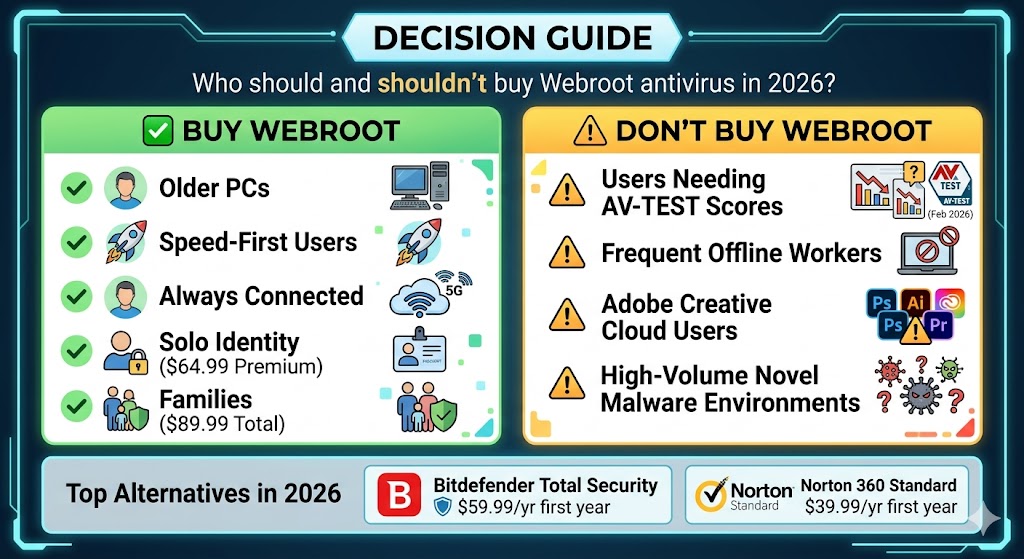
- Users who require strong independent lab validation. Webroot cannot satisfy that requirement if AV-TEST and AV-Comparatives scores are your benchmark for trust. Choose Bitdefender Total Security ($59.99/yr first year, $109.99/yr renewal) or Norton 360 Standard ($39.99/yr first year, $94.99/yr renewal) instead — both earned 18/18 from AV-TEST in February 2026, per AV-TEST February 2026.
- Users who regularly work offline. Frequent travelers, remote workers on spotty connections, and users in areas with unreliable broadband receive a materially weaker product. Webroot is not the right fit.
- Adobe Creative Cloud users with AI features enabled. The documented Identity Shield conflict with Adobe’s generative AI processes is a real, recurring problem with no permanent fix — only manual workarounds.
- Users whose primary concern is maximum malware detection rate. Webroot’s cloud-based engine has documented lower detection rates on novel general malware samples than traditional signature-based competitors achieve. Norton 360, Bitdefender Total Security, or Malwarebytes are stronger choices for users facing active, varied threat environments.
When Webroot Beats the Alternatives
Webroot beats Norton on a single-device budget when system performance is the deciding factor — Essentials 1 Device at $29.99/yr first year undercuts Norton 360 Standard at $39.99/yr first year with a much smaller local install. Webroot beats McAfee for users who do not need unlimited devices and want a lighter footprint. It does not beat Bitdefender on protection depth at any price point.
These recommendations hold up best when tested against the three specific alternatives most Webroot buyers also consider.
How Does Webroot Compare to Norton, Bitdefender, and Malwarebytes?
Webroot wins on system performance and money-back length. It loses on independent lab scores and offline protection depth. The right choice depends on which of those trade-offs matters most to you.
| Category | Webroot Essentials | Norton 360 Standard | Bitdefender Total Security | Malwarebytes Standard |
|---|---|---|---|---|
| First-Year Price | $29.99/yr (1 device) | $39.99/yr (3 devices) | $59.99/yr (5 devices) | $44.99/yr (1 device) |
| Renewal (MSRP) | $49.99/yr | $94.99/yr | $109.99/yr | — |
| AV-TEST Score (Feb 2026) | Not tested | 18/18 ✅ | 18/18 ✅ | Not tested |
| SE Labs (Q1 2026) | 95% (Green tier) | 100% (Green tier) | Not in Q1 2026 test | 97% (Green tier) |
| System Impact | Lowest ✅ | Medium | Medium | Low |
| Offline Protection | Partial ⚠️ | Full ✅ | Full ✅ | Full ✅ |
| Free Trial | 14 days (no CC) | 7 days (CC req.) | 30 days (no CC) | 14 days (no CC) |
| Money-Back | 70 days ✅ | 60 days | 30 days | 60 days |
Prices verified April 2026. Malwarebytes Standard renews at the same annual rate as the first-year price — no introductory discount spike.
The image below summarizes the core trade-offs across all four products at a glance:
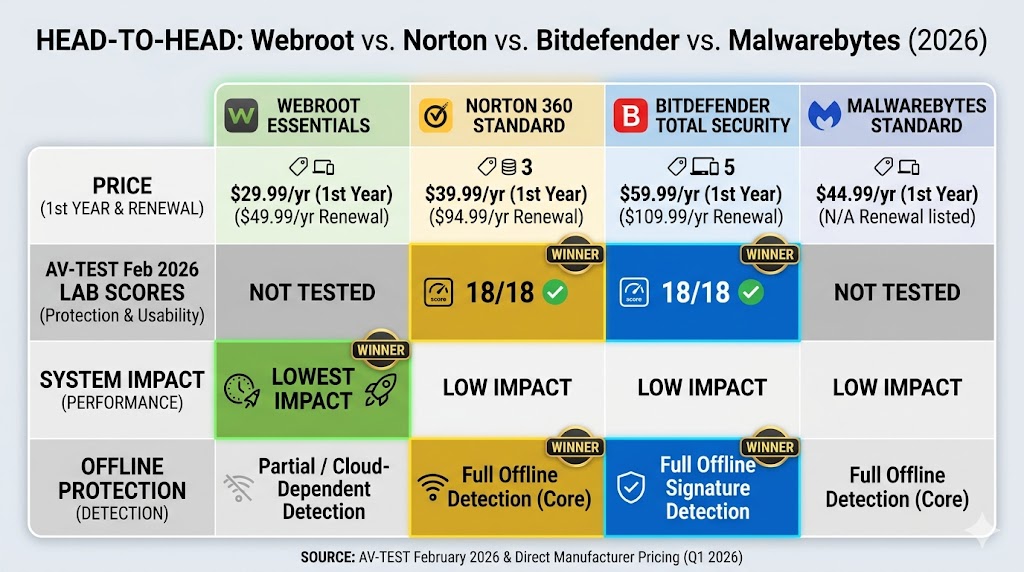
The right choice depends on which trade-off matters most. Speed and budget favor Webroot; lab-validated detection depth and full offline protection favor Norton and Bitdefender.
Webroot vs. Norton: Performance vs. Protection Depth
Norton wins on protection depth, lab validation, and feature breadth — 18/18 from AV-TEST February 2026, per AV-TEST February 2026, full offline protection, and a LifeLock identity bundle unavailable anywhere else. Webroot wins on system impact and entry price for single-device users. Choose Norton if your machine runs comfortably with it installed. The Norton 360 Review on migendeals.com covers every plan tier and feature in detail, including the full LifeLock bundle comparison.
Webroot vs. Bitdefender: When Lab Scores Actually Matter
Bitdefender Total Security earns 18/18 from AV-TEST February 2026, per AV-TEST February 2026, and holds ADVANCED+ from AV-Comparatives’ Malware Protection Test March 2026 — the top-tier rating in both major independent labs. For users who need maximum detection confidence, Bitdefender is the stronger product at every price point. Webroot’s only advantage over Bitdefender is system impact — and even that gap narrows on modern hardware where Bitdefender’s resource usage is acceptable. Bitdefender Total Security at $59.99/yr first year is a better investment if your machine is less than three years old.
Webroot vs. Malwarebytes: Two Lightweight Options Compared
Malwarebytes Standard and Webroot Essentials serve different primary purposes. Malwarebytes is built around aggressive malware detection and removal — it excels at cleaning an already-infected machine. Webroot is built around always-on prevention with minimal footprint. For a first and only antivirus, Webroot’s real-time protection architecture makes it the more complete standalone product. Malwarebytes Standard at $44.99/yr (1 device) is the better immediate tool for users who suspect an existing infection. The Malwarebytes review on migendeals.com covers all current plan tiers and pricing in full detail.
Before choosing any plan, Webroot’s renewal pricing is the detail most buyers miss — and the one most worth knowing in advance.
How Much Does Webroot Cost After the First Year?
Every Webroot plan increases significantly in price at renewal. The first-year promotional rate is not the price you pay in year two.
First-Year Promo vs. Renewal MSRP: The Price Jump Explained
| Plan | First-Year Promo | Renewal MSRP | Increase |
|---|---|---|---|
| Essentials 1 Device | $29.99/yr | $49.99/yr | +$20.00 (+67%) |
| Essentials 3 Devices | $34.99/yr | $69.99/yr | +$35.00 (+100%) |
| Premium | $64.99/yr | $129.99/yr | +$65.00 (+100%) |
| Total Protection | $89.99/yr | $179.99/yr | +$90.00 (+100%) |
Prices verified April 2026.
A 67–100% price increase at renewal is not unique to Webroot — Norton and McAfee follow the same model. Webroot Premium renews at $129.99/yr MSRP — exceeding Norton 360 Deluxe’s renewal price of $124.99/yr, a product with significantly stronger independent lab scores with 18/18 from AV-TEST February 2026, per AV-TEST February 2026, and a more established identity protection track record. At renewal, Webroot Premium stops being the budget option it appears to be in year one.
How to Get the Best Webroot Price
Three approaches reduce long-term Webroot cost:
- Cancel before auto-renewal and repurchase at the intro rate. Webroot, like most antivirus vendors, offers the promotional price to new purchases. Many users cancel before the renewal date and repurchase at the first-year rate.
- Use the 14-day free trial before purchasing. Confirm Webroot runs correctly on your specific hardware and software setup — especially if you use Adobe Creative Cloud — before paying anything.
- Check for current Webroot coupon codes before purchasing. Webroot coupon codes and first-year deal pricing are tracked and updated monthly — verified Webroot deals are listed in the resources section below.
The 70-day money-back guarantee covers your first purchase. Verify the current terms at webroot.com before buying — guarantee conditions can change.
Webroot’s pricing, performance, and trade-offs place it in a specific position within the six-brand antivirus market on migendeals.com. The comparisons and deal resources below show how those trade-offs map against Norton, Bitdefender, McAfee, ESET, and Malwarebytes.
Webroot Resources: Deals, Comparisons, and Related Questions
The Norton 360 Review on migendeals.com covers every Norton plan feature and pricing tier in detail, including the LifeLock bundle comparison referenced in the Webroot vs. Norton section above. For the complete plan-by-plan Norton 360 reference, see Norton 360 Review for complete plan-by-plan coverage.
The Malwarebytes review on migendeals.com covers all current Malwarebytes plan options — including Total ($89.99/yr, 3 devices) and Ultimate ($139.99/yr, 3 devices) tiers with expanded identity coverage — with full pricing and feature data. See the Malwarebytes review for current plan options and pricing.
Readers evaluating Webroot against the full six-brand antivirus market will find the following resources useful before making a final decision. This review focuses on Webroot’s own strengths and limitations. The broader antivirus market — Norton, Bitdefender, McAfee, ESET, Malwarebytes, and Webroot — is ranked by lab score, system impact, and price in a single guide that places all six products side by side. For that ranked overview, see the best antivirus software 2026 guide on migendeals.com.
Webroot Essentials and Norton 360 Standard are the two most frequently compared antivirus products in the lightweight-vs-validated category. For the complete head-to-head covering scan speed, offline behavior, pricing, and identity features, see the Norton vs. Webroot comparison on migendeals.com.
For deal pricing across all six brands — including Black Friday discounts, first-year promotional rates, and verified coupon codes — the antivirus deals hub on migendeals.com tracks prices with monthly updates. Current first-year promotional rates and active discount codes for all brands are available at the best antivirus deals 2026 page on migendeals.com.
Webroot coupon codes and first-year deal pricing are updated monthly. Verified current Webroot deals, coupon codes, and cancel-and-rebuy pricing strategy are tracked at the Webroot Coupon Codes & Deals 2026 page on migendeals.com.
Frequently Asked Questions
Is Webroot Safe to Use?
Yes — Webroot is a legitimate antivirus product from OpenText, a publicly traded enterprise information management company. It scored 95% Total Accuracy in SE Labs’ EPS Home Q1 2026 evaluation, per SE Labs Q1 2026. Its primary limitation is reduced effectiveness without an internet connection, which affects users on unreliable or offline networks.
Do I Need Norton If I Have Webroot?
No — running two antivirus programs simultaneously causes conflicts and degrades system performance. Replace Webroot with Norton rather than running both if Norton-level lab scores and offline protection are your priority. Uninstall one product completely before installing the other.
Does Webroot Actually Remove Malware?
Yes, for known threats — Webroot blocks and removes malware already classified in its BrightCloud cloud database. For unknown files, the journaling and rollback system removes the threat and reverses its changes after cloud classification. Independent testing has documented lower detection rates on novel general malware samples than traditional signature-based engines achieve — a known limitation of cloud-based classification in novel-threat and offline scenarios.
Why Is Webroot Not Rated by AV-TEST?
Webroot has not submitted to AV-TEST since 2019 because its cloud-based architecture does not match standard lab test protocols, which require instant local detection. SE Labs’ methodology is more compatible with cloud-based products and is the most relevant third-party benchmark for evaluating Webroot’s protection accuracy.
Is There a Free Version of Webroot?
Webroot does not offer a permanent free version. It offers a 14-day free trial with no credit card required, available at webroot.com. The trial covers the full Essentials feature set. After 14 days, a paid subscription is required to maintain protection.
Who Owns Webroot Now?
OpenText, a publicly traded enterprise information management company, owns Webroot. Webroot remains part of OpenText’s cybersecurity portfolio.
Is Webroot Compatible With Windows 11?
Yes — Webroot Essentials, Premium, and Total Protection are fully compatible with Windows 11. Webroot also supports macOS, Android, iOS, and Chromebook across all current plan tiers.
The Bottom Line: Is Webroot’s Cloud Engine Worth Buying?
Webroot’s cloud-based engine is worth buying for always-connected users on older or lower-powered hardware who prioritize scan speed and system lightness over maximum lab-validated detection depth — and the wrong choice for frequent offline workers, Adobe Creative Cloud users, or anyone who requires AV-TEST or AV-Comparatives validation.
Webroot Essentials starts at $29.99/yr first year ($49.99/yr renewal) for one device — the lowest entry price among the six brands reviewed on migendeals.com. Its local agent is tiny (under 12MB per PCMag), with most threat analysis handled in the cloud. Webroot scored 95% Total Accuracy in SE Labs’ EPS Home Q1 2026 evaluation, per SE Labs Q1 2026. Webroot has not submitted to AV-TEST or AV-Comparatives since 2019; independent testing has documented lower detection rates on novel general malware samples than traditional signature-based engines achieve.
Webroot Premium costs $64.99/yr first year ($129.99/yr renewal) and adds identity monitoring, dark web scanning, 24/7 identity restoration support, and up to $1M in fraud reimbursement through Assurant. All plans include a 14-day free trial with no credit card required and a 70-day money-back guarantee — the longest in the group. Buy Webroot Essentials if you are on older hardware, always connected to the internet, and prioritize scan speed. Choose Bitdefender Total Security ($59.99/yr first year) or Norton 360 Standard ($39.99/yr first year) if lab-validated protection depth is the deciding factor.
Webroot coupon codes and verified current pricing are tracked and updated monthly. Current first-year promotional rates and discount codes for Webroot are available at the Webroot Coupon Codes & Deals 2026 page on migendeals.com: